What Is the MERN Stack?
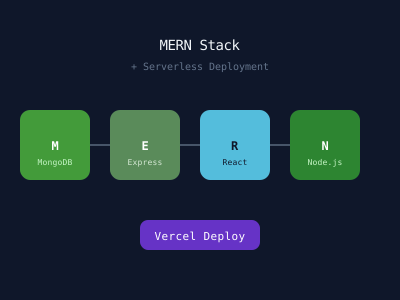
MERN stands for:
- MongoDB — a NoSQL document database that stores JSON-like documents
- Express.js — a minimal Node.js web framework for building APIs
- React — a JavaScript library for building user interfaces
- Node.js — a JavaScript runtime for the server side
Using JavaScript across the entire stack means you can share code (types, validation schemas, utilities) between client and server, and your team only needs expertise in one language.
Why Go Serverless?
Traditional backends run on always-on servers (physical or virtual). Serverless functions run only when invoked and scale automatically:
- Cost: You pay only for execution time, not idle time
- Scaling: Automatically handles traffic spikes
- No server management: No OS patches, no capacity planning
- Fast deployment: Deploy a function in seconds
Platforms like Vercel, AWS Lambda, Netlify Functions, and Cloudflare Workers make serverless deployment straightforward for Node.js/Express applications.
Project Architecture
mern-serverless/
├── client/                 # React frontend (Vite or Create React App)
│   ├── src/
│   │   ├── components/
│   │   ├── pages/
│   │   ├── hooks/
│   │   └── App.jsx
│   └── package.json
├── api/                    # Serverless functions (Vercel convention)
│   ├── users/
│   │   ├── index.js        # GET /api/users
│   │   └── [id].js         # GET /api/users/:id
│   └── posts/
│       └── index.js
├── lib/
│   └── mongodb.js          # Database connection helper
└── vercel.json
Setting Up MongoDB with Mongoose
Install Mongoose and create a connection helper that reuses the connection across function invocations (critical for serverless — don't open a new connection on every request):
// lib/mongodb.js
import mongoose from 'mongoose';

const MONGODB_URI = process.env.MONGODB_URI;

let cached = global.mongoose;

if (!cached) {
  cached = global.mongoose = { conn: null, promise: null };
}

export async function connectDB() {
  if (cached.conn) return cached.conn;

  if (!cached.promise) {
    cached.promise = mongoose.connect(MONGODB_URI, {
      bufferCommands: false,
    });
  }

  cached.conn = await cached.promise;
  return cached.conn;
}
Define your models:
// models/Post.js
import mongoose from 'mongoose';

const PostSchema = new mongoose.Schema({
  title: { type: String, required: true, trim: true },
  body: { type: String, required: true },
  author: { type: mongoose.Schema.Types.ObjectId, ref: 'User', required: true },
  tags: [String],
  createdAt: { type: Date, default: Date.now },
  updatedAt: { type: Date, default: Date.now },
});

PostSchema.pre('save', function(next) {
  this.updatedAt = new Date();
  next();
});

export default mongoose.models.Post || mongoose.model('Post', PostSchema);
Building Serverless API Functions
With Vercel, each file in the api/ directory becomes a serverless endpoint:
// api/posts/index.js
import { connectDB } from '../../lib/mongodb';
import Post from '../../models/Post';

export default async function handler(req, res) {
  await connectDB();

  if (req.method === 'GET') {
    try {
      const { page = 1, limit = 10, tag } = req.query;
      const filter = tag ? { tags: tag } : {};
      const posts = await Post.find(filter)
        .populate('author', 'name avatar')
        .sort({ createdAt: -1 })
        .limit(parseInt(limit))
        .skip((parseInt(page) - 1) * parseInt(limit));
      const total = await Post.countDocuments(filter);
      return res.status(200).json({ posts, total, page: parseInt(page) });
    } catch (err) {
      return res.status(500).json({ error: 'Failed to fetch posts' });
    }
  }

  if (req.method === 'POST') {
    try {
      const { title, body, tags } = req.body;
      // In a real app, get author from JWT
      const post = await Post.create({ title, body, tags, author: req.user.id });
      return res.status(201).json(post);
    } catch (err) {
      return res.status(400).json({ error: err.message });
    }
  }

  res.setHeader('Allow', ['GET', 'POST']);
  res.status(405).end(`Method ${req.method} Not Allowed`);
}
// api/posts/[id].js — dynamic route
import { connectDB } from '../../../lib/mongodb';
import Post from '../../../models/Post';
export default async function handler(req, res) {
await connectDB();
const { id } = req.query;
if (req.method === 'GET') {
const post = await Post.findById(id).populate('author', 'name');
if (!post) return res.status(404).json({ error: 'Post not found' });
return res.status(200).json(post);
}
if (req.method === 'DELETE') {
await Post.findByIdAndDelete(id);
return res.status(204).end();
}
}Building the React Frontend
Set up the React app with Vite:
npm create vite@latest client -- --template react
cd client && npm install axios react-router-dom
Create a custom hook for data fetching:
// hooks/usePosts.js
import { useState, useEffect } from 'react';
import axios from 'axios';

export function usePosts({ page = 1, tag } = {}) {
  const [posts, setPosts] = useState([]);
  const [loading, setLoading] = useState(true);
  const [error, setError] = useState(null);
  const [total, setTotal] = useState(0);

  useEffect(() => {
    const controller = new AbortController();
    setLoading(true);

    const params = { page, limit: 10 };
    if (tag) params.tag = tag;

    axios.get('/api/posts', { params, signal: controller.signal })
      .then(res => {
        setPosts(res.data.posts);
        setTotal(res.data.total);
        setLoading(false);
      })
      .catch(err => {
        if (err.name !== 'CanceledError') {
          setError(err.message);
          setLoading(false);
        }
      });

    return () => controller.abort();
  }, [page, tag]);

  return { posts, loading, error, total };
}
// components/PostList.jsx
import { usePosts } from '../hooks/usePosts';
import { Link } from 'react-router-dom';
export default function PostList() {
const { posts, loading, error } = usePosts();
if (loading) return <div className="spinner">Loading...</div>;
if (error) return <div className="error">Error: {error}</div>;
return (
<div className="post-grid">
{posts.map(post => (
<article key={post._id} className="post-card">
<h2><Link to={`/posts/${post._id}`}>{post.title}</Link></h2>
<p>By {post.author.name}</p>
<div className="tags">
{post.tags.map(tag => (
<Link key={tag} to={`/?tag=${tag}`} className="tag">{tag}</Link>
))}
</div>
</article>
))}
</div>
);
}Vercel Configuration
// vercel.json
{
  "rewrites": [
    { "source": "/api/:path*", "destination": "/api/:path*" },
    { "source": "/(.*)", "destination": "/" }
  ],
  "env": {
    "MONGODB_URI": "@mongodb_uri"
  }
}
Set up environment variables in the Vercel dashboard, then deploy:
npm install -g vercel
vercel --prod
Authentication with JWT
Add authentication middleware for protected routes:
// lib/auth.js
import jwt from 'jsonwebtoken';

export function withAuth(handler) {
  return async (req, res) => {
    const token = req.headers.authorization?.split(' ')[1];
    if (!token) return res.status(401).json({ error: 'Unauthorized' });

    try {
      req.user = jwt.verify(token, process.env.JWT_SECRET);
      return handler(req, res);
    } catch {
      return res.status(403).json({ error: 'Invalid token' });
    }
  };
}

// Usage: export default withAuth(handler);
Conclusion
Combining MERN with serverless deployment gives you the best of both worlds: a familiar Express/MongoDB development experience with infrastructure that scales automatically and requires zero server management. Vercel's file-based routing for API functions makes it especially easy to migrate an existing Express application to serverless incrementally.