What Is UML and Why Use It?
UML (Unified Modeling Language) was standardized by the Object Management Group (OMG) in 1997 and has become the universal visual language for software architecture. Before writing a single line of code, UML lets you:
- Communicate design decisions with teammates and stakeholders
- Identify architectural problems early when changes are cheap
- Document existing systems for onboarding and maintenance
- Plan refactoring by modeling the desired end state first
UML defines 14 diagram types grouped into two categories: structural (what the system is) and behavioral (how the system works). You don't need all 14 — mastering the 6-7 most common ones handles 95% of real-world design needs.
Class Diagrams: The Foundation of OOP Design
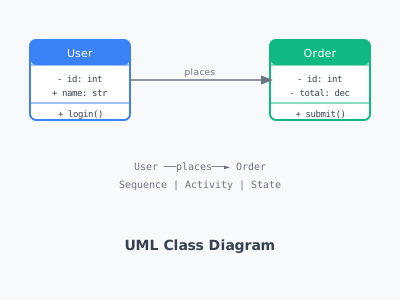
Class diagrams show the static structure of a system — classes, their attributes, methods, and relationships. They are the most widely used UML diagram type.
Class notation:
┌────────────────────────┐
│ <<interface>>          │
│ Printable              │
├────────────────────────┤
│                        │  (no attributes for interface)
├────────────────────────┤
│ + print(): void        │
└────────────────────────┘

┌────────────────────────┐
│ User                   │  (class name - bold)
├────────────────────────┤
│ - id: int              │  (- = private)
│ # name: String         │  (# = protected)
│ + email: String        │  (+ = public)
│ ~ role: Role           │  (~ = package)
├────────────────────────┤
│ + login(): boolean     │
│ + getProfile(): User   │
│ # validate(): void     │
└────────────────────────┘
Relationships:
- Association (→): One class uses another
- Aggregation (◇→): "Has-a" — parts can exist independently (Team has Players)
- Composition (◆→): "Has-a" — parts cannot exist without the whole (House has Rooms)
- Inheritance (△→): "Is-a" — subclass extends superclass
- Realization (△--→): Class implements interface
- Dependency (--→): One class depends on another temporarily
Example: E-commerce class diagram
Order ◆────── OrderItem ────── Product
  |                                 |
  └── Customer                  Category
         |
      Address (0.*)
Use Case Diagrams: Capturing System Requirements
Use case diagrams show what a system does from the user's perspective. They are ideal for gathering and communicating requirements.
Elements:
- Actor: Represents a user, system, or external service (shown as a stick figure)
- Use Case: An action the system performs for an actor (shown as an oval)
- System boundary: A box enclosing all use cases of the system
- Associations: Lines connecting actors to their use cases
Relationships between use cases:
- <<include>>: Use case A always includes use case B (e.g., "Place Order" always includes "Validate Cart")
- <<extend>>: Use case B optionally extends use case A (e.g., "Apply Coupon" extends "Checkout")
Example:
Customer ─── Browse Products
Customer ─── Add to Cart
Customer ─── Checkout ──<<include>>── Process Payment
Customer ─── Checkout ──<<extend>>── Apply Coupon
Admin ─── Manage Products
Admin ─── View Reports
Sequence Diagrams: Modeling Interactions Over Time
Sequence diagrams show how objects interact in a specific scenario, with time flowing downward. They are invaluable for designing API flows, understanding existing behavior, and debugging complex interactions.
Elements:
- Lifelines: Vertical dashed lines representing participants (objects, systems, users)
- Messages: Horizontal arrows between lifelines (solid arrow = synchronous call, dashed = return)
- Activation boxes: Thin rectangles on lifelines showing when an object is active
- Alt/Opt/Loop frames: Conditional and repetitive behavior
Example: User authentication flow
Browser     API Gateway    AuthService    UserDB
   |              |              |            |
   |──POST /login─►              |            |
   |              |──validate──►              |
   |              |              |──findUser─►|
   |              |              |◄──user─────|
   |              |              |──checkPwd  |
   |              |◄─JWT token───|            |
   |◄─200 + token─|              |            |
Activity Diagrams: Modeling Workflows and Algorithms
Activity diagrams are UML's version of flowcharts. They model the flow of actions in a process — useful for documenting business processes, algorithms, and parallel workflows.
Notation:
- Initial node: Filled circle (●)
- Activity: Rounded rectangle with action name
- Decision node: Diamond (◇) with guards [condition] on outgoing edges
- Fork/Join: Thick horizontal bar (for parallel flows)
- Final node: Filled circle inside a circle (⊙)
Example: Order processing workflow
● → Place Order → [items available?]
                        │ Yes              │ No
                        ↓                 ↓
               Process Payment      Notify Out of Stock → ⊙
                        ↓
               ═══ Fork ═══
             ↙              ↘
      Send Confirmation   Update Inventory
             ↘              ↙
               ═══ Join ═══
                        ↓
               Ship Order → ⊙
State Diagrams: Modeling Object Lifecycle
State diagrams show the different states an object can be in and the transitions between states. Perfect for modeling order status, user account states, connection states, and protocol behavior.
Example: Order state machine
[PENDING] ──pay──→ [PAID] ──ship──→ [SHIPPED] ──deliver──→ [DELIVERED]
    │                  │                                           │
  cancel            refund                                      return
    ↓                  ↓                                           ↓
[CANCELLED]      [REFUNDED]                                  [RETURNED]
Component Diagrams: High-Level Architecture
Component diagrams show the high-level components of a system and their dependencies. Use them for microservices architecture, layered architecture, and system integration documentation.
┌─────────────┐    ┌─────────────┐    ┌─────────────┐
│   Web App   │───►│   API GW    │───►│  Auth Svc   │
└─────────────┘    └─────────────┘    └─────────────┘
                          │
              ┌───────────┼───────────┐
              ▼           ▼           ▼
        ┌──────────┐ ┌──────────┐ ┌──────────┐
        │ User Svc │ │Order Svc │ │Product S.│
        └──────────┘ └──────────┘ └──────────┘
              │           │           │
              └───────────┼───────────┘
                          ▼
                    ┌──────────┐
                    │ Database │
                    └──────────┘
Deployment Diagrams
Deployment diagrams show the physical infrastructure — servers, containers, devices, and how software artifacts are deployed to them. Useful for cloud architecture documentation and DevOps planning.
UML Tools
Popular diagramming tools:
- draw.io (diagrams.net): Free, web-based, excellent UML support
- PlantUML: Text-based diagramming, great for code-adjacent documentation
- Lucidchart: Collaborative, polished UI, subscription-based
- StarUML: Desktop application with full UML 2.x support
- Mermaid: Markdown-embedded diagrams, integrates with GitHub
PlantUML example:
@startuml
class Order {
  - id: Long
  - total: BigDecimal
  + addItem(item: OrderItem): void
  + submit(): void
}

class OrderItem {
  - product: Product
  - quantity: int
  - price: BigDecimal
}

Order "1" *-- "1..*" OrderItem
OrderItem --> Product
@enduml
Best Practices
- Draw for your audience: Stakeholders need use case diagrams; developers need class and sequence diagrams.
- Keep diagrams focused: One diagram should tell one story. Don't cram everything into one diagram.
- Use consistent notation: Pick one tool and stick to its conventions.
- Update diagrams with code: Stale diagrams are worse than none — treat them as living documentation.
- Don't model everything: Diagram the complex, novel, or risky parts. Standard CRUD doesn't need a sequence diagram.