Overview: Two Layers of Defense
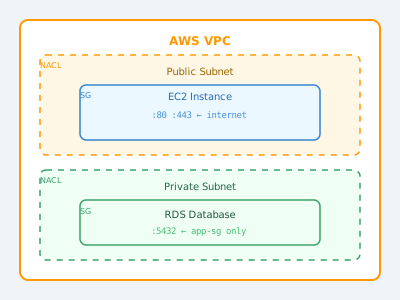
AWS provides a defense-in-depth model for network security in Virtual Private Clouds (VPCs). Security Groups and Network ACLs serve complementary roles:
- Security Groups: Act as virtual firewalls at the instance level (EC2, RDS, Lambda ENIs, etc.)
- Network ACLs: Act as optional firewalls at the subnet level
Using both layers together creates two independent barriers that traffic must pass through.
Security Groups
A security group is associated with individual AWS resources (EC2 instances, load balancers, RDS databases, etc.). It controls inbound and outbound traffic for those specific resources.
Key Characteristics of Security Groups
Stateful: This is the most important characteristic. If you allow inbound traffic on port 443, the response traffic is automatically allowed outbound — you don't need a separate outbound rule. Return traffic is tracked via connection state.
Allow rules only: Security groups can only specify what traffic IS allowed. There is no "deny" rule. Any traffic not matched by a rule is implicitly denied.
Evaluates all rules: AWS evaluates all rules in a security group before deciding to allow or deny traffic — it doesn't stop at the first match.
Multiple security groups: You can assign multiple security groups to a single resource, and a security group can be applied to multiple resources. This enables composable security policies.
Example Security Group Configuration
Security Group: web-servers-sg
Description: Allow HTTP/HTTPS from internet, SSH from bastion only

Inbound Rules:
┌──────────┬──────────┬──────────────────┬──────────────────────────────┐
│ Type     │ Protocol │ Port Range       │ Source                       │
├──────────┼──────────┼──────────────────┼──────────────────────────────┤
│ HTTP     │ TCP      │ 80               │ 0.0.0.0/0 (anywhere)         │
│ HTTPS    │ TCP      │ 443              │ 0.0.0.0/0 (anywhere)         │
│ SSH      │ TCP      │ 22               │ sg-0abc123 (bastion-sg)      │
└──────────┴──────────┴──────────────────┴──────────────────────────────┘

Outbound Rules:
┌──────────┬──────────┬──────────────────┬──────────────────────────────┐
│ All traffic │ All   │ All              │ 0.0.0.0/0 (allow all out)   │
└──────────┴──────────┴──────────────────┴──────────────────────────────┘
Notice that the SSH rule uses another security group ID as the source — this is a powerful feature that references "any resource that has the bastion-sg attached," removing the need to track IP addresses.
Referencing Security Groups
Application servers sg ──allows──► Database sg (port 5432)Instead of opening the database to a specific IP range (which changes as instances scale), you allow traffic from the application security group. As new app instances launch and get the same security group, they automatically gain database access.
Network ACLs (NACLs)
A Network ACL is associated with a subnet, not individual resources. All traffic entering or leaving the subnet passes through the NACL.
Key Characteristics of Network ACLs
Stateless: Unlike security groups, NACLs do not track connection state. If you allow inbound traffic on port 443, you must also explicitly allow the outbound response traffic on the ephemeral ports (1024-65535). Forgetting this is a common misconfiguration.
Both allow and deny rules: NACLs support explicit DENY rules. This lets you block specific IP addresses or ranges.
Rule evaluation order: Rules are evaluated in ascending order by rule number. The first matching rule is applied, and evaluation stops. This is critical — a lower-numbered DENY overrides a higher-numbered ALLOW.
One NACL per subnet: Each subnet is associated with exactly one NACL. One NACL can be associated with multiple subnets.
Default NACL: AWS creates a default NACL that allows all inbound and outbound traffic. Custom NACLs deny all traffic by default until you add rules.
Example NACL Configuration
NACL: public-subnet-nacl

Inbound Rules:
┌──────┬──────┬──────────┬───────────────┬──────────────┐
│ Rule │ Type │ Protocol │ Port/Range     │ Allow/Deny  │
├──────┼──────┼──────────┼───────────────┼─────────────┤
│ 100  │ HTTP │ TCP      │ 80            │ ALLOW       │
│ 110  │ HTTPS│ TCP      │ 443           │ ALLOW       │
│ 120  │ Custom│ TCP     │ 1024-65535    │ ALLOW       │  ← Ephemeral ports
│ 130  │ Custom│ TCP     │ 22            │ ALLOW       │
│ *    │ All  │ All      │ All           │ DENY        │  ← Default deny
└──────┴──────┴──────────┴───────────────┴─────────────┘

Outbound Rules:
┌──────┬──────┬──────────┬───────────────┬──────────────┐
│ Rule │ Type │ Protocol │ Port/Range     │ Allow/Deny  │
├──────┼──────┼──────────┼───────────────┼─────────────┤
│ 100  │ HTTP │ TCP      │ 80            │ ALLOW       │
│ 110  │ HTTPS│ TCP      │ 443           │ ALLOW       │
│ 120  │ Custom│ TCP     │ 1024-65535    │ ALLOW       │  ← Responses
│ *    │ All  │ All      │ All           │ DENY        │
└──────┴──────┴──────────┴───────────────┴─────────────┘
Side-by-Side Comparison
| Feature | Security Groups | Network ACLs |
|---|---|---|
| Level | Instance/resource | Subnet |
| Statefulness | Stateful | Stateless |
| Rules | Allow only | Allow and Deny |
| Rule evaluation | All rules evaluated | First match wins |
| Scope | Specific resources | All resources in subnet |
| Default behavior | Deny all inbound | Default NACL: Allow all |
| Association | Multiple per instance | One per subnet |
| Use case | Fine-grained per-resource control | Broad subnet-level control, explicit blocking |
When to Use Each
Use Security Groups for:
- Controlling access between specific tiers (web → app → database)
- Allowing access from specific other security groups (scales with your infrastructure)
- Fine-grained port control per service
Use Network ACLs for:
- Blocking specific malicious IP addresses or ranges at the subnet level
- Adding an extra layer of defense (defense-in-depth)
- Implementing compliance requirements that mandate subnet-level firewall rules
- Emergency response — quickly blocking a CIDR block without touching individual instances
Common Architectures
Three-tier web application:
Internet Gateway
       │
  [Public Subnet] ← NACL: Allow 80, 443 in; deny rest
       │ ← Security Group: web-sg (allow 80, 443 from internet)
  Load Balancer
       │
  [Private Subnet] ← NACL: Allow only from public subnet
       │ ← Security Group: app-sg (allow from web-sg only)
  App Servers
       │
  [Private Subnet] ← NACL: Allow only from app subnet
       │ ← Security Group: db-sg (allow 5432 from app-sg only)
  RDS Database
Troubleshooting Connectivity
When troubleshooting connectivity issues, check in this order:
- Route tables: Does the subnet have a route to the destination?
- NACL: Is there a NACL rule blocking the traffic? Are ephemeral ports open (stateless!)?
- Security Group: Does the security group allow the traffic?
- OS-level firewall: Is iptables or Windows Firewall blocking it?
- Application: Is the application listening on the right port?
AWS VPC Flow Logs can help diagnose by logging accepted and rejected traffic at the network interface level.