Why Build Your Portfolio with Vue.js?
Vue.js is an excellent choice for a portfolio site:
- Progressive: Start simple, add complexity gradually
- Fast: Vue 3 with Vite produces small, fast bundles
- Component-based: Reuse sections like project cards and skill badges
- Smooth transitions: Vue's built-in <Transition> and <TransitionGroup> make animations easy
- Easy to learn: Vue's template syntax is the gentlest learning curve of any major framework
A Vue portfolio stands out in job applications — it demonstrates the framework while showcasing your work.
Project Setup
npm create vite@latest my-portfolio -- --template vue
cd my-portfolio
npm install vue-router@4
npm install @vueuse/core      # Composable utilities (dark mode, scroll, etc.)
npm install gsap              # Optional: professional animations
npm run dev
Project Structure
my-portfolio/
├── public/
│   ├── favicon.ico
│   └── resume.pdf
├── src/
│   ├── assets/
│   │   ├── images/
│   │   └── styles/
│   │       ├── main.css
│   │       └── variables.css
│   ├── components/
│   │   ├── TheNavbar.vue
│   │   ├── TheFooter.vue
│   │   ├── ProjectCard.vue
│   │   ├── SkillBadge.vue
│   │   └── ContactForm.vue
│   ├── views/
│   │   ├── HomeView.vue
│   │   ├── ProjectsView.vue
│   │   ├── AboutView.vue
│   │   └── ContactView.vue
│   ├── data/
│   │   ├── projects.js
│   │   └── skills.js
│   ├── router/
│   │   └── index.js
│   ├── App.vue
│   └── main.js
└── vite.config.js
Setting Up Vue Router
// src/router/index.js
import { createRouter, createWebHistory } from 'vue-router';
import HomeView from '../views/HomeView.vue';

const routes = [
  {
    path: '/',
    name: 'home',
    component: HomeView,
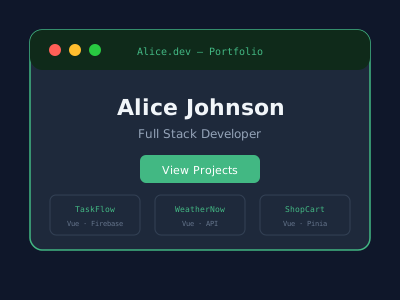
    meta: { title: 'Alice Johnson — Full Stack Developer' },
  },
  {
    path: '/projects',
    name: 'projects',
    component: () => import('../views/ProjectsView.vue'),
    meta: { title: 'Projects — Alice Johnson' },
  },
  {
    path: '/projects/:slug',
    name: 'project-detail',
    component: () => import('../views/ProjectDetailView.vue'),
  },
  {
    path: '/about',
    name: 'about',
    component: () => import('../views/AboutView.vue'),
    meta: { title: 'About — Alice Johnson' },
  },
  {
    path: '/contact',
    name: 'contact',
    component: () => import('../views/ContactView.vue'),
    meta: { title: 'Contact — Alice Johnson' },
  },
];

const router = createRouter({
  history: createWebHistory(),
  routes,
  scrollBehavior(to, from, savedPosition) {
    if (savedPosition) return savedPosition;
    return { top: 0, behavior: 'smooth' };
  },
});

// Update document title
router.afterEach((to) => {
  document.title = to.meta.title || 'My Portfolio';
});

export default router;
The Main App Component with Page Transitions
<!-- src/App.vue -->
<template>
  <div :class="{ 'dark': isDark }" class="app">
    <TheNavbar :isDark="isDark" @toggleDark="toggleDark" />

    <router-view v-slot="{ Component, route }">
      <Transition
        :name="route.meta.transitionName || 'fade'"
        mode="out-in"
      >
        <component :is="Component" :key="route.path" />
      </Transition>
    </router-view>

    <TheFooter />
  </div>
</template>

<script setup>
import { useDark, useToggle } from '@vueuse/core';
import TheNavbar from './components/TheNavbar.vue';
import TheFooter from './components/TheFooter.vue';

const isDark = useDark();
const toggleDark = useToggle(isDark);
</script>

<style>
.fade-enter-active,
.fade-leave-active {
  transition: opacity 0.3s ease;
}
.fade-enter-from,
.fade-leave-to {
  opacity: 0;
}
</style>
Navigation Component
<!-- src/components/TheNavbar.vue -->
<template>
  <header class="navbar" :class="{ scrolled: isScrolled }">
    <router-link to="/" class="logo">Alice.dev</router-link>

    <nav class="nav-links" :class="{ open: menuOpen }">
      <router-link to="/" @click="menuOpen = false">Home</router-link>
      <router-link to="/projects" @click="menuOpen = false">Projects</router-link>
      <router-link to="/about" @click="menuOpen = false">About</router-link>
      <router-link to="/contact" @click="menuOpen = false">Contact</router-link>
    </nav>

    <div class="nav-actions">
      <button @click="$emit('toggleDark')" class="theme-btn" aria-label="Toggle theme">
        {{ isDark ? '☀️' : '🌙' }}
      </button>
      <button @click="menuOpen = !menuOpen" class="hamburger" aria-label="Menu">
        <span :class="{ open: menuOpen }"></span>
      </button>
    </div>
  </header>
</template>

<script setup>
import { ref } from 'vue';
import { useWindowScroll } from '@vueuse/core';

defineProps({ isDark: Boolean });
defineEmits(['toggleDark']);

const menuOpen = ref(false);
const { y } = useWindowScroll();
const isScrolled = computed(() => y.value > 50);
</script>
Project Data and Card Component
// src/data/projects.js
export const projects = [
  {
    slug: 'task-manager',
    title: 'TaskFlow — Project Manager',
    description: 'A Kanban-style project management app with drag-and-drop, real-time sync, and team collaboration.',
    tags: ['Vue 3', 'Firebase', 'Tailwind CSS', 'TypeScript'],
    image: '/images/taskflow.jpg',
    demoUrl: 'https://taskflow.example.com',
    codeUrl: 'https://github.com/alice/taskflow',
    featured: true,
  },
  {
    slug: 'weather-app',
    title: 'WeatherNow',
    description: 'A beautiful weather dashboard with 7-day forecasts, interactive maps, and severe weather alerts.',
    tags: ['Vue 3', 'OpenWeather API', 'Leaflet.js', 'Chart.js'],
    image: '/images/weather.jpg',
    demoUrl: 'https://weather.example.com',
    codeUrl: 'https://github.com/alice/weather',
    featured: true,
  },
];
<!-- src/components/ProjectCard.vue -->
<template>
<article class="project-card" @mouseenter="hovered = true" @mouseleave="hovered = false">
<div class="project-image-wrap">
<img :src="project.image" :alt="project.title" loading="lazy" />
<div class="project-overlay" :class="{ visible: hovered }">
<a :href="project.demoUrl" target="_blank" rel="noopener">Live Demo</a>
<a :href="project.codeUrl" target="_blank" rel="noopener">View Code</a>
</div>
</div>
<div class="project-content">
<h3>{{ project.title }}</h3>
<p>{{ project.description }}</p>
<div class="tags">
<span v-for="tag in project.tags" :key="tag" class="tag">{{ tag }}</span>
</div>
</div>
</article>
</template>
<script setup>
import { ref } from 'vue';
defineProps({ project: Object });
const hovered = ref(false);
</script>Projects View with Filter
<!-- src/views/ProjectsView.vue -->
<template>
  <section class="projects-page">
    <h1>My Projects</h1>

    <div class="filter-tabs">
      <button
        v-for="tag in allTags"
        :key="tag"
        @click="activeFilter = tag"
        :class="{ active: activeFilter === tag }"
      >
        {{ tag }}
      </button>
    </div>

    <TransitionGroup name="project-list" tag="div" class="projects-grid">
      <ProjectCard
        v-for="project in filteredProjects"
        :key="project.slug"
        :project="project"
      />
    </TransitionGroup>
  </section>
</template>

<script setup>
import { ref, computed } from 'vue';
import { projects } from '../data/projects';
import ProjectCard from '../components/ProjectCard.vue';

const activeFilter = ref('All');
const allTags = computed(() => ['All', ...new Set(projects.flatMap(p => p.tags))]);
const filteredProjects = computed(() =>
  activeFilter.value === 'All'
    ? projects
    : projects.filter(p => p.tags.includes(activeFilter.value))
);
</script>

<style>
.project-list-enter-active,
.project-list-leave-active {
  transition: all 0.4s ease;
}
.project-list-enter-from,
.project-list-leave-to {
  opacity: 0;
  transform: translateY(20px);
}
</style>
Contact Form with Validation
<!-- src/components/ContactForm.vue -->
<template>
  <form @submit.prevent="handleSubmit" class="contact-form">
    <div class="form-group" :class="{ error: errors.name }">
      <label for="name">Name</label>
      <input id="name" v-model="form.name" type="text" placeholder="Your full name" />
      <span class="error-msg">{{ errors.name }}</span>
    </div>

    <div class="form-group" :class="{ error: errors.email }">
      <label for="email">Email</label>
      <input id="email" v-model="form.email" type="email" placeholder="your@email.com" />
      <span class="error-msg">{{ errors.email }}</span>
    </div>

    <div class="form-group" :class="{ error: errors.message }">
      <label for="message">Message</label>
      <textarea id="message" v-model="form.message" rows="5" placeholder="Tell me about your project..." />
      <span class="error-msg">{{ errors.message }}</span>
    </div>

    <button type="submit" :disabled="submitting">
      {{ submitting ? 'Sending...' : 'Send Message' }}
    </button>

    <p v-if="success" class="success-msg">Message sent! I'll get back to you soon.</p>
  </form>
</template>

<script setup>
import { ref, reactive } from 'vue';

const form = reactive({ name: '', email: '', message: '' });
const errors = reactive({ name: '', email: '', message: '' });
const submitting = ref(false);
const success = ref(false);

function validate() {
  errors.name = form.name.trim() ? '' : 'Name is required.';
  errors.email = /^[^\s@]+@[^\s@]+\.[^\s@]+$/.test(form.email) ? '' : 'Valid email required.';
  errors.message = form.message.trim().length >= 20 ? '' : 'Message must be at least 20 characters.';
  return !Object.values(errors).some(Boolean);
}

async function handleSubmit() {
  if (!validate()) return;
  submitting.value = true;
  try {
    await fetch('https://formspree.io/f/YOUR_FORM_ID', {
      method: 'POST',
      headers: { 'Content-Type': 'application/json' },
      body: JSON.stringify(form),
    });
    success.value = true;
    Object.assign(form, { name: '', email: '', message: '' });
  } finally {
    submitting.value = false;
  }
}
</script>
Deployment
Build and deploy:
npm run build      # Creates /dist folder

# Deploy to Netlify
npm install -g netlify-cli
netlify deploy --prod --dir=dist

# Or drag-and-drop the dist/ folder at netlify.com
# Or connect your GitHub repo for automatic deploys
Add a netlify.toml for SPA routing:
[[redirects]]
  from = "/*"
  to = "/index.html"
  status = 200