What Are CSS Media Queries?
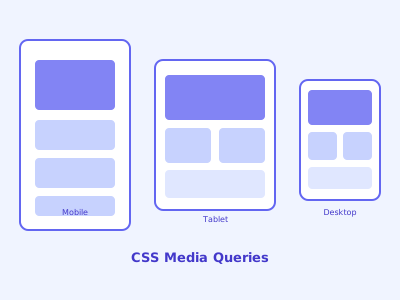
A media query is a CSS feature that applies styles conditionally based on the characteristics of the user's device or viewport. Introduced in CSS3, media queries transformed web design by making single codebases work beautifully across phones, tablets, desktops, and everything in between.
Basic syntax:
@media (condition) {
  /* CSS rules that apply when condition is true */
}
Understanding Media Features
The most common media feature is max-width and min-width:
/* Applies when viewport is 768px wide or narrower */
@media (max-width: 768px) {
  .sidebar { display: none; }
}

/* Applies when viewport is 1024px wide or wider */
@media (min-width: 1024px) {
  .container { max-width: 1200px; margin: 0 auto; }
}

/* Range: between 768px and 1200px */
@media (min-width: 768px) and (max-width: 1200px) {
  .grid { grid-template-columns: repeat(2, 1fr); }
}
You can also target other media features:
/* Orientation */
@media (orientation: landscape) { ... }
@media (orientation: portrait) { ... }

/* Screen resolution (for retina/HiDPI displays) */
@media (min-resolution: 2dppx) {
  .logo { background-image: url('logo@2x.png'); }
}

/* User preference: dark mode */
@media (prefers-color-scheme: dark) {
  body { background: #1a1a1a; color: #e0e0e0; }
}

/* User preference: reduced motion */
@media (prefers-reduced-motion: reduce) {
  * { animation-duration: 0.01ms !important; transition-duration: 0.01ms !important; }
}

/* Print */
@media print {
  .nav, .ads, .social-links { display: none; }
  body { font-size: 12pt; }
}
Mobile-First Design Philosophy
There are two approaches to responsive design:
Desktop-first: Start with the desktop layout, then use max-width queries to adjust for smaller screens.
Mobile-first: Start with the mobile layout (which is simpler and loads faster), then use min-width queries to enhance for larger screens.
Mobile-first is the recommended modern approach:
/* Base styles — mobile layout (no media query needed) */
.nav-links {
  display: none;
  flex-direction: column;
  gap: 8px;
}

.nav-links.open {
  display: flex;
}

/* Tablet and up */
@media (min-width: 768px) {
  .nav-links {
    display: flex;
    flex-direction: row;
    gap: 24px;
  }

  .hamburger-btn {
    display: none;
  }
}

/* Desktop */
@media (min-width: 1200px) {
  .nav-links {
    gap: 40px;
  }
}
Common Breakpoints
While you should base breakpoints on your content (not specific devices), these values reflect common design system breakpoints:
/* Extra small — phones (default, no query needed) */
/* Small — large phones: 480px */
@media (min-width: 480px) { ... }
/* Medium — tablets: 768px */
@media (min-width: 768px) { ... }
/* Large — desktops: 1024px */
@media (min-width: 1024px) { ... }
/* Extra large: 1280px */
@media (min-width: 1280px) { ... }
/* 2XL: 1536px */
@media (min-width: 1536px) { ... }
Define breakpoints as CSS custom properties or SCSS variables for consistency.
Project 1: Responsive Navigation Bar
<nav class="navbar">
  <a href="/" class="logo">MyBrand</a>
  <button class="hamburger" aria-label="Menu" aria-expanded="false">
    <span></span><span></span><span></span>
  </button>
  <ul class="nav-links">
    <li><a href="/about">About</a></li>
    <li><a href="/services">Services</a></li>
    <li><a href="/blog">Blog</a></li>
    <li><a href="/contact">Contact</a></li>
  </ul>
</nav>
/* Mobile: hamburger menu */
.navbar {
display: flex;
justify-content: space-between;
align-items: center;
padding: 0 16px;
height: 60px;
background: #fff;
box-shadow: 0 2px 4px rgba(0,0,0,0.1);
}
.nav-links {
display: none;
position: absolute;
top: 60px;
left: 0;
right: 0;
background: #fff;
flex-direction: column;
padding: 16px;
gap: 16px;
list-style: none;
box-shadow: 0 4px 8px rgba(0,0,0,0.1);
}
.nav-links.open { display: flex; }
.hamburger { display: block; background: none; border: none; cursor: pointer; }
.hamburger span { display: block; width: 25px; height: 3px; background: #333; margin: 5px 0; }
/* Tablet and up: horizontal nav */
@media (min-width: 768px) {
.nav-links {
display: flex;
position: static;
flex-direction: row;
padding: 0;
gap: 32px;
box-shadow: none;
}
.hamburger { display: none; }
}Project 2: Responsive Card Grid
.card-grid {
  display: grid;
  gap: 24px;
  /* Mobile: 1 column */
  grid-template-columns: 1fr;
}

/* Tablets: 2 columns */
@media (min-width: 600px) {
  .card-grid {
    grid-template-columns: repeat(2, 1fr);
  }
}

/* Desktops: 3 columns */
@media (min-width: 1024px) {
  .card-grid {
    grid-template-columns: repeat(3, 1fr);
  }
}

/* Large screens: 4 columns */
@media (min-width: 1400px) {
  .card-grid {
    grid-template-columns: repeat(4, 1fr);
  }
}
Alternatively, use CSS Grid's intrinsic sizing to avoid media queries entirely:
/* Auto-fills as many 280px columns as fit — responsive without any media queries */
.card-grid {
  display: grid;
  grid-template-columns: repeat(auto-fill, minmax(280px, 1fr));
  gap: 24px;
}
Project 3: Responsive Magazine Layout
.magazine-layout {
  display: grid;
  gap: 24px;
  grid-template-areas:
    "hero"
    "article1"
    "article2"
    "sidebar";
}

.hero    { grid-area: hero; }
.article1 { grid-area: article1; }
.article2 { grid-area: article2; }
.sidebar  { grid-area: sidebar; }

@media (min-width: 768px) {
  .magazine-layout {
    grid-template-columns: 1fr 300px;
    grid-template-areas:
      "hero    hero"
      "article1 sidebar"
      "article2 sidebar";
  }
}

@media (min-width: 1200px) {
  .magazine-layout {
    grid-template-columns: 1fr 1fr 300px;
    grid-template-areas:
      "hero     hero     hero"
      "article1 article2 sidebar";
  }
}
Container Queries: The Next Evolution
CSS Container Queries (now supported in all modern browsers) let components respond to their container's size rather than the viewport:
/* Define a containment context */
.card-wrapper {
  container-type: inline-size;
  container-name: card;
}

/* Styles apply when the container is at least 400px wide */
@container card (min-width: 400px) {
  .card {
    display: grid;
    grid-template-columns: 150px 1fr;
    gap: 16px;
  }

  .card__image {
    height: 100%;
    object-fit: cover;
  }
}
Container queries solve a fundamental limitation of viewport-based media queries: a card component in a wide sidebar and the same card in a narrow widget can now each get appropriate layouts without knowing where they'll be placed.
Viewport Meta Tag
Don't forget the viewport meta tag in your HTML <head> — without it, mobile browsers apply a default zoom that bypasses your media queries:
<meta name="viewport" content="width=device-width, initial-scale=1.0">Debugging Responsive Designs
- Chrome/Firefox DevTools: Toggle device simulation with Ctrl+Shift+M
- Resize the browser window and watch layout shifts
- Test with real devices when possible — touch targets, font sizes, and performance differ from simulations
- Use outline: 1px solid red on elements to visualize their actual rendered size