What Is AWS?
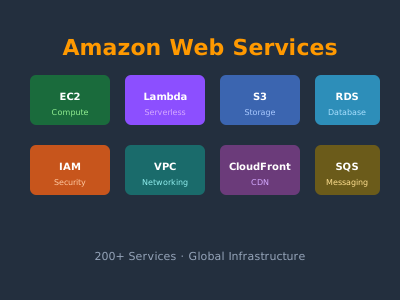
Amazon Web Services launched in 2006 as Amazon's cloud infrastructure division. Today it holds roughly 32% of the global cloud market (ahead of Azure and GCP) and serves millions of customers worldwide — from startups to Fortune 500 companies and government agencies.
AWS allows you to rent computing resources on demand instead of buying and maintaining physical servers. You pay only for what you use, scale up or down instantly, and benefit from Amazon's global infrastructure of data centers.
Core Concepts
Regions and Availability Zones
AWS infrastructure is organized into Regions — geographic locations (us-east-1, eu-west-1, ap-southeast-1, etc.). Each region contains multiple Availability Zones (AZs) — isolated data center clusters connected by low-latency links.
Best practices:
- Deploy your application in multiple AZs for high availability
- Choose a region close to your users for low latency
- Consider data sovereignty requirements when selecting regions
The AWS Free Tier
New AWS accounts get 12 months of free-tier access to many services:
- EC2: 750 hours/month of t2.micro or t3.micro instances
- S3: 5 GB of standard storage
- RDS: 750 hours of db.t2.micro
- Lambda: 1 million requests/month (always free)
- DynamoDB: 25 GB of storage (always free)
IAM: Identity and Access Management
IAM is the foundation of AWS security. It controls who can access which AWS resources.
Key IAM concepts:
- Users: Human identities (your AWS account, team members)
- Groups: Collections of users sharing the same permissions
- Roles: Identities assumed by services (EC2 instances, Lambda functions) or federated users
- Policies: JSON documents that define permissions
IAM best practices:
- Never use your root account for daily work — create an IAM admin user
- Enable MFA (Multi-Factor Authentication) on all accounts
- Follow the principle of least privilege — grant only required permissions
- Use IAM roles for applications, not access keys hardcoded in code
{
  "Version": "2012-10-17",
  "Statement": [
    {
      "Effect": "Allow",
      "Action": [
        "s3:GetObject",
        "s3:PutObject"
      ],
      "Resource": "arn:aws:s3:::my-bucket/*"
    }
  ]
}
EC2: Elastic Compute Cloud
EC2 provides virtual machines (instances) in the cloud. You choose the instance type (CPU, memory, storage), operating system, and region.
Instance types:
- t3.micro / t3.small: General purpose, burstable — good for development
- m5.large / m5.xlarge: General purpose, balanced — production web servers
- c5.large: Compute optimized — CPU-intensive workloads
- r5.large: Memory optimized — databases, in-memory caching
- p3.2xlarge: GPU instances — machine learning
Purchasing options:
- On-Demand: Pay by the hour/second, no commitment
- Reserved Instances: 1-3 year commitment for 40-72% discount
- Spot Instances: Bid on unused capacity for up to 90% off (can be interrupted)
Key EC2 features:
- Elastic IP: Static public IP address that persists across instance restarts
- Auto Scaling Groups: Automatically add/remove instances based on load
- Load Balancers (ALB/NLB): Distribute traffic across multiple instances
- Security Groups: Virtual firewall controlling instance-level traffic
S3: Simple Storage Service
S3 is AWS's object storage service — think of it as a virtually unlimited file system in the cloud.
Key concepts:
- Buckets: Containers for objects (like directories)
- Objects: Files and their metadata
- Keys: Object names/paths within a bucket
# AWS CLI examples
aws s3 mb s3://my-unique-bucket-name          # Create bucket
aws s3 cp file.txt s3://my-bucket/file.txt    # Upload
aws s3 sync ./dist s3://my-bucket/            # Sync directory
aws s3 presign s3://my-bucket/file.txt --expires-in 3600  # Signed URL
Storage classes:
- S3 Standard: Frequently accessed data
- S3 Standard-IA: Infrequently accessed, lower cost
- S3 Glacier: Archival, retrieval in minutes to hours
- S3 Intelligent-Tiering: Automatically moves objects between tiers based on access patterns
S3 for static website hosting: Upload HTML/CSS/JS files to S3, enable static website hosting, and your site is globally accessible. Combine with CloudFront for CDN delivery.
RDS: Relational Database Service
RDS manages relational databases so you don't have to handle patching, backups, or replication:
Supported engines: MySQL, PostgreSQL, MariaDB, Oracle, SQL Server, and Aurora (Amazon's MySQL/PostgreSQL-compatible engine with up to 5x MySQL performance).
Key features:
- Automated backups with point-in-time recovery
- Multi-AZ deployment for high availability
- Read replicas for horizontal read scaling
- Encryption at rest and in transit
Lambda: Serverless Functions
AWS Lambda runs code without provisioning servers. You upload a function, define a trigger, and Lambda handles execution, scaling, and billing (per 100ms of execution time):
import json
import boto3

def lambda_handler(event, context):
    # This function is triggered by an API Gateway request
    body = json.loads(event.get('body', '{}'))
    name = body.get('name', 'World')

    return {
        'statusCode': 200,
        'headers': {'Content-Type': 'application/json'},
        'body': json.dumps({'message': f'Hello, {name}!'})
    }
Common Lambda triggers: API Gateway, S3 events, DynamoDB streams, SQS queues, scheduled CloudWatch Events.
VPC: Virtual Private Cloud
VPC lets you create an isolated network within AWS where you control IP addressing, routing, and network gateways.
Key VPC components:
- Subnets: IP ranges within the VPC (public or private)
- Internet Gateway: Enables internet access for public subnets
- NAT Gateway: Allows private subnet instances to reach the internet without being reachable from it
- Route Tables: Determine where network traffic is directed
- Security Groups / NACLs: Firewall rules
CloudFront: Content Delivery Network
CloudFront caches your content at over 400 edge locations worldwide. Users get content from the nearest location, dramatically reducing latency:
- S3 + CloudFront: Serve static websites globally
- API Gateway + CloudFront: Cache API responses at the edge
- Custom origins: Any HTTP server
Other Essential Services
| Service | Purpose |
|---|---|
| DynamoDB | Managed NoSQL database, single-digit ms latency |
| SQS | Managed message queue for decoupling services |
| SNS | Pub/sub notifications (email, SMS, Lambda, SQS) |
| ElastiCache | Managed Redis or Memcached |
| ECS/EKS | Container orchestration (Docker/Kubernetes) |
| CodePipeline | CI/CD pipeline service |
| CloudWatch | Monitoring, logs, and alarms |
| CloudFormation | Infrastructure as Code (AWS-native) |
| Route 53 | Scalable DNS service |
Getting Started
- Create a free AWS account at aws.amazon.com
- Enable MFA on your root account immediately
- Create an IAM admin user for daily use
- Install and configure the AWS CLI: aws configure
- Launch a t3.micro EC2 instance and SSH into it
- Create an S3 bucket and upload a file
- Explore the AWS Console and documentation
AWS Certifications
AWS offers cloud certifications that validate your skills:
- AWS Cloud Practitioner: Entry-level overview (great starting point)
- AWS Solutions Architect Associate: Core architecture skills
- AWS Developer Associate: Development-focused services
- AWS SysOps Administrator Associate: Operations and deployment