Why Typography Matters
Approximately 95% of web design is typography. That observation, often attributed to designer Oliver Reichenstein, captures a fundamental truth: most web content is text, and how that text looks profoundly affects whether people read it, trust it, and enjoy it.
Poor typography creates friction. Lines that are too long exhaust readers. Text that's too small or too low-contrast strains eyes. Mismatched typefaces create visual noise. Inconsistent sizing undermines hierarchy.
Good typography, by contrast, becomes invisible. Readers absorb content without noticing the medium that delivers it.
Understanding Typeface Categories
Serif typefaces have small decorative strokes (serifs) at the ends of letterforms. They convey tradition, authority, and trustworthiness.
- Old Style (Garamond, Caslon): Humanist, elegant, excellent for long text
- Transitional (Times New Roman, Baskerville): More formal, high-contrast strokes
- Modern/Didone (Bodoni, Didot): High contrast, geometric — dramatic but less readable at small sizes
- Slab Serif (Georgia, Rockwell): Heavy serifs, friendly, great for digital screens
Sans-serif typefaces lack serifs. They convey modernity, clarity, and approachability.
- Grotesque (Helvetica, Arial): Neutral, utilitarian
- Humanist (Gill Sans, Optima, Frutiger): Warm, organic, excellent for UI text
- Geometric (Futura, Circular, Nunito): Based on geometric shapes, clean and modern
Monospace typefaces (Courier, JetBrains Mono, Fira Code): Each character takes identical width. Used for code, technical content.
Display typefaces: Decorative, designed for headlines only — not body text.
Choosing Typefaces
A practical approach to font pairing:
- Start with your content's personality. A legal firm needs authority (serif + neutral sans). A creative agency needs energy (bold display + clean sans). A medical app needs clarity (humanist sans throughout).
- Pair contrasting but complementary fonts. Combine a serif for headings with a sans-serif for body, or vice versa. Avoid pairing two typefaces with similar personalities — they compete without providing contrast.
- Limit yourself to 2-3 typefaces. More creates visual chaos. Most excellent designs use one typeface (varying weight and size) or two carefully chosen fonts.
High-quality free typefaces on Google Fonts:
- Body text: Inter, Source Serif 4, Lato, Merriweather, IBM Plex Sans
- Headings: Playfair Display, Raleway, Josefin Sans, Libre Baskerville
- Code: JetBrains Mono, Fira Code, Source Code Pro
Pairing examples:
- Playfair Display (headings) + Source Sans 3 (body) = Editorial, magazine feel
- Inter (headings) + Inter (body, lighter weight) = Clean, modern, tech product
- Libre Baskerville (headings) + Lato (body) = Warm, trustworthy, content-heavy sites
Establishing a Type Scale
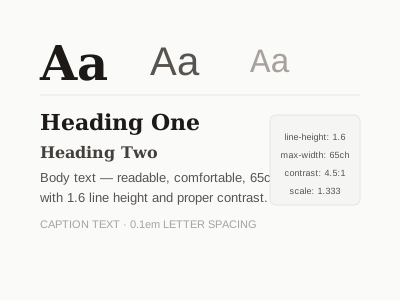
A type scale is a set of predefined font sizes related by a consistent ratio. Using a mathematical scale creates visual harmony.
Common scale ratios:
- Minor Second (1.067): Subtle differences — good for body text variations
- Major Second (1.125): Small but distinct steps
- Minor Third (1.200): Moderate scale, very common
- Major Third (1.250): Clear hierarchy
- Perfect Fourth (1.333): Dramatic, clear hierarchy
- Augmented Fourth (1.414): Very dramatic, good for landing pages
Using a base of 16px with a Perfect Fourth ratio:
:root {
  --text-xs:   0.563rem;   /* 9px */
  --text-sm:   0.75rem;    /* 12px */
  --text-base: 1rem;       /* 16px */
  --text-lg:   1.333rem;   /* 21px */
  --text-xl:   1.778rem;   /* 28px */
  --text-2xl:  2.369rem;   /* 38px */
  --text-3xl:  3.157rem;   /* 51px */
}

body  { font-size: var(--text-base); }
h1    { font-size: var(--text-3xl); }
h2    { font-size: var(--text-2xl); }
h3    { font-size: var(--text-xl); }
h4    { font-size: var(--text-lg); }
small { font-size: var(--text-sm); }
Tools like Type Scale (typescale.com) or Utopia (utopia.fyi) generate fluid type scales that scale smoothly between mobile and desktop.
Line Height (Leading)
Line height dramatically affects readability. Too tight, and lines merge visually. Too loose, and the eye struggles to return to the next line.
Guidelines:
- Body text: 1.5–1.7× the font size (e.g., 1.6 for 16px = 25.6px line height)
- Headings: 1.1–1.3× (tighter, since headings are read at a glance)
- Captions/small text: 1.3–1.5×
body {
  line-height: 1.6;        /* Unitless — scales with font size */
}

h1, h2, h3 {
  line-height: 1.15;
}

.caption {
  font-size: 0.875rem;
  line-height: 1.4;
}
Line Length (Measure)
Optimal line length for body text is 45–75 characters per line (or 2–3 alphabets). Longer lines tire the eye returning to the start; shorter lines feel choppy and interrupt flow.
/* Constrain body text width */
article, .content {
  max-width: 65ch;        /* ch unit = width of the "0" character */
  margin: 0 auto;
}
Using ch units ties the constraint directly to the font size.
Contrast and Color
Text must have sufficient contrast against its background. WCAG AA requires:
- Normal text (under 18px): 4.5:1 contrast ratio minimum
- Large text (18px+ or 14px+ bold): 3:1 minimum
Tools to check contrast: WebAIM Contrast Checker, Chrome DevTools color picker.
Avoid pure black (#000000) on pure white (#FFFFFF) — the extreme contrast is actually harder to read for many people. A dark gray on white (#1a1a1a on #ffffff, ratio ~19:1) is technically higher contrast but less tiring.
body {
  color: #1F2937;          /* Dark gray, not pure black */
  background: #FFFFFF;
}

.secondary-text {
  color: #6B7280;          /* Medium gray for supporting info */
}
Font Weight and Emphasis
Use weight to create emphasis and hierarchy:
body          { font-weight: 400; }  /* Regular */
strong, b     { font-weight: 700; }  /* Bold — use sparingly */
h1, h2        { font-weight: 700; }  /* Bold headings */
.subtitle     { font-weight: 300; }  /* Light for supporting text */
.badge        { font-weight: 600; }  /* Semibold */
Variable fonts allow fluid weight adjustment across a range (e.g., 100–900) with a single font file, improving both flexibility and performance.
Letter Spacing (Tracking)
- Headings: Slightly decrease tracking for large text (letter-spacing: -0.02em)
- All-caps/small-caps labels: Increase tracking (letter-spacing: 0.08em) — uppercase text reads better with more space
- Body text: Leave at default (0) — do not add positive tracking
h1 {
  letter-spacing: -0.025em;
}

.label-uppercase {
  text-transform: uppercase;
  font-size: 0.75rem;
  letter-spacing: 0.1em;
  font-weight: 600;
}
Establishing Visual Hierarchy
Good typography guides the reader's eye through a clear hierarchy:
- Primary heading (H1): Largest, boldest — the page's main message
- Subheading (H2/H3): Smaller, may use different weight or color
- Body text: Comfortable reading size, normal weight
- Supporting text: Labels, captions, metadata — smaller, lighter color
- Call-to-action text: May be bold or colored to draw attention
Fluid Typography with clamp()
CSS clamp() creates font sizes that scale fluidly between a minimum and maximum:
h1 {
  font-size: clamp(1.8rem, 4vw + 1rem, 3.5rem);
  /* Minimum: 1.8rem | Preferred: fluid | Maximum: 3.5rem */
}

body {
  font-size: clamp(1rem, 0.5vw + 0.875rem, 1.125rem);
}
This eliminates the need for media query typography overrides entirely.
Summary Checklist
- No more than 2-3 typefaces
- Clear type scale with consistent ratios
- Line height 1.5–1.7 for body text
- Line length 45–75 characters
- Sufficient color contrast (4.5:1 for normal text)
- Letter spacing adjusted for headings and uppercase
- Clear visual hierarchy across heading levels
- Responsive font sizes (fluid typography or breakpoints)