Introduction
Building a quiz application is an excellent way to solidify your understanding of modern web development tools. In this guide, you will learn how to create a production-ready quiz app by combining three powerful technologies: Next.js, Chakra UI, and Firebase. The result will be a dynamic, responsive application capable of storing questions, tracking user scores, and providing real-time feedback.
Why These Technologies?
Next.js is a React framework that provides server-side rendering (SSR), static site generation (SSG), and API routes out of the box. Its file-based routing system makes building multi-page applications intuitive, and its performance optimizations ensure fast load times.
Chakra UI is a modular and accessible component library for React. It gives developers a rich set of pre-built components that follow accessibility best practices and can be customized using a simple theming system. Instead of writing raw CSS, you use props like colorScheme, size, and variant.
Firebase is Google's Backend-as-a-Service platform. It provides a real-time NoSQL database (Firestore), user authentication, hosting, and more — all without managing your own server infrastructure.
Project Setup
Start by creating a new Next.js project and installing dependencies:
npx create-next-app@latest quiz-app --typescript
cd quiz-app
npm install @chakra-ui/react @emotion/react @emotion/styled framer-motion
npm install firebase
Initialize Firebase by creating a project in the Firebase Console, then add a web app to get your config credentials. Create a file at lib/firebase.ts:
import { initializeApp, getApps } from 'firebase/app';
import { getFirestore } from 'firebase/firestore';
import { getAuth } from 'firebase/auth';

const firebaseConfig = {
  apiKey: process.env.NEXT_PUBLIC_FIREBASE_API_KEY,
  authDomain: process.env.NEXT_PUBLIC_FIREBASE_AUTH_DOMAIN,
  projectId: process.env.NEXT_PUBLIC_FIREBASE_PROJECT_ID,
  storageBucket: process.env.NEXT_PUBLIC_FIREBASE_STORAGE_BUCKET,
  messagingSenderId: process.env.NEXT_PUBLIC_FIREBASE_MESSAGING_SENDER_ID,
  appId: process.env.NEXT_PUBLIC_FIREBASE_APP_ID,
};

const app = getApps().length === 0 ? initializeApp(firebaseConfig) : getApps()[0];
export const db = getFirestore(app);
export const auth = getAuth(app);
Store your credentials in a .env.local file. Never commit this file to version control.
Setting Up Chakra UI
Wrap your application with the Chakra UI ChakraProvider in pages/_app.tsx:
import type { AppProps } from 'next/app';
import { ChakraProvider, extendTheme } from '@chakra-ui/react';

const theme = extendTheme({
  colors: {
    brand: {
      500: '#3182CE',
      600: '#2B6CB0',
    },
  },
});

export default function App({ Component, pageProps }: AppProps) {
  return (
    <ChakraProvider theme={theme}>
      <Component {...pageProps} />
    </ChakraProvider>
  );
}
Data Modeling in Firestore
Design your Firestore collections. You will need:
- quizzes — stores quiz metadata (title, description, category)
- questions — a subcollection under each quiz with question text, options, and correct answer
- results — stores user scores tied to a quiz and user ID
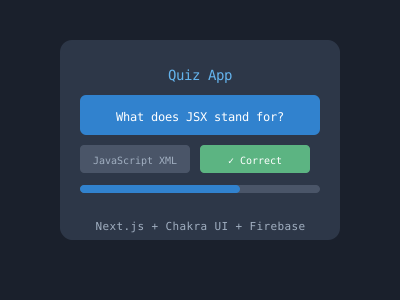
A sample question document structure:
{
  "question": "What does JSX stand for?",
  "options": ["JavaScript XML", "Java Syntax Extension", "JSON X", "JavaScript X"],
  "correctIndex": 0,
  "points": 10
}
Building the Quiz Component
The core of the application is the quiz runner component. It should:
- Fetch questions from Firestore on mount
- Display one question at a time with selectable answer options
- Track the current question index and user score
- Show a results screen at the end
import { useState, useEffect } from 'react';
import { Box, Button, Text, VStack, RadioGroup, Radio, Progress } from '@chakra-ui/react';
import { collection, getDocs } from 'firebase/firestore';
import { db } from '../lib/firebase';

interface Question {
  id: string;
  question: string;
  options: string[];
  correctIndex: number;
  points: number;
}

export default function QuizRunner({ quizId }: { quizId: string }) {
  const [questions, setQuestions] = useState<Question[]>([]);
  const [current, setCurrent] = useState(0);
  const [score, setScore] = useState(0);
  const [selected, setSelected] = useState('');
  const [finished, setFinished] = useState(false);

  useEffect(() => {
    const fetch = async () => {
      const snap = await getDocs(collection(db, 'quizzes', quizId, 'questions'));
      setQuestions(snap.docs.map(d => ({ id: d.id, ...d.data() } as Question)));
    };
    fetch();
  }, [quizId]);

  const handleNext = () => {
    const q = questions[current];
    if (parseInt(selected) === q.correctIndex) setScore(s => s + q.points);
    if (current + 1 >= questions.length) setFinished(true);
    else { setCurrent(c => c + 1); setSelected(''); }
  };

  if (finished) return <Text fontSize="2xl">Your score: {score}</Text>;
  if (!questions.length) return <Text>Loading...</Text>;

  const q = questions[current];
  return (
    <VStack spacing={4} p={6}>
      <Progress value={(current / questions.length) * 100} w="100%" />
      <Text fontWeight="bold">{q.question}</Text>
      <RadioGroup onChange={setSelected} value={selected}>
        <VStack align="start">
          {q.options.map((opt, i) => (
            <Radio key={i} value={String(i)}>{opt}</Radio>
          ))}
        </VStack>
      </RadioGroup>
      <Button colorScheme="brand" onClick={handleNext} isDisabled={!selected}>
        {current + 1 === questions.length ? 'Finish' : 'Next'}
      </Button>
    </VStack>
  );
}
Adding Authentication
Firebase Authentication makes it easy to add Google Sign-In:
import { signInWithPopup, GoogleAuthProvider } from 'firebase/auth';

const provider = new GoogleAuthProvider();

export const signInWithGoogle = () => signInWithPopup(auth, provider);
Use Chakra's Button component with Google colors to create a clean sign-in UI, then store results against the authenticated user's UID in Firestore.
Deploying to Vercel
Next.js apps deploy seamlessly on Vercel. Push your code to GitHub, connect the repository to Vercel, and add your environment variables in the Vercel dashboard. Your quiz app will be live with automatic deployments on every push.
Conclusion
Combining Next.js, Chakra UI, and Firebase gives you a powerful full-stack toolkit that handles rendering, styling, and data persistence without heavy configuration. The patterns shown here — fetching from Firestore, managing component state, and using Chakra's accessible components — scale well beyond a simple quiz app into any data-driven web application.