Why Django + Vue.js for Ecommerce?
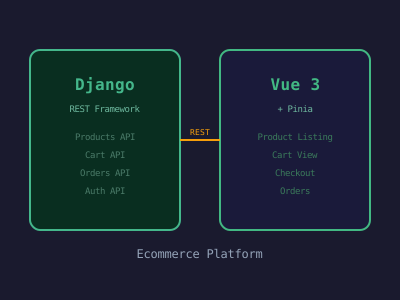
Django handles the parts that ecommerce demands most: a robust ORM for complex product/order queries, built-in admin for catalog management, Django REST Framework for clean API design, and a mature ecosystem for payments, authentication, and security. Vue.js brings reactive UI, component reuse, and smooth single-page app experiences without the complexity of a heavier framework.
This combination lets your backend team work independently from the frontend team, APIs can be reused for a mobile app, and Vue's reactivity makes cart interactions feel instant.
Project Architecture
ecommerce/
├── backend/               # Django project
│   ├── config/            # Settings, URLs, WSGI
│   ├── products/          # Product models, views, serializers
│   ├── orders/            # Cart, orders, checkout
│   ├── users/             # Custom user model, auth
│   └── payments/          # Payment integration
├── frontend/              # Vue 3 + Vite
│   ├── src/
│   │   ├── components/
│   │   ├── views/
│   │   ├── stores/        # Pinia state management
│   │   ├── services/      # API calls
│   │   └── router/
│   └── package.json
└── docker-compose.yml
Backend: Django REST Framework Setup
pip install django djangorestframework django-cors-headers pillow stripe
django-admin startproject config .
python manage.py startapp products
python manage.py startapp orders
python manage.py startapp users
config/settings.py additions:
INSTALLED_APPS = [
    ...
    'rest_framework',
    'corsheaders',
    'products',
    'orders',
    'users',
]

MIDDLEWARE = [
    'corsheaders.middleware.CorsMiddleware',  # Must be first
    ...
]

CORS_ALLOWED_ORIGINS = ['http://localhost:5173']

REST_FRAMEWORK = {
    'DEFAULT_AUTHENTICATION_CLASSES': [
        'rest_framework_simplejwt.authentication.JWTAuthentication',
    ],
    'DEFAULT_PERMISSION_CLASSES': [
        'rest_framework.permissions.IsAuthenticatedOrReadOnly',
    ],
    'DEFAULT_PAGINATION_CLASS': 'rest_framework.pagination.PageNumberPagination',
    'PAGE_SIZE': 12,
}

MEDIA_URL = '/media/'
MEDIA_ROOT = BASE_DIR / 'media'
Product Models
# products/models.py
from django.db import models
from django.utils.text import slugify

class Category(models.Model):
    name = models.CharField(max_length=200)
    slug = models.SlugField(unique=True)
    description = models.TextField(blank=True)
    image = models.ImageField(upload_to='categories/', blank=True)

    class Meta:
        verbose_name_plural = 'categories'

    def __str__(self):
        return self.name

class Product(models.Model):
    category = models.ForeignKey(Category, on_delete=models.SET_NULL, null=True, related_name='products')
    name = models.CharField(max_length=300)
    slug = models.SlugField(unique=True)
    description = models.TextField()
    price = models.DecimalField(max_digits=10, decimal_places=2)
    compare_price = models.DecimalField(max_digits=10, decimal_places=2, null=True, blank=True)
    stock = models.IntegerField(default=0)
    image = models.ImageField(upload_to='products/')
    is_active = models.BooleanField(default=True)
    created_at = models.DateTimeField(auto_now_add=True)
    updated_at = models.DateTimeField(auto_now=True)

    def save(self, *args, **kwargs):
        if not self.slug:
            self.slug = slugify(self.name)
        super().save(*args, **kwargs)

    @property
    def is_on_sale(self):
        return self.compare_price and self.compare_price > self.price

    @property
    def discount_percent(self):
        if self.is_on_sale:
            return int((1 - self.price / self.compare_price) * 100)
        return 0

    def __str__(self):
        return self.name

class ProductImage(models.Model):
    product = models.ForeignKey(Product, on_delete=models.CASCADE, related_name='images')
    image = models.ImageField(upload_to='products/gallery/')
    alt_text = models.CharField(max_length=200, blank=True)
    is_primary = models.BooleanField(default=False)
Serializers and Views
# products/serializers.py
from rest_framework import serializers
from .models import Product, Category, ProductImage

class ProductImageSerializer(serializers.ModelSerializer):
    class Meta:
        model = ProductImage
        fields = ['id', 'image', 'alt_text', 'is_primary']

class ProductListSerializer(serializers.ModelSerializer):
    category_name = serializers.CharField(source='category.name', read_only=True)
    is_on_sale = serializers.BooleanField(read_only=True)
    discount_percent = serializers.IntegerField(read_only=True)

    class Meta:
        model = Product
        fields = ['id', 'name', 'slug', 'price', 'compare_price',
                  'image', 'category_name', 'is_on_sale', 'discount_percent', 'stock']

class ProductDetailSerializer(ProductListSerializer):
    images = ProductImageSerializer(many=True, read_only=True)

    class Meta(ProductListSerializer.Meta):
        fields = ProductListSerializer.Meta.fields + ['description', 'images']
# products/views.py
from rest_framework import viewsets, filters
from django_filters.rest_framework import DjangoFilterBackend
from .models import Product, Category
from .serializers import ProductListSerializer, ProductDetailSerializer
class ProductViewSet(viewsets.ReadOnlyModelViewSet):
queryset = Product.objects.filter(is_active=True).select_related('category')
filter_backends = [DjangoFilterBackend, filters.SearchFilter, filters.OrderingFilter]
filterset_fields = ['category__slug']
search_fields = ['name', 'description']
ordering_fields = ['price', 'created_at', 'name']
lookup_field = 'slug'
def get_serializer_class(self):
if self.action == 'retrieve':
return ProductDetailSerializer
return ProductListSerializerOrder Model and Cart Logic
# orders/models.py
from django.db import models
from django.contrib.auth.models import User

class Cart(models.Model):
    user = models.OneToOneField(User, on_delete=models.CASCADE, null=True, blank=True)
    session_key = models.CharField(max_length=40, null=True, blank=True)
    created_at = models.DateTimeField(auto_now_add=True)

class CartItem(models.Model):
    cart = models.ForeignKey(Cart, on_delete=models.CASCADE, related_name='items')
    product = models.ForeignKey('products.Product', on_delete=models.CASCADE)
    quantity = models.PositiveIntegerField(default=1)

    @property
    def subtotal(self):
        return self.product.price * self.quantity

class Order(models.Model):
    STATUS_CHOICES = [
        ('pending', 'Pending'),
        ('processing', 'Processing'),
        ('shipped', 'Shipped'),
        ('delivered', 'Delivered'),
        ('cancelled', 'Cancelled'),
    ]
    user = models.ForeignKey(User, on_delete=models.SET_NULL, null=True)
    status = models.CharField(max_length=20, choices=STATUS_CHOICES, default='pending')
    total_price = models.DecimalField(max_digits=10, decimal_places=2)
    stripe_payment_id = models.CharField(max_length=200, blank=True)
    shipping_address = models.JSONField()
    created_at = models.DateTimeField(auto_now_add=True)
Frontend: Vue 3 with Pinia
npm create vite@latest frontend -- --template vue
cd frontend
npm install vue-router pinia axios @stripe/stripe-js
Cart store with Pinia:
// src/stores/cart.js
import { defineStore } from 'pinia';
import { ref, computed } from 'vue';
import { cartAPI } from '../services/api';

export const useCartStore = defineStore('cart', () => {
  const items = ref([]);

  const totalItems = computed(() =>
    items.value.reduce((sum, item) => sum + item.quantity, 0)
  );

  const totalPrice = computed(() =>
    items.value.reduce((sum, item) => sum + item.product.price * item.quantity, 0)
  );

  async function fetchCart() {
    const { data } = await cartAPI.get();
    items.value = data.items;
  }

  async function addToCart(productId, quantity = 1) {
    const { data } = await cartAPI.addItem({ product_id: productId, quantity });
    items.value = data.items;
  }

  async function updateQuantity(itemId, quantity) {
    if (quantity <= 0) return removeItem(itemId);
    const { data } = await cartAPI.updateItem(itemId, { quantity });
    items.value = data.items;
  }

  async function removeItem(itemId) {
    await cartAPI.removeItem(itemId);
    items.value = items.value.filter(item => item.id !== itemId);
  }

  return { items, totalItems, totalPrice, fetchCart, addToCart, updateQuantity, removeItem };
});
Product card component:
<!-- src/components/ProductCard.vue -->
<template>
  <div class="product-card">
    <div class="product-image-wrapper">
      <img :src="product.image" :alt="product.name" loading="lazy" />
      <span v-if="product.is_on_sale" class="sale-badge">
        -{{ product.discount_percent }}%
      </span>
    </div>
    <div class="product-info">
      <h3>{{ product.name }}</h3>
      <p class="category">{{ product.category_name }}</p>
      <div class="price-row">
        <span class="price">${{ product.price }}</span>
        <span v-if="product.compare_price" class="compare-price">
          ${{ product.compare_price }}
        </span>
      </div>
      <button
        @click="addToCart"
        :disabled="product.stock === 0 || adding"
        class="btn-add-cart"
      >
        {{ product.stock === 0 ? 'Out of Stock' : adding ? 'Adding...' : 'Add to Cart' }}
      </button>
    </div>
  </div>
</template>

<script setup>
import { ref } from 'vue';
import { useCartStore } from '../stores/cart';

const props = defineProps({ product: Object });
const cartStore = useCartStore();
const adding = ref(false);

async function addToCart() {
  adding.value = true;
  try {
    await cartStore.addToCart(props.product.id);
  } finally {
    adding.value = false;
  }
}
</script>
Payment Integration with Stripe
# payments/views.py
import stripe
from django.conf import settings
from rest_framework.decorators import api_view, permission_classes
from rest_framework.permissions import IsAuthenticated
from rest_framework.response import Response

stripe.api_key = settings.STRIPE_SECRET_KEY

@api_view(['POST'])
@permission_classes([IsAuthenticated])
def create_payment_intent(request):
    cart = request.user.cart
    amount = int(cart.get_total() * 100)  # Stripe expects cents

    intent = stripe.PaymentIntent.create(
        amount=amount,
        currency='usd',
        metadata={'user_id': request.user.id},
    )
    return Response({'client_secret': intent.client_secret})
Conclusion
Django and Vue.js complement each other well for ecommerce: Django provides the robust data layer, admin interface, and secure API, while Vue delivers a responsive shopping experience. With Django REST Framework handling serialization and permissions, and Pinia managing frontend state (cart, user session), you have a scalable foundation ready for real-world ecommerce features like product reviews, wishlists, discount codes, and multi-currency support.