The Privacy and Cost Risks of Cloud-Hosted AI
When building applications to interact with internal documentation, security audits, or private code repositories, developers frequently default to commercial cloud APIs. However, this architectural choice introduces several liabilities:
- Intellectual Property Exposure: Uploading sensitive proprietary data, financial reports, or healthcare records to external servers violates standard compliance rules (such as GDPR, HIPAA, or SOC2).
- Uncapped API Consumption Costs: Token-based pricing models scale linearly with usage. Processing thousands of multi-page PDF manuals can quickly become financially unsustainable.
- Dependency on Internet Connectivity: Systems reliant on cloud APIs are vulnerable to network latency, service outages, and rate limit ceilings.
- Model Drift and Deprecation: Relying on external models means your application behavior can change arbitrarily when providers update their underlying architectures.
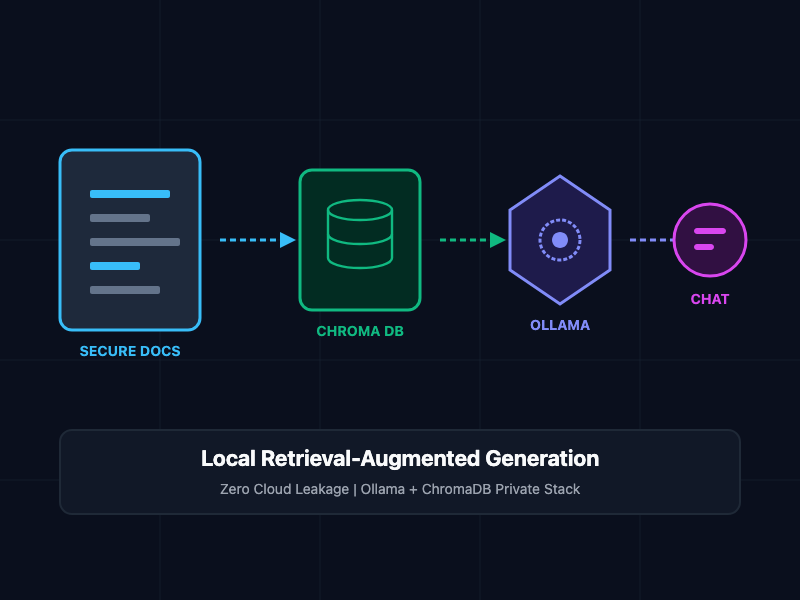
Building a private Retrieval-Augmented Generation (RAG) pipeline solves these issues. By running open-weights models locally on dedicated hardware, you guarantee absolute data privacy, eliminate subscription fees, and maintain complete control over your computational pipeline.
Understanding the Local RAG Architecture
A local RAG system dynamically supplements the LLM prompt with relevant context retrieved from your private documents. This process operates in three decoupled stages:
- Ingestion and Chunking: Reading unstructured documents (PDFs, Markdown, text files) and dividing them into small, overlapping text segments to preserve semantic context.
- Vectorization and Storage: Passing these text chunks through a local embedding model to generate numerical vectors, which are then indexed inside a local vector database.
- Retrieval and Generation: When a user queries the system, the vector database returns the text chunks most mathematically similar to the query. These chunks are injected into a prompt template alongside the user's question, and a local LLM generates a cohesive answer based solely on the retrieved data.
Core Concepts and Implementation
1. Document Parsing and Semantic Chunking
To ensure the vector database returns precise answers, documents must be split into logical pieces. If a chunk is too large, the specific answer gets diluted; if it is too small, critical surrounding context is lost.
This Python script reads local text documents and implements recursive character splitting with a target overlap:
import os

class DocumentProcessor:
    def __init__(self, chunk_size=500, chunk_overlap=100):
        self.chunk_size = chunk_size
        self.chunk_overlap = chunk_overlap

    def read_text_file(self, file_path):
        with open(file_path, "r", encoding="utf-8") as f:
            return f.read()

    def split_text(self, text):
        chunks = []
        start = 0
        text_length = len(text)

        while start < text_length:
            end = start + self.chunk_size
            chunk = text[start:end]
            chunks.append(chunk)

            # Step forward by chunk_size minus overlap
            start += (self.chunk_size - self.chunk_overlap)

        return chunks

# Usage Example
# processor = DocumentProcessor(chunk_size=500, chunk_overlap=100)
# document_content = processor.read_text_file("audit_report.txt")
# text_chunks = processor.split_text(document_content)
# print(f"Generated {len(text_chunks)} distinct chunks.")
2. Vector Indexing with ChromaDB and Local Embeddings
Once the text is chunked, you must convert it into vector coordinates using a local embedding model, storing the results in a persistent vector database.
The following Python code uses the chromadb library to spin up an in-memory database and index the processed document chunks utilizing local Ollama embeddings:
import chromadb
import requests

class LocalVectorStore:
    def __init__(self, collection_name="local_documents"):
        # Initialize persistent disk-backed database client
        self.chroma_client = chromadb.PersistentClient(path="./chroma_db")
        self.collection = self.chroma_client.get_or_create_collection(name=collection_name)
        self.ollama_emb_url = "http://localhost:11434/api/embeddings"

    def _get_local_embedding(self, text, model="nomic-embed-text"):
        # Query local Ollama service for embeddings
        response = requests.post(
            self.ollama_emb_url,
            json={"model": model, "prompt": text}
        )
        return response.json()["embedding"]

    def index_chunks(self, chunks):
        ids = [f"id-{i}" for i in range(len(chunks))]
        embeddings = [self._get_local_embedding(chunk) for chunk in chunks]

        self.collection.add(
            documents=chunks,
            embeddings=embeddings,
            ids=ids
        )
        print(f"Indexed {len(chunks)} vectors successfully.")

    def query_similarity(self, query_text, n_results=3):
        query_vector = self._get_local_embedding(query_text)
        results = self.collection.query(
            query_embeddings=[query_vector],
            n_results=n_results
        )
        return results["documents"][0]
3. Context Injection and LLM Generation
With relevant context chunks isolated, compile the system prompt and route it to the locally running LLM instance via the Ollama endpoint to generate the final, grounded response.
class LocalRAGPipeline:
    def __init__(self, vector_store, model="llama3"):
        self.vector_store = vector_store
        self.model = model
        self.ollama_gen_url = "http://localhost:11434/api/generate"

    def ask(self, question):
        # 1. Retrieve the most semantically relevant document chunks
        context_chunks = self.vector_store.query_similarity(question, n_results=3)
        context_payload = "\n---\n".join(context_chunks)

        # 2. Build the system prompt enforcing strict grounding rules
        prompt = f"""You are a helpful assistant. Answer the user's question using ONLY the provided context. If the context does not contain the answer, state that you do not know. Do not make up information.

Context:
{context_payload}

Question:
{question}

Answer:"""

        # 3. Query the local LLM
        response = requests.post(
            self.ollama_gen_url,
            json={
                "model": self.model,
                "prompt": prompt,
                "stream": False
            }
        )
        return response.json()["response"]
Hardware and Architectural Best Practices
- Match Model Sizes to Available VRAM: For consumer workstations (e.g., Apple M-series chips or standard NVIDIA GPUs), prioritize quantized models. Run 8-billion parameter models (such as Llama 3) on systems with at least 16GB of unified memory or VRAM, and 70-billion parameter models only on setups with 48GB or more.
- Enforce Strict Hallucination Guards: In your system prompts, explicitly instruct the model to return a structured "Data not found" response if the retrieved context does not contain the answer. This prevents the LLM from hallucinating answers based on its generic pre-trained weights.
- Fine-Tune Chunk Overlap Rates: Maintain a chunk overlap of 15% to 20%. This ensures that sentences split by the boundaries are not lost, preserving structural logic across adjoining vectors.
- Use Efficient Embedding Models: Dedicate smaller, highly-efficient models like nomic-embed-text exclusively for vector generation, reserving larger models like llama3 solely for natural language synthesis.
Getting Started
To configure and run your private RAG system locally:
# Step 1: Install Ollama on your machine
curl -fsSL [https://ollama.com/install.sh](https://ollama.com/install.sh) | sh

# Step 2: Pull the required embedding and reasoning models
ollama pull nomic-embed-text
ollama pull llama3

# Step 3: Set up your Python environment and install database packages
pip install chromadb requests

# Step 4: Execute your local pipeline script
python local_rag_executor.py
By transitioning to this architecture, you eliminate external dependencies, minimize compute costs, and establish a sovereign, highly secure data analysis environment directly on your local hardware.