The Limitations of Single-Prompt AI Execution
When developers attempt to build complex automation pipelines using single-prompt language model invocations, they encounter severe architectural boundaries:
- Lack of Real-World System Interaction: Static language models cannot directly query active databases, fetch live HTTP API endpoints, or execute local shell scripts without programmatic bridges.
- Context Gap and Hallucination Vector: Instructing an LLM to guess current infrastructure states, database schemas, or system logs leads to fabricated parameters and invalid execution steps.
- Brittle Multistep Reasoning: Forcing an LLM to predict every future sub-task in a single turn frequently fails when intermediate steps produce unexpected errors or require dynamic strategy pivoting.
- Lack of State Persistence Across Iterations: Stateless API calls require manual state management to track what tools have been executed and what raw data has been returned.
Building an Autonomous AI Agent solves these limitations. By pairing Claude 3.5 Sonnet with a deterministic execution loop and custom Tool Use (function calling) definitions, the LLM transitions from a passive text generator into an active, self-correcting problem-solver.
What Is an Autonomous Agent Loop with Claude?
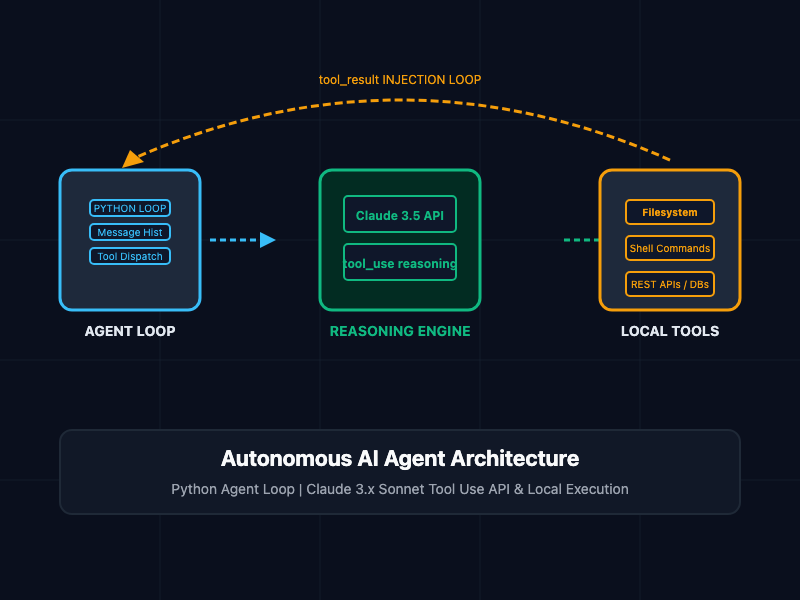
An autonomous agent loop is a continuous execution pattern where a language model receives a goal, evaluates its active context, selects and invokes external tools, observes the tool outputs, and iteratively determines the next step until the objective is achieved or a termination condition is met.
┌────────────────────────────────────────────────────────┐
│  Python Agent Controller (Main Execution Loop)         │
└────────────────────────────────────────────────────────┘
       │
       ▼ 1. Send Messages + Tool Schemas
┌────────────────────────────────────────────────────────┐
│  Anthropic Claude 3.5 Sonnet API                       │
│  (Evaluates prompt & decides stop_reason)          │
└────────────────────────────────────────────────────────┘
       │
       ├─────────────────────────────────────────┐
       ▼ (stop_reason == "end_turn")             ▼ (stop_reason == "tool_use")
┌──────────────────────────────┐          ┌──────────────────────────────┐
│ Return Final Answer to User  │          │ Extract Tool Name & Inputs   │
└──────────────────────────────┘          └──────────────────────────────┘
                                                 │
                                                 ▼ 2. Execute Function
                                          ┌──────────────────────────────┐
                                          │ Local Python Execution Engine│
                                          └──────────────────────────────┘
                                                 │
                                                 ▼ 3. Append Tool Result
                                          ┌──────────────────────────────┐
                                          │ Append role: "user" Tool     │
                                          │ Response to Message History  │
                                          └──────────────────────────────┘
                                                 │
                                                 └─────────► [ Loop Back ]
Key Architecture Components
- Tool Schemas: JSON Schema declarations passed to the Anthropic API that describe available functions, expected argument types, and explicit usage descriptions.
- The Agent Orchestrator Loop: A Python control loop that monitors model responses (stop_reason). If Claude requests tool_use, the orchestrator executes the corresponding Python function locally.
- Tool Result Injection: The output of the local function execution is packaged into a tool_result content block and appended back to the conversation history, allowing Claude to observe the result and plan the next step.
Core Concepts and Implementation
1. Defining Tool Schemas and Local Python Functions
Tools exposed to Claude must be defined with clear, explicit JSON schemas. The quality of the tool's description field directly dictates how accurately Claude selects and parameterizes the tool.
The following Python script defines local utility functions alongside their corresponding JSON schemas for the Anthropic SDK:
import os
import json
import subprocess
from typing import Dict, Any, List

# Define concrete local Python execution functions
def execute_system_command(command: str) -> str:
    """Executes a restricted bash command locally and returns stdout/stderr."""
    # Production note: Restrict allowed command wrappers in real environments
    try:
        result = subprocess.run(
            command,
            shell=True,
            capture_output=True,
            text=True,
            timeout=15
        )
        if result.returncode == 0:
            return result.stdout if result.stdout else "Command executed successfully with no output."
        return f"Error (Exit Code {result.returncode}): {result.stderr}"
    except Exception as e:
        return f"Execution exception: {str(e)}"

def read_file_contents(file_path: str) -> str:
    """Reads and returns the contents of a local text file."""
    try:
        if not os.path.exists(file_path):
            return f"Error: File path '{file_path}' does not exist."
        with open(file_path, "r", encoding="utf-8") as f:
            return f.read()
    except Exception as e:
        return f"File read error: {str(e)}"

# Define Anthropic Tool Schemas
TOOLS_SCHEMA: List[Dict[str, Any]] = [
    {
        "name": "execute_system_command",
        "description": "Runs a shell command on the host terminal. Use this to check system status, directory contents, or running processes.",
        "input_schema": {
            "type": "object",
            "properties": {
                "command": {
                    "type": "string",
                    "description": "The exact bash command to execute (e.g., 'ls -la', 'ps aux')."
                }
            },
            "required": ["command"]
        }
    },
    {
        "name": "read_file_contents",
        "description": "Reads the raw text contents of a target file from the filesystem.",
        "input_schema": {
            "type": "object",
            "properties": {
                "file_path": {
                    "type": "string",
                    "description": "The absolute or relative path to the target file."
                }
            },
            "required": ["file_path"]
        }
    }
]
2. Building the Resilient Agent Loop Engine in Python
The agent loop initiates a request to Claude 3.5 Sonnet. If Claude responds with a stop_reason of "tool_use", the agent executes the function, formats the return value, appends it to the message payload, and calls the API again.
import anthropic

class AutonomousAgent:
    def __init__(self, api_key: str, max_iterations: int = 10):
        self.client = anthropic.Anthropic(api_key=api_key)
        self.model = "claude-3-5-sonnet-20241022"
        self.max_iterations = max_iterations
        self.tool_map = {
            "execute_system_command": execute_system_command,
            "read_file_contents": read_file_contents
        }

    def run(self, user_goal: str, system_prompt: str = None) -> str:
        messages = [
            {"role": "user", "content": user_goal}
        ]

        default_system = (
            "You are an autonomous systems engineering agent. You have access to local tools. "
            "Inspect the environment, diagnose issues step-by-step, and resolve tasks independently. "
            "When you have completed the task or reached a conclusion, provide a concise final summary."
        )

        iteration = 0
        while iteration < self.max_iterations:
            iteration += 1
            print(f"\n--- Agent Iteration {iteration}/{self.max_iterations} ---")

            # 1. Query Claude with cumulative message history and available tool schemas
            response = self.client.messages.create(
                model=self.model,
                max_tokens=4000,
                system=system_prompt or default_system,
                tools=TOOLS_SCHEMA,
                messages=messages
            )

            # Append Claude's response assistant message to history
            messages.append({"role": "assistant", "content": response.content})

            # 2. Check if Claude wants to stop or use a tool
            if response.stop_reason == "end_turn":
                # Extract and return final text answer
                final_text = []
                for block in response.content:
                    if block.type == "text":
                        final_text.append(block.text)
                return "\n".join(final_text)

            elif response.stop_reason == "tool_use":
                # Process tool calls requests from Claude
                tool_results_content = []

                for block in response.content:
                    if block.type == "tool_use":
                        tool_name = block.name
                        tool_inputs = block.input
                        tool_use_id = block.id

                        print(f"[Agent Invoking Tool]: {tool_name} with inputs: {json.dumps(tool_inputs)}")

                        # Execute mapped local function
                        if tool_name in self.tool_map:
                            execution_func = self.tool_map[tool_name]
                            tool_output = execution_func(**tool_inputs)
                        else:
                            tool_output = f"Error: Tool '{tool_name}' is not registered in local execution map."

                        print(f"[Tool Result Preview]: {str(tool_output)[:150]}...")

                        # 3. Format result block expected by Anthropic API
                        tool_results_content.append({
                            "type": "tool_result",
                            "tool_use_id": tool_use_id,
                            "content": str(tool_output)
                        })

                # Append tool result as a 'user' role message to history
                messages.append({
                    "role": "user",
                    "content": tool_results_content
                })

            else:
                print(f"Unhandled stop_reason: {response.stop_reason}")
                break

        return "Agent reached maximum iteration limit before completing the objective."

# Execution Example
if __name__ == "__main__":
    api_key = os.environ.get("ANTHROPIC_API_KEY", "your-api-key-here")
    agent = AutonomousAgent(api_key=api_key, max_iterations=8)

    goal = "Inspect the current working directory, list all files, and summarize the contents of 'requirements.txt' if it exists."
    result = agent.run(goal)
    print("\n================ FINAL AGENT SUMMARY ================")
    print(result)
Agentic Workflow Matrix
Review the operational parameters when deciding between single-turn prompt execution vs. autonomous agentic loops:
| Architectural Dimension | Single-Turn Prompt Execution | Autonomous Agentic Loop |
|---|---|---|
| System Interoperability | Non-existent (Text input/output only) | High (Invokes APIs, DBs, Shells) |
| Error Recovery | Fails on single mistake | Self-correcting via iteration feedback |
| Execution Latency | Low (Single HTTP API request) | Variable (Multiple turn loops) |
| Token Consumption | Static, predictable | Accumulates over loop turns |
| Complexity Bounds | Simple Q&A and text generation | Multi-step problem solving & automation |
Production and Security Best Practices
- Enforce Strict Iteration Caps: Always specify a hard limit on max_iterations (e.g., 10 to 15 turns) to prevent agent loops from spinning indefinitely during unresolvable system errors.
- Implement Tool Input Validation: Validate arguments inside local Python execution wrappers before executing actions. Never pass un-sanitized string inputs directly into unrestricted shell calls (eval() or raw subprocess.run()).
- Apply Least-Privilege Execution Accounts: Run local tool-execution worker processes inside isolated Docker containers or unprivileged user accounts with restricted filesystem write permissions.
- Trim Accumulating Message Histories: Over long agent loops, token footprints expand rapidly. Summarize or prune older tool_result messages that exceed immediate context needs to manage API consumption costs.
Getting Started
To install dependencies and run your first autonomous agent pipeline in Python:
# Step 1: Install official Anthropic SDK
pip install anthropic

# Step 2: Set your Anthropic API Key environment variable
export ANTHROPIC_API_KEY="sk-ant-api03-YOUR_API_KEY_HERE"

# Step 3: Run the agent script
python autonomous_agent.py
By shifting from static single-turn API calls to an autonomous tool-use loop, engineering teams build resilient, self-correcting AI systems capable of executing complex end-to-end workflows independently.