The Operational Mismatch of Autonomous AI Agents in Kubernetes
Modern cloud infrastructure was architected around two primary workload patterns: stateless request-response microservices (managed via Kubernetes Deployments) and run-to-completion computational workloads (managed via Jobs or CronJobs).
With the rapid emergence of autonomous coding agents, multi-agent frameworks, and agentic workflows (such as Claude Code, Codex, and AutoGPT), infrastructure teams are encountering an entirely new class of workload that breaks traditional orchestration primitives:
- State Accumulation and Volatile Working Trees: Agents do not process single HTTP calls. They execute multi-hour loops, inspect filesystems, edit Git repositories, install dynamic package dependencies, and generate intermediate task state. If a Kubernetes pod restarts due to a node drain, the agent's entire scratchpad and file modifications vanish.
- Security Hazards of Untrusted Code Execution: Autonomous agents routinely execute dynamic shell commands, pull third-party packages, and query external APIs. Running agent tasks inside shared, root-level container namespaces introduces container escape and lateral movement risks across the cluster.
- Cold-Start Latency for Heavy Contexts: Bootstrapping an agent workspace requiring large codebases, Model Context Protocol (MCP) servers, language toolchains, and specialized skill packages can take several minutes if executed from scratch on every run.
- Runaway Execution Loops and Financial Drain: An agent caught in an unhandled exception loop or repetitive debugging cycle can burn through thousands of model API tokens and cloud compute cycles before an operator notices.
To solve this operational mismatch, Google open-sourced AX (Agent Executor)—a declarative agentic orchestration runtime built natively for Kubernetes and hosted at agentexecutor.io.
What Is Google AX?
Google AX is an open-source, Apache 2.0-licensed orchestration runtime designed specifically to schedule, isolate, inspect, and manage autonomous agent workloads on Kubernetes.
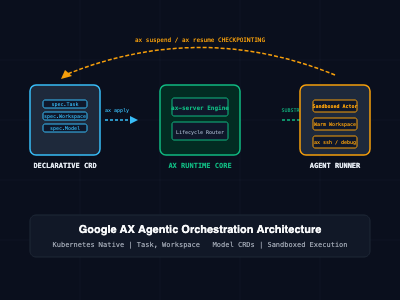
Rather than forcing developers to construct ad-hoc Job templates or run unconstrained Docker containers, AX models agent execution through three declarative Custom Resource Definitions (CRDs) under the ax.io/v1alpha1 API group:
- Task: The executable actor representing the agent's active execution lifecycle. It defines CPU/memory compute constraints, image definitions, timeout budgets, and failure criteria.
- Workspace: The pre-wired environment template. It configures cloned Git repositories, cached dependencies, language runtimes, skill packages, and Model Context Protocol (MCP) server endpoints so agents boot warm.
- Model: The platform-level inference gateway. It maps which large language model the platform uses, resolving API keys and credentials securely from Kubernetes Secrets.

The Underlying Substrate: Sandboxed Actor Isolation
AX schedules every task as a sandboxed actor on Agent Substrate (the actor runtime engine installed in the ate-system namespace). Through Agent Substrate and kernel sandboxing (such as gVisor or microVM runtimes), AX isolates untrusted shell executions, bounds network access via the atenet router, and provides checkpointing capabilities.
Core Declarative Manifests (ax.io/v1alpha1)
AX uses a unified declarative manifest structure, allowing engineers to define the model credentials, workspace dependencies, and task parameters within a single file.
The following manifest defines a complete environment: configuring an Anthropic Claude model provider, a pre-wired Node.js/Python security workspace, and an autonomous audit task:
# examples/security-audit-task.yaml
apiVersion: ax.io/v1alpha1
kind: Model
metadata:
  name: claude-sonnet
  namespace: default
spec:
  provider: anthropic
  modelName: claude-3-7-sonnet-20250219
  credentialsSecretRef:
    name: anthropic-api-keys
    key: api-key
---
apiVersion: ax.io/v1alpha1
kind: Workspace
metadata:
  name: secops-workspace
  namespace: default
spec:
  git:
    repo: "https://github.com/enterprise/payment-gateway.git"
    branch: "main"
    depth: 1
  tools:
    mcpServers:
      - name: filesystem-auditor
        image: "ghcr.io/modelcontextprotocol/servers/filesystem:latest"
        mountPath: "/workspace"
    packages:
      - "semgrep"
      - "trivy"
---
apiVersion: ax.io/v1alpha1
kind: Task
metadata:
  name: secops-audit-task-091
  namespace: default
spec:
  workspaceRef:
    name: secops-workspace
  modelRef:
    name: claude-sonnet
  timeout: "1800s" # Hard 30-minute ceiling to prevent runaway token spend
  resources:
    requests:
      cpu: "1000m"
      memory: "2Gi"
    limits:
      cpu: "2000m"
      memory: "4Gi"
  command:
    - "/bin/sh"
    - "-c"
    - "semgrep scan --config auto --json -o /workspace/audit.json && ax-complete"
The AX CLI Workflow and Operational Lifecycle
The ax command-line utility is designed to match the ergonomics of kubectl while introducing verbs tailored to non-deterministic agent workflows.
1. Task Deployment and Live Inspection
Deploying and tracking an agent task follows standard Kubernetes-style patterns:
# Apply declarative manifest (Model + Workspace + Task)
ax apply -f examples/security-audit-task.yaml

# List active agent tasks across worker nodes
ax get tasks
# Output:
# NAME                   ATESPACE   PHASE     ACTOR                  WORKER-IP     AGE
# secops-audit-task-091  default    Running   secops-audit-task-091  10.20.3.67    1m

# Stream live lifecycle phase changes and condition signals
ax watch task secops-audit-task-091
2. Real-Time Inspection via ax ssh
When an autonomous agent stalls, behaves unexpectedly, or generates anomalous network activity, engineers do not have to rely on passive logs. AX provides direct, authenticated shell access into the sandboxed task container:
# Open an interactive shell inside the running agent's sandbox
ax ssh secops-audit-task-091

# Execute a one-off diagnosis command inside the task workspace
ax ssh secops-audit-task-091 -- ls -la /workspace
3. State Checkpointing with ax suspend and ax resume
Because agents accumulate state during execution, terminating a pod mid-run to free cluster capacity destroys working memory. AX supports native task suspension:
# Pause the running agent, checkpoint memory state, and release compute resources
ax suspend task secops-audit-task-091

# Resume the agent task on an available node from its exact checkpointed state
ax resume task secops-audit-task-091
4. Context Switching with kubectx
The ax CLI automatically follows your active Kubernetes context. When managing multi-cluster fleets across staging and production, ax transparently resolves and tunnels to the target control plane:
# Follows active cluster context automatically
kubectx staging-cluster
ax get tasks

kubectx prod-cluster
ax get tasks

# Or target an explicit context directly without switching
ax --context=dev-cluster get tasks
Architectural Comparison: Google AX vs. Standard Kubernetes Workloads
| Dimension | Kubernetes Deployment | Kubernetes Job / CronJob | Google AX (Agent Executor) |
| Target Workload | Stateless microservices | Run-to-completion batch tasks | Autonomous, multi-turn AI agents |
| State Handling | Ephemeral or volume-bound | Stateless execution | Native Workspace state & checkpointing |
| Isolation Level | Standard container cgroups | Standard container cgroups | Sandboxed Actor on Agent Substrate |
| Interactive Debugging | Basic kubectl exec | Limited (Terminal kills pod) | Native ax ssh into live sandbox |
| Lifecycle Control | Start / Stop / Scale | Run to completion | Native suspend and resume |
| Tool & MCP Pre-Wiring | Manual image packaging | Manual script initialization | Declarative Workspace MCP integration |
| Cost & Loop Governance | Lacks token/model awareness | Wall-clock execution timeout | Budget thresholds & token throttling |
SRE and Production Engineering Best Practices
- Always Specify Declarative Task Timeouts: Autonomous agents can encounter logic deadlocks or infinite prompt-retry cycles. Always declare explicit timeout boundaries (e.g., spec.timeout: "1800s") in Task manifests to prevent runaway cloud compute and token billing.
- Enforce Rootless Runner Sandboxes: Never run custom agent runner images as root. Configure the ax-task-runner to execute under an unprivileged user ID (UID 1000) and enforce read-only root filesystems where only /workspace is writable.
- Pre-Cache Workspace Dependencies: To minimize cold-start latency when scaling large agent cohorts, build pre-warmed Workspace base images containing standard compiler toolchains, Git repositories, and base packages.
- Secure Model Secrets with Sealed Secrets or External Vaults: Do not store raw API tokens inside plain Model definitions. Reference Kubernetes Secrets populated dynamically from AWS Secrets Manager, HashiCorp Vault, or Google Cloud Secret Manager.
- Monitor Agent Substrate Resource Ceilings: Ensure worker nodes hosting Agent Substrate daemons possess adequate ephemeral storage for active /workspace overlay filesystems, especially when agents clone multi-gigabyte source repositories.
Getting Started
To install the AX CLI, deploy the control plane to your Kubernetes cluster, and launch your first declarative agent task:
# Step 1: Install the AX CLI binary via Go
go install github.com/google/ax/cmd/ax@latest

# Verify binary availability on your system PATH
ax --version

# Step 2: Ensure Agent Substrate is running in your cluster
kubectl get svc api -n ate-system

# Step 3: Deploy the AX Control Plane into the ax-system namespace
export AX_IMAGE_REPO="gcr.io/your-project-id"
make deploy

# Step 4: Run your first sandboxed task from the repository examples
ax apply -f examples/task.yaml

# Step 5: Check task status and explore inside the sandbox
ax get tasks
ax ssh task123 -- ls -la /workspace
By decoupling agent execution from ad-hoc container scripts and introducing native primitives for sandboxing, workspaces, and lifecycle control, Google AX establishes the foundation for managing autonomous AI agent fleets reliably at enterprise scale.