The Limitation of Standard POSIX Permissions
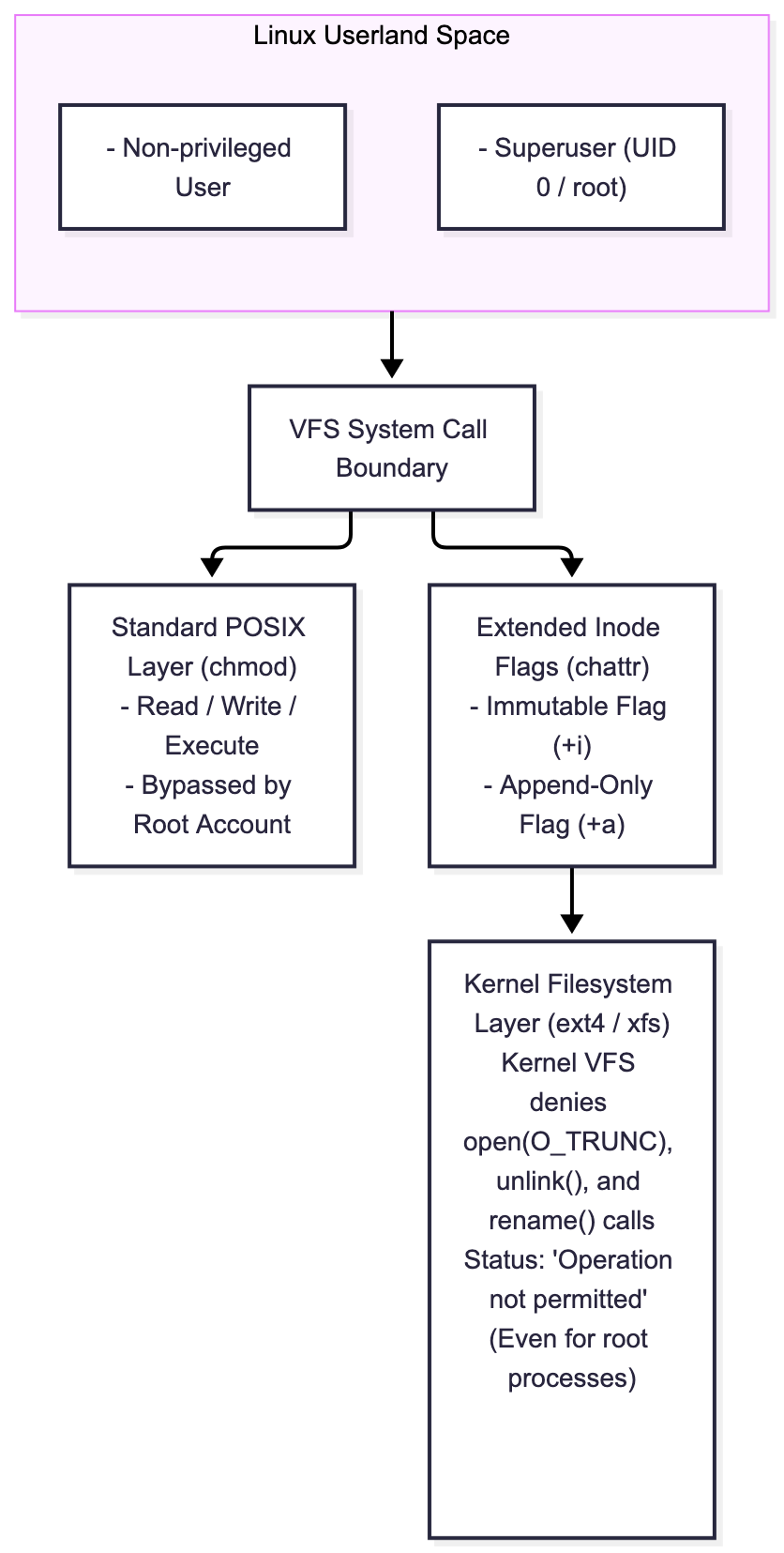
In standard Linux administration, security permissions traditionally rely on the standard POSIX permission model (rwxrwxrwx) enforced via chmod, chown, and chgrp. While effective for basic user access partitioning, standard permissions possess an inherent single point of failure: the superuser (root).
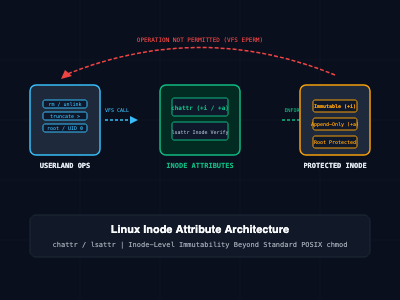
When an administrative script runs rogue, an attacker obtains elevated root privileges, or an operator accidentally executes a destructive command (rm -rf / or unintended truncate redirects >), standard permissions offer zero protection:
- Root Absolute Override: The root account possesses the CAP_DAC_OVERRIDE capability, bypassing standard read, write, and execute restrictions at will.
- Log File Tampering: Attackers who gain unauthorized root access routinely clear or rewrite log files (/var/log/auth.log, /var/log/secure) to erase forensics footprints.
- Configuration Drift: Critical network and runtime files (such as /etc/resolv.conf, /etc/passwd, or /etc/shadow) can be overwritten by rogue DHCP clients, container entrypoints, or automated package upgrades.
- Silent File Renames and Unlinks: Write permissions on a parent directory permit any user with write access to delete or rename child files, regardless of individual file permissions.
Linux solves these vulnerabilities by implementing extended filesystem attributes. By manipulating inode-level flags using chattr (change attribute) and auditing them via lsattr (list attribute), system administrators can enforce kernel-level immutability that even the root user cannot bypass without explicitly removing the attribute flag.
What Are chattr and lsattr?
chattr and lsattr are core command-line utilities bundled within the e2fsprogs package. They interface directly with native Linux filesystems (including ext2, ext3, ext4, xfs, and btrfs) to read and modify special inode flags stored in the filesystem metadata.
The primary operational difference between the two tools is straightforward:
- lsattr (List Attributes): Inspects and displays the active extended attribute flags assigned to files and directories.
- chattr (Change Attributes): Adds, removes, or assigns exact extended attribute flags on target inodes.
The Operators: Adding, Removing, and Setting Flags
The chattr command uses three explicit operators:
- + (Add): Appends the designated attribute to the target file while retaining all existing attributes (e.g., chattr +i file.txt).
- - (Remove): Strips the designated attribute from the file while retaining remaining flags (e.g., chattr -i file.txt).
- = (Set Exact): Overwrites the file's entire attribute profile to match only the specified flags.
Deep Breakdown of Critical Extended Attributes
When running lsattr, the utility renders a string of dashed placeholders (e.g., --------------e----- file.txt), where letters represent active attributes.
The most critical attributes utilized in production security include:
1. The Immutable Flag (i)
The immutable flag represents the highest level of non-destructive lockdown in the Linux kernel:
- A file marked with +i cannot be modified, deleted, renamed, overwritten, or symlinked.
- No new data can be written, and file truncation is rejected.
- Even the root superuser cannot delete or edit the file.
- To edit an immutable file, an operator must possess the CAP_LINUX_IMMUTABLE capability and explicitly remove the flag (chattr -i).
2. The Append-Only Flag (a)
The append-only flag restricts write operations strictly to appending data at the end of the file:
- Existing data blocks cannot be modified, truncated, or overwritten.
- The file cannot be renamed or deleted by any user, including root.
- The file can only be opened with the O_APPEND flag (e.g., via >> shell append redirection).
- Essential for hardening critical audit ledgers, centralized auth logs, and transactional records against truncation.
3. No Access Time Updates (A)
Tells the Linux kernel not to update the atime (last access timestamp) inode record when the file is read. This eliminates disk I/O write operations during high-frequency read loops on database files and web server document roots.
4. Synchronous Updates (s and S)
- S (Synchronous Directory / File Writes): Forces file modifications to be committed synchronously to physical disk storage immediately, bypassing the Linux page cache write buffer.
- s (Secure Deletion): Instructs the filesystem kernel driver to zero-fill the allocated disk blocks when the file is unlinked, preventing physical data recovery by forensic analysis tools.
Core Commands and Implementation
1. Making Critical System Configurations Tamper-Proof
Configuration files such as /etc/resolv.conf, /etc/hosts, and /etc/sudoers are prime targets for automated malware and misconfigured initialization daemons.
Locking down /etc/resolv.conf to prevent DHCP clients or local network tools from overwriting DNS resolvers:
# Step 1: Apply the immutable flag (Requires root/sudo privileges)
sudo chattr +i /etc/resolv.conf

# Step 2: Verify active attributes with lsattr
lsattr /etc/resolv.conf

# Expected Output:
# ----i---------e----- /etc/resolv.conf
Testing the kernel rejection behavior under the superuser account:
# Attempting to delete the file as root
sudo rm -f /etc/resolv.conf
# Output: rm: cannot remove '/etc/resolv.conf': Operation not permitted

# Attempting to overwrite or truncate via shell redirection
sudo bash -c "echo 'nameserver 1.1.1.1' > /etc/resolv.conf"
# Output: bash: /etc/resolv.conf: Operation not permitted
To modify or perform intentional maintenance on the file:
# Remove the immutable flag
sudo chattr -i /etc/resolv.conf

# Apply necessary maintenance modifications
echo "nameserver 1.1.1.1" | sudo tee /etc/resolv.conf

# Re-engage the immutable flag immediately
sudo chattr +i /etc/resolv.conf
2. Protecting Security Logs with Append-Only Enforcement
To prevent malicious users or exploited daemon services from clearing their operational traces, configure log files with the append-only (+a) attribute.
# Create custom audit log
sudo touch /var/log/audit_ledger.log

# Enforce append-only restriction
sudo chattr +a /var/log/audit_ledger.log

# Verify the setting
lsattr /var/log/audit_ledger.log

# Expected Output:
# -----a--------e----- /var/log/audit_ledger.log
Validating append permissions versus truncation attempts:
# Appending data via >> succeeds
echo "TIMESTAMP: $(date) | EVENT: USER_LOGIN" | sudo tee -a /var/log/audit_ledger.log

# Overwriting data via > fails immediately
sudo bash -c "echo 'MALICIOUS_WIPE' > /var/log/audit_ledger.log"
# Output: bash: /var/log/audit_ledger.log: Operation not permitted

# Truncating with truncate utility fails
sudo truncate -s 0 /var/log/audit_ledger.log
# Output: truncate: cannot truncate '/var/log/audit_ledger.log': Operation not permitted
3. Recursive Inspections and Directory Hardening
lsattr and chattr support recursive directory processing via the -R flag, and directory inode scoping via -d.
# Inspect all files and subdirectories recursively
lsattr -R /etc/nginx/

# Apply immutability across an entire directory tree
sudo chattr -R +i /var/www/static_assets/

# Inspect directory inode flags directly without traversing its child items
lsattr -d /var/www/static_assets/
# Output: ----i---------e----- /var/www/static_assets/
Operational Note: Applying +i directly to a directory inode prevents files from being created, deleted, or renamed within that directory. However, existing files inside the directory can still be modified unless the recursive flag (-R) is applied to lock the individual file inodes.
4. Automated Fleet Audit Script: Detecting Hidden Inode Attributes
Intrusion Detection Systems (IDS) and rootkit hunting workflows inspect files for suspicious +i or +a flags that attackers might use to persist malicious scripts (e.g., locking /etc/ld.so.preload or malicious cron tasks).
The following bash script scans critical system paths and reports any anomalous immutable or append-only flags:
#!/usr/bin/env bash
# audit_linux_attributes.sh - Automated security audit for immutable & append-only files
set -euo pipefail

TARGET_DIRS=("/etc" "/bin" "/sbin" "/usr/bin" "/usr/sbin" "/var/log")

echo "=== [1/2] Scanning System Binaries and Configs for Immutable Flags (+i) ==="
for dir in "${TARGET_DIRS[@]}"; do
    if [ -d "$dir" ]; then
        echo "[*] Auditing directory: $dir"
        sudo lsattr -R "$dir" 2>/dev/null | grep -E '^....i' || true
    fi
done

echo ""
echo "=== [2/2] Scanning /var/log for Append-Only Validation (+a) ==="
sudo lsattr -R /var/log/ 2>/dev/null | grep -E '^.....a' || true

echo ""
echo "=== File Attribute Audit Completed Successfully ==="
Comparative Analysis: chmod vs. chattr
| Dimension | Standard POSIX Permissions (chmod) | Extended Filesystem Attributes (chattr) |
| Control Layer | User, Group, Others (u / g / o) | Inode Metadata Layer |
| Root Bypass | Yes (root bypasses all permissions) | No (Enforced against root by kernel VFS) |
| Modification Detection | File modification time (mtime) | Inode change time (ctime) |
| Undeletable Protection | Bound to parent directory write permission | Direct file-level enforcement (+i / +a) |
| Append-Only Mode | Not supported via standard chmod | Natively supported via +a flag |
| Backup Preservation | Retained by standard tar / rsync | Requires specific flags (tar --xattrs, rsync -X) |
| Tooling Suite | chmod, stat, ls -l | chattr, lsattr |
SRE and Security Hardening Best Practices
- Always Check lsattr During "Permission Denied" Triage: When troubleshooting unexpected Operation not permitted errors where the user is root and file permissions are 777, always check lsattr <file>. A forgotten +i or +a flag is frequently the root cause.
- Account for Package Manager Updates: When package managers like apt, dnf, or pacman update software packages, they attempt to replace binaries and configuration files. If files are marked +i, the update transaction will fail with filesystem write errors. Strip immutability before updating and reapply post-installation.
- Audit Backup Pipelines for Extended Attributes: Standard rsync or tar commands do not archive extended attributes by default. Configure your backup tooling to explicitly capture attributes using rsync -X (or -aAX) and tar --xattrs.
- Protect Against Immutable Persistence by Attackers: Threat actors frequently place malicious backdoor libraries into /etc/ld.so.preload and mark the file with chattr +i to prevent system administrators from removing it via standard rm. Always audit /etc for unexpected immutable flags during security incident response.
- Verify Filesystem Mount Capabilities: Extended attributes require active filesystem support. Ensure filesystems are not mounted with non-standard options that disable attribute interpretation.
Getting Started
To verify extended filesystem attribute behavior on your local system:
# Step 1: Create an isolated testing workspace
mkdir -p /tmp/chattr_demo && cd /tmp/chattr_demo

# Step 2: Create a test file
echo "Production Configuration Payload" > secure_service.conf

# Step 3: Lock the file with the immutable attribute
sudo chattr +i secure_service.conf

# Step 4: Validate the active attribute
lsattr secure_service.conf

# Step 5: Test deletion rejection
rm -f secure_service.conf

# Step 6: Unlock and clean up
sudo chattr -i secure_service.conf
rm -f secure_service.conf
By leveraging chattr and lsattr, system administrators and SREs establish deterministic file protections that transcend standard POSIX permissions, insulating production servers from destructive human errors, unauthorized tampering, and malicious file manipulation.