The Friction of Cloud-Native Workload Portability
Over the past decade, enterprise cloud adoption transitioned from simple Infrastructure-as-a-Service (IaaS) virtual machine hosting to deep integration with proprietary, cloud-native managed services. While platforms like Microsoft Azure provide rich ecosystems for .NET application development, embedding provider-specific software development kits (SDKs) and service bindings creates severe architectural lock-in:
- Pervasive SDK Coupling: Applications become heavily coupled to Azure client libraries (such as Azure.Storage.Blobs, Microsoft.Azure.Cosmos, and Azure.Storage.Queues). Ripping out and replacing these SDK abstractions requires inspecting hundreds of database queries, object streaming buffers, and messaging pipelines line by line.
- Serverless Execution Paradigm Shifts: Azure Functions rely on distinct execution triggers, binding models, and attribute decorators ([FunctionName], [BlobTrigger], [CosmosDB]). Migrating to event-driven architectures on AWS Lambda requires restructuring function entry points, dependency injection scopes, and event payload deserialization schemas.
- Database Driver Incompatibilities: Azure Cosmos DB applications structured around SQL/Core APIs, partition keys, and container clients (CosmosClient, Container.CreateItemAsync) do not map directly to Amazon DynamoDB document models (AmazonDynamoDBClient, DynamoDBContext) without substantial query refactoring.
- High Cost and Latency of Manual Code Migration: Manually modernizing an enterprise portfolio containing hundreds of .NET microservices can consume thousands of engineering hours, introducing regression risks, unhandled exception mismatches, and delayed delivery timelines.
To eliminate this manual refactoring barrier, Amazon Web Services launched the general availability of Azure-to-AWS Cloud-Native Code Conversion within AWS Transform.
What Is AWS Transform Azure-to-AWS Code Conversion?
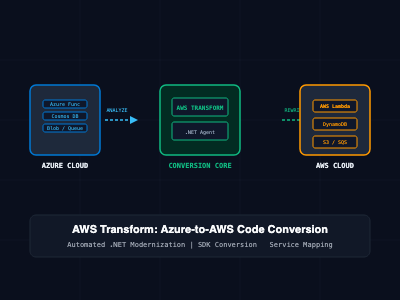
AWS Transform is an agentic AI modernization service engineered to analyze, plan, and automate application refactoring across heterogeneous computing environments. Through its specialized .NET modernization agent, AWS Transform automatically discovers, assesses, and rewrites Azure-specific cloud-native .NET source code into equivalent AWS SDK code.
Rather than forcing organizations to rely solely on lift-and-shift VM emulation or completely manual code rewrites, AWS Transform converts code at the API and SDK level while maintaining business logic and unit test coverage.
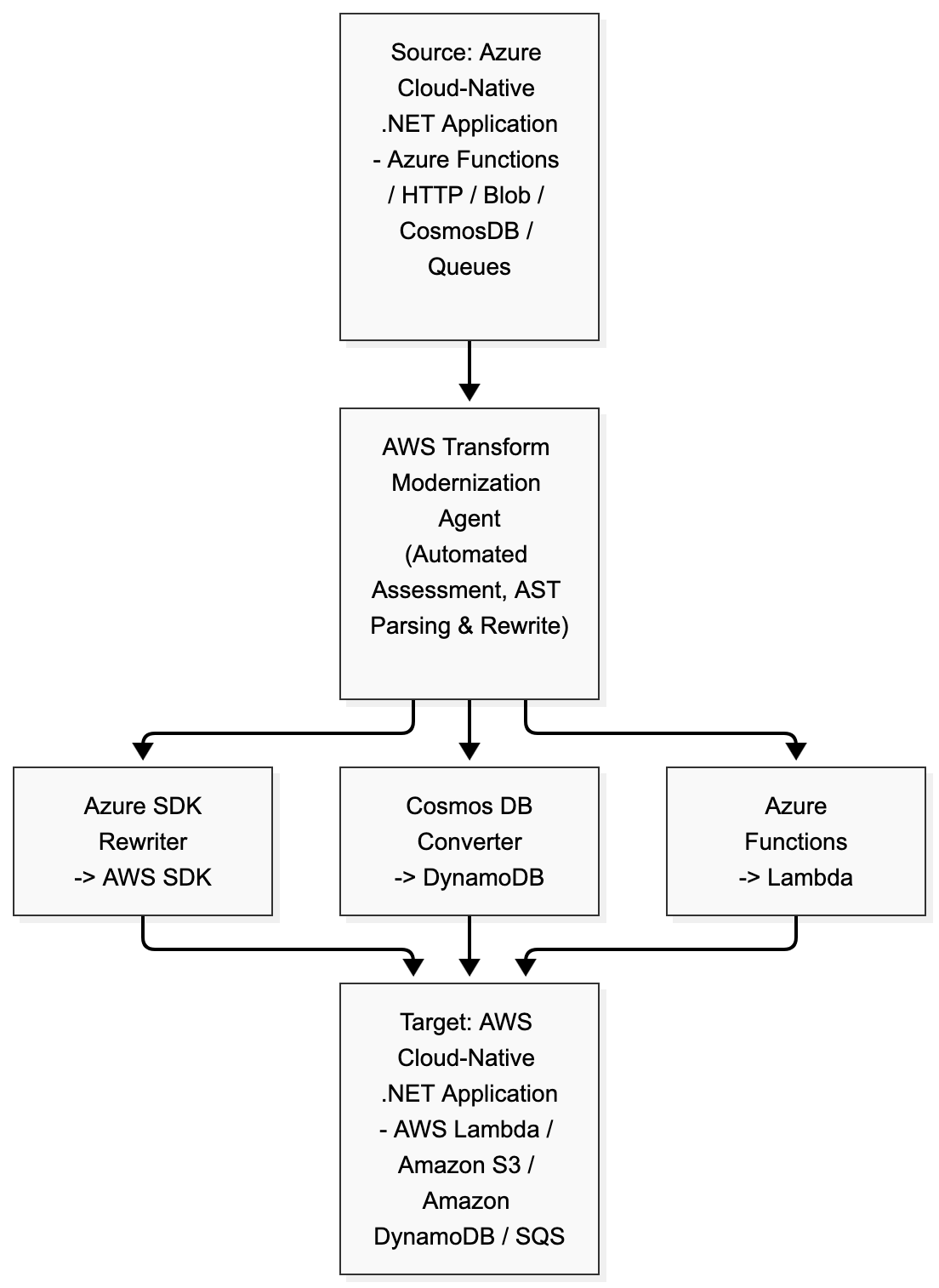
Core Capabilities and Service Mapping
- Serverless Compute: Transforms Azure Functions ([FunctionName], input/output bindings) into AWS Lambda function handlers utilizing the Amazon.Lambda.Core and Amazon.Lambda.Annotations frameworks.
- NoSQL Database Migration: Rewrites Microsoft Azure Cosmos DB client operations (CosmosClient, FeedIterator) into Amazon DynamoDB SDK invocations (IAmazonDynamoDB, DynamoDBContext).
- Object Storage Conversion: Converts Azure Blob Storage interactions (BlobServiceClient, BlobContainerClient) into Amazon Simple Storage Service (Amazon S3) equivalents (IAmazonS3, PutObjectRequest).
- Message Queuing Transformation: Replaces Azure Queue Storage payloads and clients (QueueClient, SendMessageAsync) with Amazon Simple Queue Service (Amazon SQS) calls (AmazonSQSClient, SendMessageRequest).
- Regional Availability: Generally available across eight key AWS Regions: US East (N. Virginia), Asia Pacific (Mumbai, Tokyo, Seoul, Sydney), Canada (Central), and Europe (Frankfurt, London).
Deep Technical Comparison: Before and After Code Conversion
1. Serverless Document Ingestion: Azure Functions & Cosmos DB (Before)
In a typical Azure-native .NET implementation, an HTTP-triggered Azure Function writes incoming JSON order payloads into Azure Cosmos DB using the Microsoft.Azure.Cosmos SDK:
// Azure Cloud-Native Source Implementation (C# .NET)
using System.IO;
using System.Threading.Tasks;
using Microsoft.AspNetCore.Mvc;
using Microsoft.Azure.WebJobs;
using Microsoft.Azure.WebJobs.Extensions.Http;
using Microsoft.AspNetCore.Http;
using Microsoft.Extensions.Logging;
using Newtonsoft.Json;
using Microsoft.Azure.Cosmos;

namespace Enterprise.OrderService
{
    public class OrderProcessingFunction
    {
        private readonly CosmosClient _cosmosClient;
        private readonly Container _container;

        public OrderProcessingFunction(CosmosClient cosmosClient)
        {
            _cosmosClient = cosmosClient;
            _container = _cosmosClient.GetContainer("OrderDatabase", "Orders");
        }

        [FunctionName("CreateOrder")]
        public async Task<IActionResult> Run(
            [HttpTrigger(AuthorizationLevel.Function, "post", Route = "orders")] HttpRequest req,
            ILogger log)
        {
            log.LogInformation("Processing incoming order via Azure Functions...");

            string requestBody = await new StreamReader(req.Body).ReadToEndAsync();
            OrderRecord order = JsonConvert.DeserializeObject<OrderRecord>(requestBody);

            // Persist order item into Azure Cosmos DB container
            ItemResponse<OrderRecord> response = await _container.CreateItemAsync(
                order,
                new PartitionKey(order.CustomerId)
            );

            return new OkObjectResult(new { OrderId = order.Id, Status = "Persisted" });
        }
    }

    public class OrderRecord
    {
        [JsonProperty("id")]
        public string Id { get; set; }
        public string CustomerId { get; set; }
        public decimal TotalAmount { get; set; }
    }
}
2. Serverless Document Ingestion: AWS Lambda & Amazon DynamoDB (Converted by AWS Transform)
AWS Transform analyzes the syntax tree, identifies dependency injections, replaces the runtime package bindings, and converts the handler into an AWS Lambda function interacting with Amazon DynamoDB:
// Modernized AWS Cloud-Native Target Implementation (C# .NET)
using System;
using System.IO;
using System.Net;
using System.Text.Json;
using System.Threading.Tasks;
using Amazon.Lambda.Core;
using Amazon.Lambda.APIGatewayEvents;
using Amazon.DynamoDBv2;
using Amazon.DynamoDBv2.DataModel;

[assembly: LambdaSerializer(typeof(Amazon.Lambda.Serialization.SystemTextJson.DefaultLambdaJsonSerializer))]

namespace Enterprise.OrderService
{
    public class OrderProcessingLambda
    {
        private readonly IAmazonDynamoDB _dynamoDbClient;
        private readonly DynamoDBContext _context;

        public OrderProcessingLambda()
        {
            _dynamoDbClient = new AmazonDynamoDBClient();
            _context = new DynamoDBContext(_dynamoDbClient);
        }

        public OrderProcessingLambda(IAmazonDynamoDB dynamoDbClient)
        {
            _dynamoDbClient = dynamoDbClient;
            _context = new DynamoDBContext(_dynamoDbClient);
        }

        public async Task<APIGatewayProxyResponse> FunctionHandler(
            APIGatewayProxyRequest request,
            ILoggerContext context)
        {
            context.Logger.LogLine("Processing incoming order via AWS Lambda...");

            OrderRecord order = JsonSerializer.Deserialize<OrderRecord>(request.Body);

            // Persist order item into Amazon DynamoDB table
            await _context.SaveAsync(order);

            return new APIGatewayProxyResponse
            {
                StatusCode = (int)HttpStatusCode.OK,
                Body = JsonSerializer.Serialize(new { OrderId = order.Id, Status = "Persisted" }),
                Headers = new System.Collections.Generic.Dictionary<string, string> { { "Content-Type", "application/json" } }
            };
        }
    }

    [DynamoDBTable("Orders")]
    public class OrderRecord
    {
        [DynamoDBHashKey]
        public string Id { get; set; }

        [DynamoDBRangeKey]
        public string CustomerId { get; set; }

        [DynamoDBProperty]
        public decimal TotalAmount { get; set; }
    }
}
Architectural Comparison Matrix: Azure vs. AWS Cloud-Native Equivalents
| Capability / Architecture Plane | Microsoft Azure Source Service | Amazon Web Services Target Service | AWS Transform Conversion Mechanics |
| Serverless Compute | Azure Functions | AWS Lambda | Converts trigger attributes to APIGateway/SQS event handlers |
| Document / NoSQL Data | Azure Cosmos DB (Core SQL) | Amazon DynamoDB | Maps PartitionKey to Hash/Range attributes & DynamoDBContext |
| Object Storage | Azure Blob Storage | Amazon Simple Storage Service (S3) | Replaces BlobClient calls with AmazonS3Client operations |
| Message Queuing | Azure Queue Storage | Amazon Simple Queue Service (SQS) | Maps QueueClient calls to SendMessage / ReceiveMessage SDK APIs |
| Dependency Resolution | NuGet (Azure.* namespace) | NuGet (AWSSDK.* namespace) | Updates .csproj package references automatically |
| Identity & Authentication | Managed Identities / Azure AD | AWS IAM Roles / Execution Roles | Rewrites credential chains to DefaultAWSCredentials |
Step-by-Step Modernization Workflow with AWS Transform
To convert enterprise .NET codebases from Azure to AWS using the automated transformation pipeline:
Step 1: Ingest and Assess the Codebase
AWS Transform integrates directly with Git repositories (GitHub, GitLab, Bitbucket, and Azure DevOps Repos) or local code directories:
# Initiate codebase assessment using the AWS Transform CLI
aws transform start-assessment \
  --source-location "https://dev.azure.com/enterprise-org/CoreBanking/_git/OrderProcessing" \
  --workload-type "DOTNET_AZURE_CLOUD_NATIVE" \
  --output-bucket "s3://modernization-artifacts-vault-prod"
The service scans the repository, identifies all external Azure SDK dependencies, maps architecture topologies, and generates an Assessment & Modernization Report detailing conversion complexity, estimated effort, and target AWS service mappings.
Step 2: Configure Conversion Rules and Strategy
Customize translation flags inside the AWS Transform transformation plan (transformation-plan.json):
{
  "TransformationTarget": "AWS_CLOUD_NATIVE",
  "TargetRuntime": "net8.0",
  "ServiceMappings": {
    "AzureFunctions": {
      "Target": "AWS_LAMBDA",
      "Framework": "LAMBDA_ANNOTATIONS"
    },
    "CosmosDB": {
      "Target": "AMAZON_DYNAMODB",
      "BillingMode": "PAY_PER_REQUEST"
    },
    "AzureBlobStorage": {
      "Target": "AMAZON_S3"
    },
    "AzureQueueStorage": {
      "Target": "AMAZON_SQS"
    }
  },
  "GenerateUnitTests": true
}
Step 3: Execute Code Transformation and Test Generation
Trigger the autonomous transformation pipeline:
# Execute automated code transformation
aws transform start-code-conversion \
  --plan-id "plan_azure_dotnet_99214" \
  --branch "migration/aws-modernization"
AWS Transform checks out the repository, creates a dedicated migration branch, transforms source files, updates NuGet dependencies in .csproj files, and generates matching unit test suites to validate that business invariants remain intact post-migration.
SRE and Enterprise Migration Best Practices
- Establish Dual-Track Validation: Never deploy converted applications directly to production without side-by-side integration testing. Execute shadow traffic replication (mirroring production Azure requests to your modernized AWS staging environment) to compare response payloads, latency profiles, and exception rates.
- Audit IAM Execution Roles and Permissions: Converted services switch from Azure Managed Identities to AWS IAM execution roles. Ensure the principle of least privilege is applied to Lambda roles, restricting dynamodb:PutItem or s3:PutObject permissions strictly to target table and bucket Amazon Resource Names (ARNs).
- Account for DynamoDB Attribute Limitations: While Azure Cosmos DB supports arbitrary nested JSON schemas up to 2MB per document, Amazon DynamoDB enforces a hard 400KB limit per item. If incoming payloads exceed 400KB, implement the Claim-Check pattern using Amazon S3 to store raw payloads while writing metadata references to DynamoDB.
- Validate Queue Message Retention and Dead-Letter Policies: Azure Queue Storage defaults to a 7-day retention period, whereas Amazon SQS retains messages from 60 seconds up to 14 days (defaulting to 4 days). Verify SQS queue attributes (MessageRetentionPeriod, VisibilityTimeout, and Dead-Letter Queue redrive policies) during deployment.
Getting Started
To explore AWS Transform's Azure-to-AWS code conversion:
- Verify Prerequisites: Ensure your source .NET code targets .NET Core 3.1, .NET 6, .NET 7, or .NET 8.
- Access AWS Transform: Navigate to the AWS Transform console in an eligible region (such as us-east-1 or eu-central-1) or connect through the AWS Toolkit for Visual Studio.
- Link Your Repository: Connect your Azure DevOps, GitHub, or GitLab repository, run an initial automated assessment, and review your customized Azure-to-AWS modernization plan.
By leveraging automated agentic code conversion, engineering organizations eliminate manual SDK refactoring, de-risk cloud migrations, and modernize legacy Azure .NET workloads onto AWS cloud-native architectures in days rather than months.