The Operational Friction of Kafka Inspection and Triage
In distributed event-driven systems, Apache Kafka acts as the central data backbone. However, when software engineers, Site Reliability Engineers (SREs), and data engineers need to debug active event streams or diagnose production partition anomalies, tooling choices introduce severe operational friction:
- Primitive Interactive Experience in Standard CLIs: The standard Kafka scripts (kafka-topics.sh, kafka-console-consumer.sh) are functional but awkward for interactive triage. Inspecting messages across partitions, setting custom consumer offsets, or filtering message headers requires chaining complex shell commands and remembering dozens of command-line flags.
- Heavyweight Overhead of Web Management Dashboards: Web-based tools (such as Kafka UI, AKHQ, or Confluent Control Center) provide rich visualization but require dedicated deployment infrastructure, database containers, ingress routing, and continuous maintenance. For ad-hoc local development or temporary bastion troubleshooting, launching a multi-service web platform is excessive.
- Context-Switching from Terminal Workflows: Developers and operators debugging microservices via SSH or terminal-bound IDEs (neovim, tmux) must constantly switch between terminal windows and browser dashboards, breaking investigative flow.
- Complex Schema Deserialization Barriers: Modern production event streams rarely use raw plain-text strings. When payloads are encoded in Apache Avro or Protocol Buffers (Protobuf) backed by Confluent Schema Registry or Apicurio Registry, basic terminal consumers render unreadable binary strings unless custom consumers are compiled with pre-generated class files.
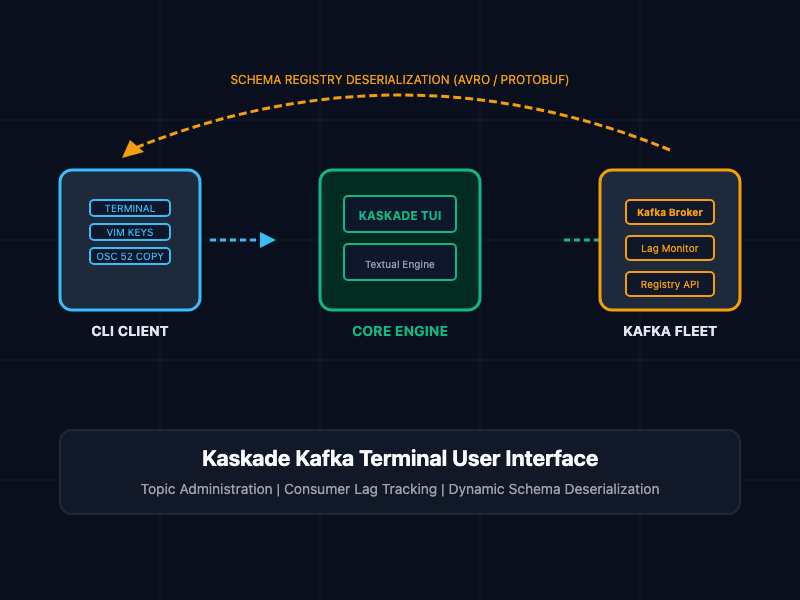
Kaskade addresses this divide by providing an interactive Text User Interface (TUI) that runs directly inside the terminal, combining the lightweight execution of CLI utilities with the visual clarity and rich deserialization of GUI dashboards.
What Is Kaskade?
Kaskade is an open-source terminal user interface (TUI) for Apache Kafka created by Saúl Piña. Developed in Python using the Textual framework and backed by confluent-kafka-python and librdkafka, Kaskade provides an interactive, keyboard-driven interface for cluster administration and real-time message consumption.
Operating entirely within the terminal, Kaskade requires no external backend web servers or persistent daemon processes. Engineers can launch the utility from a local workstation, jump box, or remote production node via SSH to interactively inspect topics, audit consumer group lag, deserialize complex binary schemas, and filter messages on the fly.
┌────────────────────────────────────────────────────────┐
│  Developer / SRE Terminal (OSC 52 / Keyboard Nav)      │
└───────────────────────────┬────────────────────────────┘
                            │
              Textual TUI Framework (Render Loop)
                            │
                            ▼
┌────────────────────────────────────────────────────────┐
│  Kaskade Core Runtime Engine                           │
│  ├── Admin Plane: Topic CRUD, Lag, Partition Metadata  │
│  └── Consumer Plane: Multi-Format Deserializer Engine  │
└─────────────┬────────────────────────────┬─────────────┘
              │                            │
   Schema Fetch (REST)            libkrdkafka TCP Connection
              │                            │
              ▼                            ▼
┌──────────────────────────┐  ┌──────────────────────────┐
│ Confluent / Apicurio     │  │ Apache Kafka Broker Fleet│
│ Schema Registry          │  │ (TLS / SASL / AWS MSK)   │
└──────────────────────────┘  └──────────────────────────┘
Core Capabilities
- Cluster and Topic Administration: Inspect topic partition counts, replication factors, consumer groups, active member assignments, and live consumer lag. Create, alter configuration, and delete topics without leaving the terminal.
- Rich Record Deserialization: Deserialize keys, values, and headers across primitive types (string, integer, long, double, boolean), structured JSON, Apache Avro, and Protobuf payloads.
- Dynamic Schema Registry Resolution: Automatically fetches schemas from Confluent Schema Registry or native Apicurio Registry v3, resolving Protobuf and Avro definitions dynamically without requiring generated language bindings.
- Interactive Filtering and Seeking: Filter live message streams by key, value, partition, or header attributes. Seek directly to specific offsets or consume historical streams from earliest boundaries.
- Keyboard-Driven Ergonomics: Full Vim-style keybindings (j, k, /), terminal themes, and integrated OSC 52 clipboard support to copy JSON records directly into local system clipboards.
Core Concepts and Implementation
1. Cluster Administration View (kaskade admin)
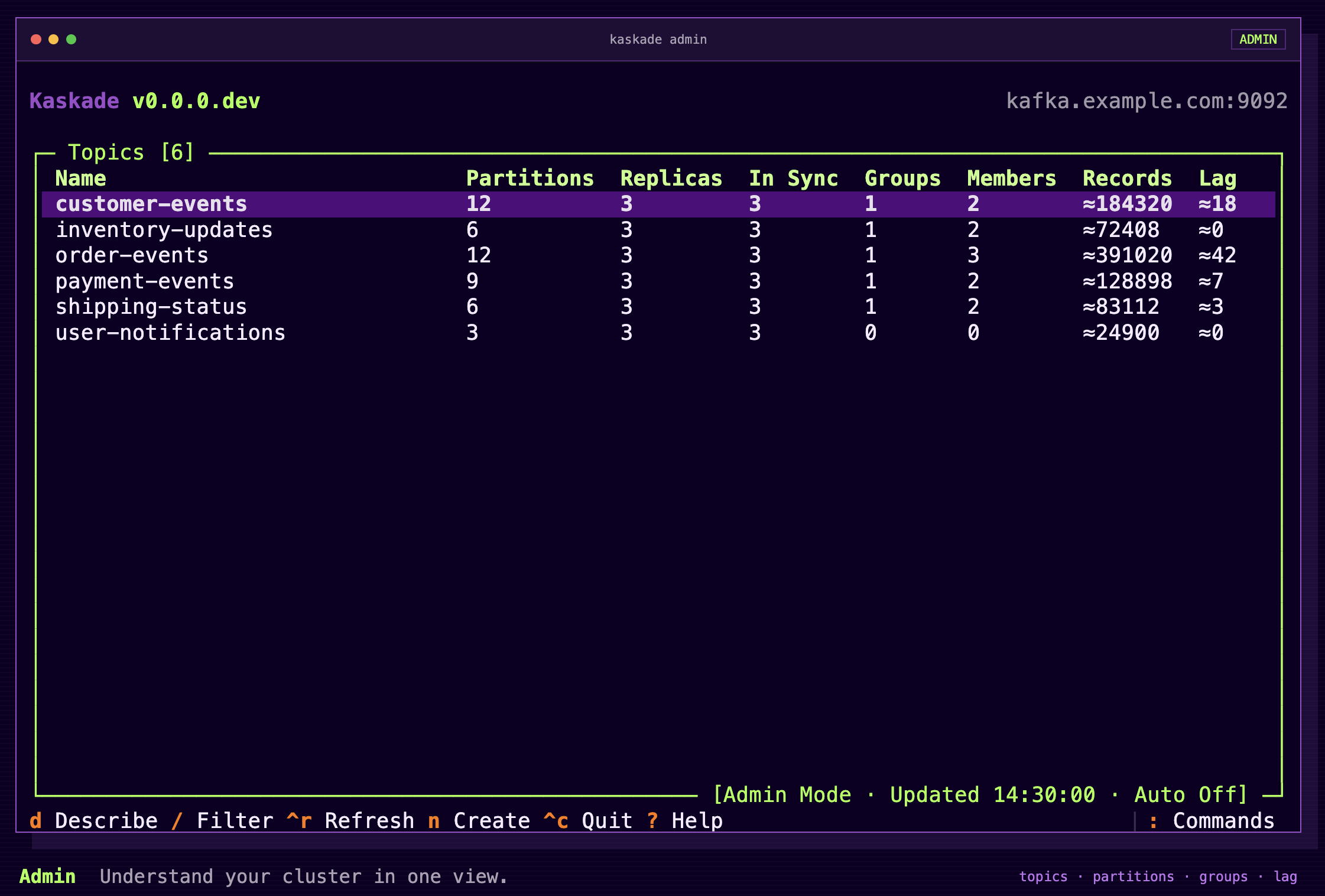
The Admin interface provides an immediate overview of cluster health, active topics, partitions, and consumer lag. To launch the administrative dashboard against an active broker:
# Connect to a local or remote Kafka cluster in Admin mode
kaskade admin -b localhost:9092
When connected, Kaskade exposes two primary panes:
- Topic Explorer: Lists topics alongside partition distribution, leader brokers, replica synchronization state (ISR), and total record counts. Pressing / allows instant substring filtering to isolate specific event streams within thousands of active topics.
- Consumer Group Monitor: Displays active consumer groups, individual partition assignments, current offset progression, log end offsets, and calculated lag. This allows operators to immediately pinpoint stalling consumer instances during processing bottlenecks.
┌ Topics ───────────────────────────────┐┌ Details: order-events ───────────────┐
│ Filter: [order                       ]││ Partitions: 6   Replicas: 3          │
│                                       ││ Total Records: 1,482,910             │
│ > order-events                        ││ Retention: 604800000 ms (7 days)     │
│   order-notifications                 ││ Cleanup Policy: delete               │
│   order-settlements                   ││                                      │
├ Consumer Groups ──────────────────────┤├ Partitions & Lag ────────────────────┤
│ > payment-processor-group (Lag: 42)   ││ P0 | Leader: 101 | Lag: 0  | ISR: 3/3│
│   inventory-sync-group    (Lag: 1280) ││ P1 | Leader: 102 | Lag: 14 | ISR: 3/3│
│   analytics-export-group  (Lag: 0)    ││ P2 | Leader: 103 | Lag: 28 | ISR: 3/3│
└───────────────────────────────────────┘└──────────────────────────────────────┘
2. Interactive Record Consumption and Deserialization (kaskade consumer)
To read and inspect records from a specific topic, execute the consumer command, specifying the target topic and deserialization formats:
# Consume JSON-formatted values from a topic
kaskade consumer -b localhost:9092 -t order-events -k string -v json
Supported built-in deserializers include:
- bytes: Raw byte presentation (with toggleable Base64, hex, or byte-array formats).
- string: Standard UTF-8 decoded text.
- integer / long / float / double / boolean: Primitive types.
- json: Structured JSON with syntax highlighting and collapsible keys.
- avro: Binary Apache Avro deserialization.
- protobuf: Binary Protocol Buffers.
- registry: Automatic schema resolution via an external Schema Registry.
3. Schema Registry Integration (Confluent & Apicurio)
When working with typed schemas in production environments, Kaskade dynamically interfaces with Schema Registry endpoints, removing the wire-format magic byte header (5 bytes for Confluent, 10 bytes for Apicurio) and rendering structured JSON.
The following command connects to Kafka with Confluent Schema Registry integration:
# Consume Avro/Protobuf records resolved dynamically via Confluent Schema Registry
kaskade consumer \
  -b kafka-broker.internal:9092 \
  -t telemetry-events \
  -k string \
  -v registry \
  --registry-url http://schema-registry.internal:8081
For authenticated Schema Registry setups:
# Authenticated Confluent Schema Registry with HTTP Basic Auth
kaskade consumer \
  -b secure-kafka:9092 \
  -t customer-transactions \
  -k registry \
  -v registry \
  --registry-url https://registry.internal:8081 \
  --registry-auth "apiKey:apiSecret"
4. Enterprise Security and Client Configurations
Kaskade leverages librdkafka under the hood, enabling direct compatibility with standard Kafka security configurations, including SSL/TLS encryption, SASL/SCRAM, and AWS IAM authentication.
Configurations can be supplied directly via command-line flags (-c property=value) or grouped inside a standard configuration file (client.properties).
Connecting with TLS and SASL/SCRAM-SHA-512:
# Launch Admin interface with SASL/SCRAM authentication over TLS
kaskade admin \
  -b prod-kafka-cluster.example.com:9093 \
  -c security.protocol=SASL_SSL \
  -c sasl.mechanism=SCRAM-SHA-512 \
  -c sasl.username="svc-kaskade-sre" \
  -c sasl.password="ProductionSecretKey123" \
  -c ssl.ca.location=/etc/ssl/certs/kafka-ca.pem
Reusing Client Configuration Profiles (client.properties):
Instead of passing verbose arguments in shell sessions, create a client configuration file:
# ~/.config/kaskade/production.ini
[kafka]
bootstrap.servers = prod-kafka-01:9093,prod-kafka-02:9093
security.protocol = SASL_SSL
sasl.mechanism = PLAIN
sasl.username = cluster-admin
sasl.password = VaultRetrievedPassword
ssl.ca.location = /etc/ssl/certs/ca-bundle.crt

[schema-registry]
url = https://registry.example.com
auth = registryAdmin:registrySecret
Execute Kaskade passing the profile definition:
# Run Kaskade leveraging pre-configured INI connection profile
kaskade admin --config ~/.config/kaskade/production.ini
Architectural Comparison Matrix
| Architectural Dimension | Kafka CLI (kafka-console-consumer) | Web GUIs (Kafka UI / AKHQ) | Kaskade TUI |
| Deployment Footprint | None (Local binary scripts) | Heavy (Docker containers, DBs, Ingress) | None (Local Python/pipx execution) |
| Interaction Model | Command flags and piped grep | Web browser, mouse-driven | Keyboard-driven TUI (Vim-style navigation) |
| Schema Deserialization | Manual (Requires jar files) | Built-in via web UI | Dynamic (Avro, Protobuf, Apicurio, Confluent) |
| Consumer Lag Visibility | Separate CLI invocation required | Visual dashboard | Interactive real-time lag tracking |
| SSH / Bastion Suitability | High | Low (Requires SSH tunnels / port forwarding) | High (Native terminal interface) |
| Resource Overhead | Process spins up per execution | Continuous memory / CPU consumption | Ephemeral (Zero footprint on exit) |
| Message Filtering | Manual via shell utilities (jq, awk) | Web UI query filters | Real-time key, value, and header filters |
SRE and Production Best Practices
- Use Dedicated Read-Only Service Accounts: When inspecting production topics via Kaskade, authenticate using a dedicated Kafka SASL account granted strictly read-only ACLs (DESCRIBE on Topics/Groups, READ on Topics). This prevents accidental topic deletion or partition modifications during incident triage.
- Isolate High-Volume Consumers with Explicit Offsets: On topics ingesting tens of thousands of records per second, avoid consuming from the earliest offset (--from-beginning) without explicit filters. Instead, inspect the latest messages or specify a narrow partition and offset window to prevent local terminal memory exhaustion.
- Leverage OSC 52 for Remote Bastion Copying: When operating over remote SSH sessions, enable an OSC 52-compatible terminal emulator (such as Alacritty, iTerm2, or Kitty). This allows you to copy payload JSON directly from Kaskade into your local workstation clipboard without setting up X11 forwarding.
- Configure Operational Deadlines on High-Latency Networks: When connecting to remote managed Kafka clusters (such as AWS MSK or Confluent Cloud across VPNs), configure client timeout properties to prevent UI freezing:
kaskade admin -b msk-cluster:9092 -c request.timeout.ms=30000 -c default.api.timeout.ms=60000
- Preserve Malformed Payloads with Fallback Parsing: When troubleshooting consumer deserialization failures (e.g., poisoned messages sent by buggy upstream producers), Kaskade defaults to raw BYTES fallback presentation. Inspect the hex and byte array views to isolate corrupt magic bytes or unexpected headers without dropping connection.
Getting Started
Install Kaskade on your system using Homebrew or pipx:
# Option 1: Install via Homebrew (macOS / Linux)
brew install kaskade

# Option 2: Install via pipx (Isolated Python environment)
pipx install kaskade

# Option 3: Run via Docker (Ephemeral container sandbox)
docker run --rm -it \
  --net=host \
  sauljabin/kaskade:latest \
  admin -b localhost:9092
Launch an initial inspection session against an active broker:
# Launch interactive admin cluster explorer
kaskade admin -b localhost:9092

# Consume from an active topic with JSON value formatting
kaskade consumer -b localhost:9092 -t sample-topic -k string -v json
By transitioning from fragmented CLI scripts and heavyweight web dashboards to Kaskade, engineering teams streamline Kafka troubleshooting, inspect complex schema payloads, and manage clusters directly from the command line.