The 15-Minute Wall in Serverless Architectures
Since AWS Lambda introduced functions in 2014, the maximum execution duration has been bound to a strict ceiling: first five minutes, and later extended to 15 minutes (900 seconds) in 2018. For event-driven microservices, webhook listeners, and lightweight API backends, this execution budget was more than sufficient.
However, as modern cloud-native systems evolved toward data-intensive processing, the 15-minute barrier became an operational bottleneck:
- Artificial Workload Partitioning: Large batch jobs, database migrations, and ETL pipelines processing multi-gigabyte files were forced into complex chunking patterns simply to avoid hard timeout boundaries.
- Heavy Container Re-Architecting: When workloads naturally exceeded 15 minutes (such as high-fidelity video transcoding, audio transcription, or scientific calculations), engineering teams were forced to abandon Lambda's operational simplicity and re-platform onto Amazon ECS, AWS Fargate, or AWS Batch.
- Orchestration Overhead: Managing multi-step chunking often required sprawling AWS Step Functions state machines with dozens of map states, introducing additional state transition costs and observability friction.
- AI Inference Saturation: Modern multi-agent reasoning systems, local embedding generation, and synthetic dataset validation routinely demand sustained CPU and memory allocation beyond the standard 15-minute cutoff.
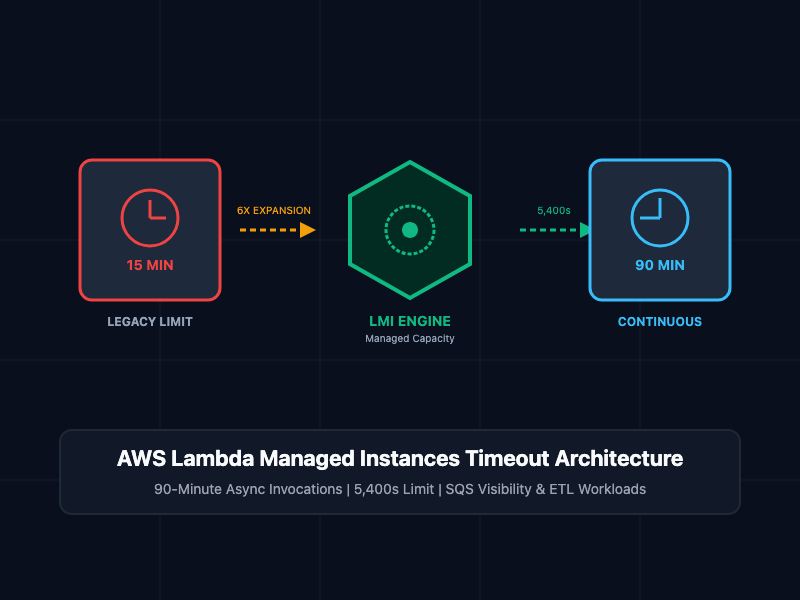
To eliminate these structural workarounds, AWS has introduced a 90-minute function timeout (5,400 seconds) for eligible asynchronous and Event Source Mapping (ESM) invocations on AWS Lambda Managed Instances (LMI).
What Is the 90-Minute Lambda Execution Model?
The 90-minute timeout represents a $6\times$ duration expansion over standard Lambda functions, enabled specifically through Lambda Managed Instances (LMI).
Lambda Managed Instances combine the serverless execution model with the predictable pricing and capacity flexibility of Amazon EC2 instances under the hood. The 90-minute timeout allows long-running computational jobs to execute continuously within a single invocation without infrastructure management or code rewriting.
┌────────────────────────────────────────────────────────┐
│  Asynchronous Trigger (S3 Event, SQS, CLI Event)       │
└───────────────────────────┬────────────────────────────┘
                            │
              Asynchronous Ingestion (HTTP 202)
                            │
                            ▼
┌────────────────────────────────────────────────────────┐
│               AWS Lambda Service Plane                 │
└───────────────────────────┬────────────────────────────┘
                            │
               Capacity Provider Dispatch
                            │
                            ▼
┌────────────────────────────────────────────────────────┐
│  Lambda Managed Instance (LMI Worker Node)             │
│                                                        │
│  Continuous Execution Lifecycle: Up to 5,400 Seconds   │
│  ┌──────────────────────────────────────────────────┐  │
│  │ Runtime: Python 3.13 / Node.js 24 (arm64 / x86)  │  │
│  │ - Media Transcoding Pipeline (FFmpeg)            │  │
│  │ - Batch Data Extraction (Multi-GB Parquet/CSV)   │  │
│  │ - Monte Carlo Financial Risk Simulations         │  │
│  │ - Long-Context AI Reasoning & Model Testing      │  │
│  └──────────────────────────────────────────────────┘  │
└───────────────────────────┬────────────────────────────┘
                            │
                     Output Delivery
                            │
         ┌──────────────────┴──────────────────┐
         ▼                                     ▼
┌──────────────────┐                 ┌──────────────────┐
│ Amazon S3 Bucket │                 │ Amazon DynamoDB  │
│ (Target Payload) │                 │ (State Tracking) │
└──────────────────┘                 └──────────────────┘
Key Architectural Rules and Eligibility
- Invocation Scope: The 90-minute continuous execution limit applies strictly to asynchronous invocations (e.g., InvocationType=Event) and Event Source Mappings (ESM) such as Amazon SQS, Amazon Kinesis, and DynamoDB Streams.
- Synchronous Invocations Remain at 15 Minutes: Synchronous request-response invocations (InvocationType=RequestResponse, including API Gateway and Application Load Balancer integrations) remain capped at the existing 15-minute maximum timeout to maintain connection stability.
- Capacity Provider Requirement: Functions must run under a configured Lambda Managed Instance (LMI) Capacity Provider.
- Zero Code Changes: The runtime environment, handler signature, VPC peering, and IAM execution roles remain identical to standard Lambda functions.
Core Concepts and Implementation
1. Provisioning a 90-Minute Function via AWS CLI
To leverage the extended execution window, configure the function with the designated capacity provider configuration and define --timeout up to 5400 seconds.
# Step 1: Package application code
zip -r data_pipeline.zip handler.py

# Step 2: Create Lambda function targeting Lambda Managed Instances
aws lambda create-function \
  --function-name lmi-batch-processor \
  --runtime python3.13 \
  --architectures arm64 \
  --role arn:aws:iam::123456789012:role/service-role/LambdaBatchExecutionRole \
  --handler handler.process_large_dataset \
  --zip-file fileb://data_pipeline.zip \
  --timeout 5400 \
  --memory-size 4096 \
  --capacity-provider-config '{
    "CapacityProviders": [
      {
        "CapacityProvider": "arn:aws:lambda:us-east-1:123456789012:capacity-provider/lmi-general-compute",
        "Weight": 1
      }
    ]
  }'

# Step 3: Publish an immutable version for production deployment
aws lambda publish-version --function-name lmi-batch-processor
2. Asynchronous Long-Running Execution (Python)
The handler script below models a sustained data aggregation process that streams and processes gigabytes of telemetry, maintaining state across an execution window exceeding 15 minutes:
# handler.py - Long-Running Data Processing Worker
import time
import json
import logging
import boto3

logger = logging.getLogger()
logger.setLevel(logging.INFO)
s3_client = boto3.client('s3')

def process_large_dataset(event, context):
    """
    Executes heavy batch workloads on Lambda Managed Instances
    with up to 90 minutes of continuous compute capability.
    """
    start_time = time.time()
    batch_id = event.get("batch_id", "batch-default-001")
    target_bucket = event.get("target_bucket", "analytics-processed-data")

    logger.info(f"Starting long-running batch job {batch_id}...")

    # Calculate execution duration dynamically
    total_records = 0
    checkpoint_interval = 600  # Checkpoint every 10 minutes
    last_checkpoint = time.time()

    # Simulate sustained compute loops (e.g., ETL, simulation, or AI pipeline)
    for iteration in range(1, 46):
        # Emulate discrete 1-minute processing iterations
        time.sleep(60)
        total_records += 250000

        elapsed_minutes = (time.time() - start_time) / 60
        logger.info(f"Iteration {iteration}/45 complete. Elapsed: {elapsed_minutes:.2f} mins. Records: {total_records}")

        # Periodic intermediate state checkpointing
        if time.time() - last_checkpoint >= checkpoint_interval:
            save_checkpoint(batch_id, iteration, total_records)
            last_checkpoint = time.time()

    total_duration = time.time() - start_time
    logger.info(f"Batch {batch_id} completed successfully in {total_duration / 60:.2f} minutes.")

    return {
        "status": "COMPLETED",
        "batch_id": batch_id,
        "processed_records": total_records,
        "execution_seconds": total_duration
    }

def save_checkpoint(batch_id, step, count):
    logger.info(f"Checkpoint saved for {batch_id} at step {step} with {count} records.")

# Example trigger execution:
# aws lambda invoke --function-name lmi-batch-processor:1 \
#   --invocation-type Event \
#   --payload '{"batch_id": "job_9981"}' /tmp/response.json
3. SQS Event Source Mapping Visibility Timeout Alignment
When triggering a 90-minute function from an Amazon SQS queue, SREs must reconfigure queue parameters. AWS Lambda requires that the Visibility Timeout of the source queue be configured to at least six times the function timeout to allow retry resilience if downstream throttles occur:

For a function configured with the full 90-minute (5,400 s) timeout:

# Update SQS queue attributes to match the 90-minute function timeout requirement
aws sqs set-queue-attributes \
  --queue-url https://sqs.us-east-1.amazonaws.com/123456789012/batch-jobs-queue \
  --attributes '{
    "VisibilityTimeout": "32400",
    "MessageRetentionPeriod": "1209600"
  }'

# Create the Event Source Mapping
aws lambda create-event-source-mapping \
  --function-name lmi-batch-processor:1 \
  --batch-size 1 \
  --event-source-arn arn:aws:sqs:us-east-1:123456789012:batch-jobs-queue
Architectural Comparison Matrix
| Operational Dimension | Standard Lambda Functions | Lambda Managed Instances (LMI) | AWS Fargate / ECS |
| Max Timeout (Async / ESM) | 15 minutes (900s) | 90 minutes (5,400s) | Days / Indefinite |
| Max Timeout (Sync) | 15 minutes (900s) | 15 minutes (900s) | Days / Indefinite |
| Infrastructure Management | None (Fully managed) | Managed EC2 Capacity Providers | Cluster / Task definition config |
| Scaling Velocity | Milliseconds | Seconds | Tens of seconds to minutes |
| Billing Model | Millisecond execution time | Instance baseline + compute | vCPU and Memory per second |
| Durable Execution Lifespan | Up to 1 year (multi-step) | Up to 1 year (90 min per step) | External orchestration required |
| Ideal Workload Profile | Low-latency APIs, webhooks | Heavy batch, ETL, AI, media | Long-lived daemons, web servers |
SRE and Production Best Practices
- Refresh Ephemeral Credentials Proactively: Standard AWS STS temporary credentials generated for the IAM execution role expire during extended execution windows. When functions run for up to 90 minutes, configure SDK clients to automatically refresh credentials rather than caching static credentials at cold-start initialization.
- Implement Intermediate Checkpointing: Long-running executions are susceptible to network drops or host interruptions. Persist processing state (to Amazon DynamoDB or Amazon S3) every 10 to 15 minutes so failed retries can resume processing from the last valid checkpoint rather than reprocessing from byte zero.
- Enforce Strict Idempotency: Asynchronous invocations provide at-least-once delivery semantics. Ensure jobs write outputs to deterministic object keys (e.g., s3://bucket/results/<job_id>.json) and verify task completion state before re-running compute loops.
- Tune TCP Keep-Alive and Idle Timeouts: Intermediary firewalls, NAT Gateways, and downstream database connections often terminate idle connections after 350 seconds. Enable TCP keep-alive packets on long-running database pools or external HTTP sessions to prevent abrupt socket resets mid-execution.
- Audit Dead-Letter Queues (DLQ): Configure an asynchronous dead-letter queue or on-failure destination (OnFailure) pointing to Amazon SNS or Amazon EventBridge to capture functions that exhaust their retry attempts.
Getting Started
To verify the 90-minute function timeout on your AWS account:
# Step 1: Verify current AWS CLI version
aws --version

# Step 2: Ensure Lambda Managed Instance capacity provider is provisioned in target region
aws lambda list-capacity-providers --region us-east-1

# Step 3: Deploy testing function with a 20-minute timeout to verify execution past the 15-minute mark
aws lambda create-function \
  --function-name lmi-timeout-verification \
  --runtime python3.13 \
  --role arn:aws:iam::123456789012:role/LambdaBasicExecution \
  --handler index.handler \
  --zip-file fileb://test_payload.zip \
  --timeout 1200

# Step 4: Dispatch asynchronous invocation event
aws lambda invoke \
  --function-name lmi-timeout-verification \
  --invocation-type Event \
  --payload '{}' \
  /tmp/response.json

# Step 5: Monitor execution duration via CloudWatch Logs Insights
# FILTER @type = "platform.report" | FIELDS @duration, @billedDuration
By expanding execution boundaries to 90 minutes on Lambda Managed Instances, AWS bridges the final operational divide between serverless agility and sustained batch computing, allowing engineering teams to eliminate complex state-splitting workarounds and unify long-duration workloads onto a single compute substrate.