The Operational Bottleneck and Cost Escalation of SaaS Email Marketing
In modern digital enterprises, e-commerce platforms, and high-growth SaaS ventures, email remains the highest-converting owned marketing and transactional notification channel. However, relying on commercial newsletter and marketing automation software—such as Mailchimp, Klaviyo, HubSpot, or Sendgrid Marketing Campaigns—introduces severe architectural and financial liabilities:
- Exponential Per-Contact Licensing Escalation: Commercial SaaS platforms bill on list size rather than resource usage. Maintaining a database of 100,000 to 1,000,000+ contacts can cost between $800 to $4,500+ every single month—even if you only send a handful of campaigns.
- Arbitrary Delivery Throttling and Sudden Account Suspensions: Centralized marketing vendors enforce aggressive shared-IP sender reputation heuristics. A sudden spike in unengaged subscribers or anomalous bounce reports can lead to automated account freezes, halting critical customer communication lines without warning.
- Data Governance and Compliance Exposures: Uploading complete customer lists, behavioral click events, and demographic attributes to multi-tenant third-party vendors compromises strict data residency requirements under GDPR, CCPA, and enterprise security frameworks.
- Fragmented Transactional vs. Campaign Infrastructure: Organizations frequently split their email stacks: paying one provider for transactional notification relays (invoices, password resets) and another for marketing broadcasts, creating administrative overhead and double-billing.
Combining Listmonk (a high-performance, self-hosted newsletter and mailing list manager) with Docker Mailserver (DMS) (a full-stack, containerized SMTP/IMAP mail transfer engine) on a high-speed DigitalOcean Droplet resolves these liabilities. This unified stack restores complete data sovereignty, uncaps sending volumes, and eliminates recurring per-subscriber software fees.
What Is Listmonk?
Listmonk is an open-source, standalone, high-performance newsletter and mailing list manager created by Kailash Nadh. Written in Go and backed by PostgreSQL, Listmonk is engineered for raw speed and minimal resource consumption.
A single modest virtual server running Listmonk can process and dispatch multi-threaded campaigns at rates exceeding 10,000 messages per minute, using only a fraction of the CPU and memory demanded by older PHP/Python-based mailing software:
- Massive Throughput Engine: Compiled native Go binary utilizing goroutines to stream batch email dispatches in parallel without worker queue lag.
- Multi-Format Campaign Templating: Native support for visual WYSIWYG, raw Markdown, and standard HTML email authoring with customizable dynamic mustache tags.
- Segmentation & Custom Metadata: High-speed SQL-backed segmentation using native PostgreSQL JSONB queries to filter subscriber lists dynamically based on custom attributes, locations, or purchase histories.
- Dual Delivery Modes: Functions simultaneously as a mass newsletter broadcast system and an external transactional HTTP API engine for transactional message dispatch.
- Multi-MTA SMTP Load Balancing: Can route outbound traffic through multiple internal or external SMTP gateways, managing custom concurrency pools per gateway.
The Unified Product Stack: Listmonk + Docker Mailserver (DMS)
While Listmonk excels at subscriber management, campaign generation, link tracking, and dispatch queuing, it is not a Mail Transfer Agent (MTA). It requires a high-throughput, standards-compliant SMTP server to hand off messages to the public internet.
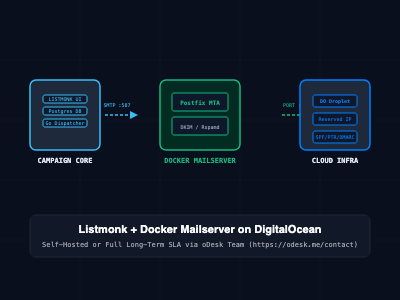
By pairing Listmonk with Docker Mailserver (DMS) on the same private virtual cloud network, organizations create a completely unified, independent email product:
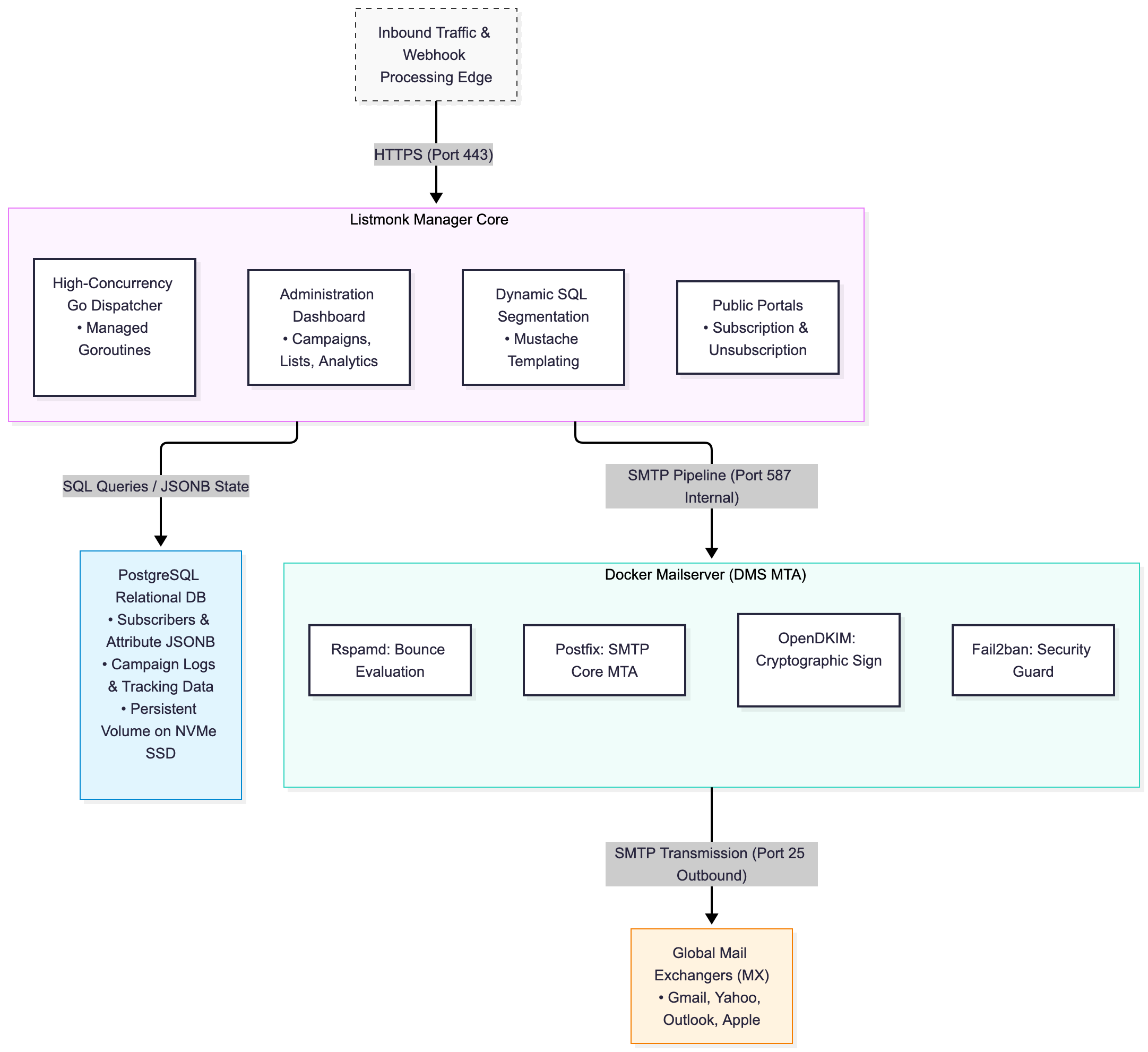
In this unified architecture:
- Listmonk manages the UI, contacts, templates, and analytics.
- PostgreSQL stores structured contacts, dynamic tags, and click/open interactions.
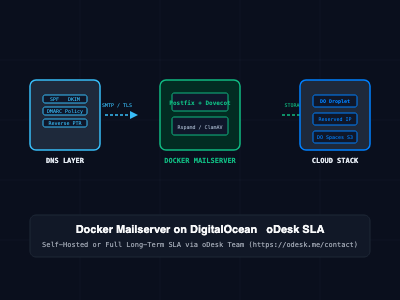
- Docker Mailserver acts as the dedicated internal MTA, handling Postfix routing, cryptographic DKIM signing, TLS negotiation, and delivery queues directly to recipient mail servers.
Deploying the Unified Stack on DigitalOcean
Deploying this architecture in production requires provisioning a dedicated DigitalOcean Droplet, configuring persistent block storage, establishing internal Docker networking, and validating DNS deliverability records.
Step 1: Droplet Provisioning and Static IP Configuration
- Provision a DigitalOcean Droplet running Ubuntu 24.04 LTS (recommended: 2 vCPUs, 4GB RAM to accommodate PostgreSQL caching, Listmonk concurrency, and Postfix queuing comfortably).
- Allocate a dedicated Reserved IP (Floating IP) to ensure your outbound mail-sending IP never changes across infrastructure rebuilds.
- Request Port 25 Unblocking: DigitalOcean restricts outbound TCP port 25 on new accounts by default to curb spam abuse. Open a ticket with DigitalOcean Support providing your fully qualified domain name (FQDN), website URL, and production architecture justification to unlock port 25.
Step 2: Unified Infrastructure Architecture (docker-compose.yml)
Create /opt/email-stack/docker-compose.yml:
version: '3.8'

networks:
  mail_internal:
    driver: bridge

services:
  # Database Service: High-performance PostgreSQL
  db:
    image: postgres:16-alpine
    container_name: listmonk_db
    restart: always
    environment:
      POSTGRES_DB: listmonk
      POSTGRES_USER: listmonk_user
      POSTGRES_PASSWORD: SecureVaultDatabasePassword123!
    volumes:
      - ./data/postgres:/var/lib/postgresql/data
    networks:
      - mail_internal

  # Campaign Management Core: Listmonk
  listmonk:
    image: listmonk/listmonk:latest
    container_name: listmonk_app
    restart: always
    ports:
      - "9000:9000"
    volumes:
      - ./config/listmonk/config.toml:/listmonk/config.toml
      - ./data/listmonk/uploads:/listmonk/uploads
    depends_on:
      - db
      - mailserver
    networks:
      - mail_internal

  # Mail Transfer Agent Core: Docker Mailserver
  mailserver:
    image: ghcr.io/docker-mailserver/docker-mailserver:latest
    container_name: dms_mta
    hostname: mail
    domainname: yourdomain.com
    env_file: mailserver.env
    ports:
      - "25:25"       # Standard SMTP (MTA to MTA routing)
      - "587:587"     # Submission (Client to MTA with STARTTLS)
      - "465:465"     # SMTPS (Implicit TLS)
    volumes:
      - ./data/dms/mail-data/:/var/mail/
      - ./data/dms/mail-state/:/var/mail-state/
      - ./data/dms/mail-logs/:/var/log/mail/
      - ./config/dms/:/tmp/docker-mailserver/
      - /etc/letsencrypt:/etc/letsencrypt:ro
    restart: always
    stop_grace_period: 1m
    cap_add:
      - NET_ADMIN
    networks:
      - mail_internal
Step 3: Core Service Properties (mailserver.env)
Configure the environment properties inside /opt/email-stack/mailserver.env:
# Core FQDN and Relay Configuration
OVERRIDE_HOSTNAME=mail.yourdomain.com
POSTMASTER_ADDRESS=postmaster@yourdomain.com

# Service Optimization (Disabled heavy components to free RAM for Listmonk)
ENABLE_CLAMAV=0
ENABLE_RSPAMD=1
ENABLE_FAIL2BAN=1
ENABLE_MANAGESIEVE=0

# Security and TLS Hardening
SSL_TYPE=letsencrypt
SSL_CERT_PATH=/etc/letsencrypt/live/mail.yourdomain.com/fullchain.pem
SSL_KEY_PATH=/etc/letsencrypt/live/mail.yourdomain.com/privkey.pem
TLS_LEVEL=modern
LOG_LEVEL=info
Step 4: Configuring Listmonk to Route via Local Docker Mailserver
Inside /opt/email-stack/config/listmonk/config.toml, establish the database link and declare the internal Docker Mailserver SMTP pipeline:
[app]
address = "0.0.0.0:9000"
admin_username = "admin"
admin_password = "SuperSecureAdminPassword2026!"

[db]
host = "db"
port = 5432
user = "listmonk_user"
password = "SecureVaultDatabasePassword123!"
database = "listmonk"
ssl_mode = "disable"
max_open = 25
max_idle = 10
Inside the Listmonk Web Dashboard under Settings > SMTP:
- Host: mailserver (Utilizing the internal Docker bridge network)
- Port: 587
- Auth: Plain / Login (Create dedicated credentials via ./setup.sh email add newsletter@yourdomain.com "YourSMTPPassword")
- TLS: STARTTLS
- Max Concurrency: 15 to 25 workers
DNS Architecture for Enterprise Deliverability
Self-hosting your marketing and transactional sending engine grants total independence, but inbox placement relies on configuring strict, cryptographic DNS records:
; 1. Mail Host A Record
mail.yourdomain.com.    IN  A       198.51.100.50

; 2. Newsletter Subdomain A Record (Points to DigitalOcean Droplet)
newsletter.yourdomain.com. IN A     198.51.100.50

; 3. MX Record (Directs bounces and replies back to your Droplet)
yourdomain.com.         IN  MX  10  mail.yourdomain.com.

; 4. SPF Record (Explicitly authorizes the DigitalOcean IP address)
yourdomain.com.         IN  TXT     "v=spf1 mx ip4:198.51.100.50 -all"

; 5. DKIM Record (2048-bit Cryptographic Public Key generated by OpenDKIM)
mail._domainkey.yourdomain.com. IN TXT "v=DKIM1; k=rsa; p=MIIBIjANBgkqhkiG9w0BAQEFAAOCAQ8AMIIBCgKCAQEA..."

; 6. DMARC Policy Record (Enforces strict quarantine or reject reporting)
_dmarc.yourdomain.com.  IN  TXT     "v=DMARC1; p=quarantine; rua=mailto:dmarc-reports@yourdomain.com; pct=100; adkim=s; aspf=s"

; 7. Reverse DNS (PTR Record) - CRITICAL:
; Set directly in DigitalOcean Console under Networking -> IPv4 -> Edit PTR
; The PTR record for 198.51.100.50 MUST resolve exactly to "mail.yourdomain.com".
Turnkey Deployment, Cloud Setup & SLA Maintenance via oDesk Team
Deploying and scaling a production-grade email marketing engine requires meticulous systems administration. Managing IP warming schedules, handling bounce loops, preventing spam trap listings, configuring Nginx reverse proxies with SSL auto-renewal, and maintaining high inbox deliverability requires ongoing focus.
To eliminate this operational burden, the oDesk Team delivers complete end-to-end cloud provisioning, custom email stack integration, and long-term maintenance contracts.
Clients can partner with the oDesk Team through two primary service models:
Model A: Turnkey Setup on Your Cloud Account
If your organization owns an active DigitalOcean, AWS, or private cloud account, the oDesk Team designs and implements the full production infrastructure directly within your tenancy:
- Droplet Sizing & Port 25 Clearance: Provisioning optimized DigitalOcean compute, configuring VPC subnets, and managing the formal port 25 unblocking approval process directly with cloud support engineers.
- Hardened Listmonk + DMS Integration: Deploying the unified stack with automated Nginx reverse proxies, SSL certificate termination, custom upload directories, and PostgreSQL tuning.
- Complete DNS & Deliverability Auditing: Configuring and testing SPF, DKIM, DMARC, BIMI, and PTR alignment to guarantee a 10/10 score on standard email deliverability benchmarks (e.g., mail-tester.com).
- Subscriber Migration & Data Cleansing: Scrubbing existing contact lists of syntax errors, invalid MX domains, and known honeypots before importing into Listmonk.
Model B: Long-Term Management & Maintenance Contracts (SLA Retainer)
For businesses that require hands-off, zero-downtime reliability without employing dedicated in-house Site Reliability Engineers, the oDesk Team provides long-term managed service level agreement (SLA) contracts:
- Continuous Deliverability & Blacklist Monitoring: Real-time surveillance of your server IP across major DNS blacklists (Spamhaus, Barracuda, SORBS) with immediate delisting intervention if an anomalous event occurs.
- Proactive Security Patching & Version Updates: Executing non-disruptive upgrades to the underlying Linux kernel, Docker engine, PostgreSQL, Listmonk, and Docker Mailserver releases to protect against zero-day CVE exploits.
- Automated Encrypted Offsite Backups: Implementing automated nightly snapshots of PostgreSQL databases, subscriber metadata, and configuration state synced to encrypted offsite object storage (such as DigitalOcean Spaces or AWS S3).
- Custom Feature Engineering & API Integrations: Developing custom webhooks, CRM sync connectors, automated bounce-handling pipelines, and tailored mustache templates under agreed-upon response-time SLAs.
To commission full email marketing deployment or establish a managed long-term maintenance contract, reach out to the oDesk Team directly:
Official Contact Portal: https://odesk.me/contact
Architectural Comparison: Unified Self-Hosted Stack vs. SaaS Providers
| Operational Dimension | Mailchimp / Klaviyo / HubSpot | Self-Managed Listmonk + DMS | Managed Stack on DigitalOcean (oDesk Team) |
|---|---|---|---|
| Pricing Model | $500 - $3,000+ / mo (Per Subscriber) | Droplet compute only ($24 - $48/mo) | Fixed Droplet Cost + Predictable SLA Retainer |
| Subscriber Limits | Hard caps; billing jumps on tier thresholds | Unlimited (Storage & DB bound) | Unlimited subscribers, fully maintained by oDesk |
| Sending Velocity | Subject to vendor rate limits | 10,000+ emails / minute | Tuned for maximum throughput & IP protection |
| Data Sovereignty | Stored on proprietary vendor cloud | 100% Private Cloud Sovereignty | 100% Client-Owned Private Cloud Sovereignty |
| Deliverability Effort | Managed automatically by vendor | High manual effort (High risk of blacklist) | Managed & monitored 24/7 by oDesk Team |
| Transactional Routing | Separate product / Extra fee | Unified with marketing pipeline | Unified, optimized, and audited by oDesk Team |
| Long-Term Maintenance | None required (SaaS) | Demands dedicated internal DevOps time | Handled via contractual SLA with oDesk Team |
SRE and Production Best Practices
- Execute Strict IP Warming Schedules: Never blast 100,000 emails on day one from a fresh DigitalOcean IP. Begin by sending 100–300 messages per day to highly engaged users. Double the sending volume every three days over a 3-week window to allow Gmail and Microsoft algorithms to establish sender trust.
- Automate Bounce and Complaint Feedback Loops: Configure Listmonk bounce processing webhooks or link Rspamd reject notifications directly to Listmonk's bounce-handling API to automatically unsubscribe bounced addresses.
- Isolate Database IOPS with High-Speed Volumes: DigitalOcean Droplets with Dedicated NVMe block storage ensure PostgreSQL indexes remain sub-millisecond during concurrent campaign writes and click-tracking bursts.
- Monitor Queue Backlogs Continuously: Set up Prometheus monitoring or basic shell scripts to check postqueue -p. A sudden accumulation of deferred messages indicates throttling from a specific recipient domain (such as Yahoo or Comcast), requiring immediate rate adjustment in Listmonk.
Getting Started
To launch your private marketing and transactional email stack:
# Step 1: Provision an Ubuntu 24.04 Droplet on DigitalOcean
# Recommended: 2 vCPU, 4GB RAM Droplet with an attached Reserved IP

# Step 2: Install Docker Engine and Docker Compose Plugin
sudo apt-get update
sudo apt-get install -y docker.io docker-compose-v2

# Step 3: Clone project files and start the unified stack
mkdir -p /opt/email-stack && cd /opt/email-stack
# [Deploy docker-compose.yml, mailserver.env, and config.toml detailed in Section 2]
docker compose up -d

# Step 4: For complete turnkey deployment, deliverability audits,
# or long-term SLA management contracts, contact the oDesk Team:
# https://odesk.me/contact
By unifying Listmonk and Docker Mailserver on DigitalOcean, organizations reclaim data privacy, break free from per-subscriber SaaS fees, and secure unlimited messaging pipelines—backed by the option of turnkey deployment and managed support contracts through the oDesk Team.