The Operational Friction in Modern Google Play Publishing
Historically, mobile software engineers could register a personal Google Play Console account, build an Android App Bundle (.aab), and deploy directly to global production within a few hours. In response to an influx of untested, unstable, or fraudulent applications, Google updated its developer platform policies for all personal accounts created after November 13, 2023.
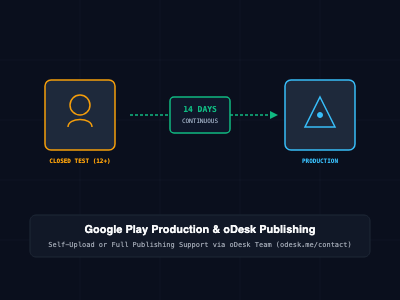
Under current policy standards, individual developers face an enforced operational gate: they must successfully execute a Closed Testing cycle that satisfies three mandatory criteria before applying for production distribution access:
- Strict Tester Quota: A minimum of 12 distinct Google accounts must formally opt into your closed test track.
- Unbroken Consecutive Duration: All 12 (or more) testers must remain continuously opted in for at least 14 consecutive calendar days.
- Production Access Review Questionnaire: Developers must complete a formal, human-reviewed questionnaire detailing tester recruitment methodologies, engagement metrics, and bug-fixing iterations.
A single tester opting out on day 11 or 12 breaks the unbroken streak, resetting the 14-day clock back to zero and delaying commercial release schedules.
┌────────────────────────────────────────────────────────┐
│               1. Internal Testing Track                │
│    (Fast iterative testing for up to 100 users)        │
└───────────────────────────┬────────────────────────────┘
                            │ (Bypasses Google Review)
                            ▼
┌────────────────────────────────────────────────────────┐
│               2. Closed Testing Track                  │
│  ★ MANDATORY: 12+ Testers for 14 Consecutive Days ★    │
└───────────────────────────┬────────────────────────────┘
                            │ (Apply for Production Access)
                            ▼
┌────────────────────────────────────────────────────────┐
│                 3. Open Testing Track                  │
│    (Public opt-in beta testing on Google Play)         │
└───────────────────────────┬────────────────────────────┘
                            │ (Publish to Global Store)
                            ▼
┌────────────────────────────────────────────────────────┐
│                   4. Production Track                  │
│     (Public discovery & installation by end-users)     │
└────────────────────────────────────────────────────────┘
Why Internal Testing Does Not Satisfy the Rule
A common mistake among indie developers is running an Internal Test track for two weeks and expecting production publishing to unlock.
Internal testing tracks bypass Google's app review process to allow rapid iterative distribution to pre-approved internal devices. Because internal builds do not undergo complete policy compliance verification, Google explicitly excludes internal testing from fulfilling the 14-day production gate. Only builds deployed to an official Closed Testing track contribute to the consecutive counter.
Mechanics of the 12-Tester 14-Day Clock
The 14-day timeline operates under deterministic, state-monitored rules:
- Opt-In Trigger: The clock begins only when at least 12 distinct Google accounts have clicked the opt-in invite link, selected "Become a tester", and installed the application on a compatible physical device.
- Consecutive Streak Requirement: The opt-in state must remain active and continuous. If 2 testers opt out on day 11, reducing your active count to 10, the continuous streak resets to zero, requiring another full 14-day period once replacement testers are recruited.
- Active Engagement Tracking: Google evaluates telemetry to confirm that testers launch the application, navigate primary user flows, and generate crash reports or feedback. Distributing test links to inactive accounts or automated device farms often results in rejection during production review.
Step-by-Step Implementation and Verification
Step 1: Manage Testers via Google Groups
Instead of manually adding individual email addresses as a static list (which can lead to accidental resets if the list is updated), establish a dedicated Google Group.
- Create a Google Group (e.g., app-closed-beta@googlegroups.com).
- Set the group access settings so invited testers can join easily.
- In Google Play Console, navigate to Testing > Closed testing.
- Create a new closed track, select the Testers tab, choose Google Groups, and enter your group's email address.
Step 2: Build and Sign the Release Bundle
Build a signed production release bundle (.aab) in Android Studio or via Gradle CLI:
# Clean project and generate release AAB
./gradlew clean bundleRelease
Upload the generated bundle (app/build/outputs/bundle/release/app-release.aab) to your Closed Testing track, complete the release notes, and submit the track for Google review.
Step 3: Distribute Opt-In Links and Monitor Dashboard Status
Once the closed release is approved by Google, retrieve the opt-in URL:
- Web Link: https://play.google.com/apps/testing/com.yourcompany.app
- Android Link: Direct Play Store deep-link for mobile devices.
Instruct testers to accept the web link first and then install the app from the Play Store.
To track your progress, check Google Play Console > Dashboard > Apply for access to production:
- Publish a closed testing release (Checked green).
- Have at least 12 testers opted in to your closed test (Checked green).
- Run your closed test with at least 12 testers, for at least 14 days (Tracks current consecutive streak, e.g., "12 testers have currently been opted in for 4 days continuously").
Answering the Production Access Questionnaire
When your app hits 14 continuous days with 12+ active testers, the Apply for production button unlocks. Google requires developers to complete a three-part questionnaire before approving production access:
Part 1: About Your Closed Test
- Tester Recruitment: Describe how you recruited your testers. (Example: "Recruited 18 beta testers from our existing user mailing list and a private Android developer testing community. Verified that testers used a mix of Android 12, 13, and 14 physical devices.")
- Tester Engagement: Explain how users interacted with the app. (Example: "Testers engaged in daily 5-minute sessions exploring the checkout workflow, search filtering, and profile editing features.")
- Feedback Summary: Summarize reported bugs and feature requests. (Example: "Testers identified an issue with slow image loading on low-bandwidth networks and a crash on Android 11 during token refresh. Both issues were patched in version 1.0.2.")
Part 2: About Your App
- Target Audience: Specify target demographics, geographic focus, and use cases.
- Value Proposition: Provide a detailed explanation of the core problem your application solves and how it delivers value over alternatives.
Part 3: Production Readiness
- Iterative Improvements: Detail specific code updates, dependency upgrades, or UI redesigns committed during the 14-day testing period.
- Quality Verification: Explain how you confirmed production readiness (e.g., verifying a 99.8% crash-free session rate via Firebase Crashlytics).
Automated Deployment via Fastlane
To eliminate manual dashboard uploads during closed testing iteration cycles, automate builds and uploads using Fastlane.
1. Configure Appfile
Create fastlane/Appfile:
json_key_file("fastlane/play-console-api-key.json") # Google Service Account Key
package_name("com.company.myapp")                    # Application Package Name
2. Configure Fastfile
Define automated deployment lanes in fastlane/Fastfile:
default_platform(:android)

platform :android do
  desc "Build and deploy release bundle to Google Play Closed Testing Track"
  lane :deploy_closed_test do
    # Ensure local git workspace has no uncommitted changes
    ensure_git_status_clean

    # Increment Gradle Version Code automatically
    increment_version_code(
      gradle_file_path: "app/build.gradle.kts"
    )

    # Build signed Android App Bundle (AAB)
    gradle(
      task: "bundle",
      build_type: "Release"
    )

    # Upload AAB to Play Console Closed Track
    upload_to_play_store(
      track: "closed",
      aab: "app/build/outputs/bundle/release/app-release.aab",
      skip_upload_apk: true,
      skip_upload_metadata: false,
      skip_upload_images: true,
      skip_upload_screenshots: true,
      release_status: "completed"
    )
  end
end
Run the deployment lane:
bundle exec fastlane android deploy_closed_test
Turnkey App Publishing & Management via oDesk Team
For engineering teams, startups, and enterprises seeking to bypass the logistical burden of recruiting 12 reliable physical testers, avoiding timer resets, or navigating Google's production questionnaire, the oDesk Team delivers complete end-to-end publishing and deployment services.
Clients can partner with the oDesk Team through two primary distribution models:
Model A: Managed Upload and Testing on Your Account
If your organization maintains its own Google Play Developer account, the oDesk Team manages the full publication and compliance pipeline within your console:
- Auditing and Prerequisites: Verifying target SDK compliance (Android 14/15/16), generating signed app bundles, configuring Data Safety declarations, and mapping privacy policies.
- Cohort Management (12+ Real Device Testers): Provisioning a dedicated group of real testers on physical Android devices who remain continuously opted in for the full 14-day window.
- Active Feedback & Telemetry Logging: Generating authentic interaction telemetry, submitting structured feedback logs, and catching runtime crashes.
- Production Questionnaire Completion: Drafting professional, evidence-backed answers for the 3-part production access review.
Model B: Turnkey Publishing via Established oDesk Developer Account
For businesses that do not own a registered Google Play Developer account, or organizations that want to launch immediately without navigating personal account 14-day gates, the oDesk Team can publish and host your application directly under verified, established oDesk organizational developer accounts:
- Zero Personal Testing Gate: Deployed directly under verified corporate developer infrastructure that is exempt from personal 12-tester gates.
- Turnkey Cloud & API Setup: Setting up associated cloud backends, database configurations, push notification gateways (FCM), and custom API routing.
- Full Maintenance and Version Updates: Managing continuous releases, hotfixes, policy compliance audits, and store listing optimization under an ongoing SLA retainer.
To commission full app publishing or retain managed testing cohorts, reach out to the oDesk Team directly:
Official Contact Portal: https://odesk.me/contact
Architectural Comparison: Google Play Testing & Publishing Pathways
| Operational Dimension | Internal Testing | Self-Managed Closed Testing | Managed Deployment (oDesk Team) |
| Max Testers | Up to 100 | Up to 2,000 per list | Tailored cohort (15–20 real devices) |
| Google Review Barrier | Fast / Bypassed | Full policy review | Pre-audited compliance verification |
| 14-Day Production Gate | Does NOT satisfy | Required (High reset risk) | Guaranteed 14-day continuous retention |
| Tester Recruitment Effort | Internal team | High manual effort | 100% Handled by oDesk Team |
| Account Flexibility | Personal / Org | Personal account locked | Client Account OR oDesk Account |
| Review Questionnaire | None | High rejection risk if vague | Handled with verified test logs |
Production Best Practices & Review Verification
- Maintain a 15–20 Tester Buffer: Never maintain exactly 12 testers. If a single user uninstalls the app, leaves the Google Group, or resets their device, your active count drops to 11 and the 14-day clock resets immediately.
- Push Intermediate Updates: Do not leave a single build static for 14 days. Ship at least 1 or 2 minor patch releases during the testing window to demonstrate active response to tester feedback.
- Integrate Crash Reporting: Embed Firebase Crashlytics or Sentry into your closed testing build to collect production telemetry, stack traces, and device hardware profiles.
- Avoid One-Line Survey Answers: Human reviewers assess the production questionnaire. Providing thorough, professional descriptions of testing protocols, feedback summaries, and architecture changes significantly reduces the risk of rejection.
Getting Started
To initialize your closed testing pipeline or explore managed publishing:
# Step 1: Install Fastlane tooling
gem install fastlane -NV

# Step 2: Validate service account credentials
bundle exec fastlane run validate_play_store_json_key json_key:"fastlane/play-console-api-key.json"

# Step 3: Deploy initial closed testing bundle
bundle exec fastlane android deploy_closed_test

# Step 4: For turnkey publishing or managed tester cohorts, contact oDesk Team:
# https://odesk.me/contact
By establishing a disciplined testing group, actively resolving feedback during the 14-day window, or partnering with the oDesk Team for turnkey publishing, organizations eliminate operational delays and transition applications to production smoothly.