The Operational Friction and Cost of Proprietary Email Infrastructure
In modern corporate environments, transactional and organizational email remains a primary operational backbone. However, relying on commercial software-as-a-service (SaaS) email suites—such as Google Workspace, Microsoft 365, or specialized transactional providers—introduces severe business and architectural liabilities:
- Escalating Per-User Seat Subscriptions: SaaS providers charge recurring fees per mailbox ($6 to $30+ per user monthly). For enterprises, startups with numerous operational aliases, or agencies managing hundreds of client inboxes, software licensing costs scale exponentially.
- Transmission Throttling and Arbitrary Rate Caps: Commercial platforms enforce strict outgoing thresholds (e.g., recipient counts per day and burst-rate restrictions), causing delivery delays during large-scale customer notification events or product alerts.
- Data Sovereignty and Confidentiality Exposures: Routing corporate correspondence and customer communications through external third-party cloud vendors compromises strict data residency requirements, exposing sensitive records to vendor platform modifications or policy changes.
- Fragmented Multi-Domain Management: Managing dozens of disparate domains across siloed vendor accounts requires duplicated administrative overhead and disparate billing accounts.
Docker Mailserver (DMS) resolves these liabilities by providing a containerized, production-grade email server solution. When deployed on high-performance cloud infrastructure—such as a DigitalOcean Droplet—organizations regain full operational control, data privacy, and uncapped domain routing.
What Is Docker Mailserver (DMS)?
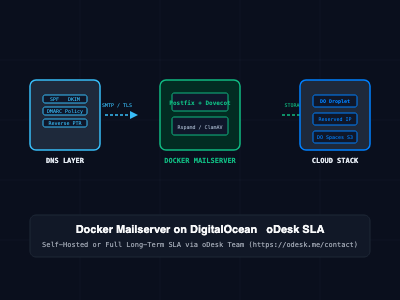
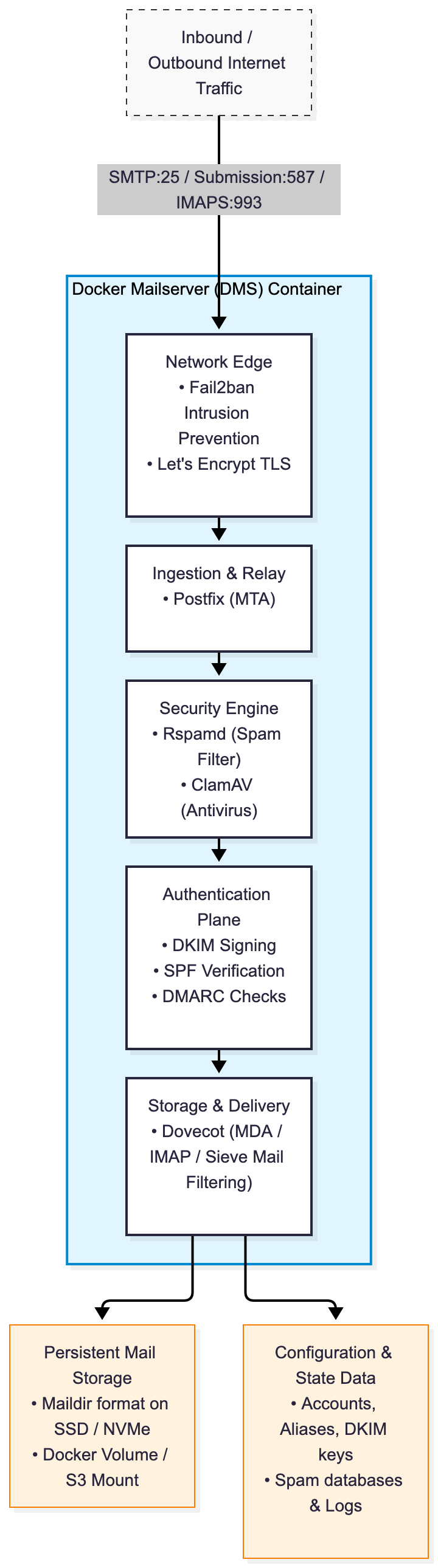
Docker Mailserver is an open-source, full-stack, containerized mail server image built on top of battle-tested Unix utilities. Rather than requiring administrators to manually install, compile, and interconnect individual networking packages, DMS packages a complete mail handling pipeline into a single, maintainable container image:
- MTA (Mail Transfer Agent): Postfix orchestrates inbound and outbound SMTP/SMTPS routing and relay policy enforcement.
- MDA / IMAP / POP3 Server: Dovecot manages mailbox storage, user access authentication, and secure client retrieval over IMAP/POP3 with native TLS.
- Spam & Anti-Phishing Defense: Rspamd executes statistical analysis, Bayesian filtering, and reputation checks to intercept unsolicited bulk mail.
- Antivirus Scanning: ClamAV provides local heuristic and signature-based scanning to quarantine malicious attachments before mailbox delivery.
- Email Authentication Stack: Native generation and verification of DKIM (OpenDKIM), SPF, and DMARC records to maintain pristine sending domain reputations.
- Security & Hardening Layers: Integrated Fail2ban actively detects and blocks brute-force authentication attacks on SMTP and IMAP ports.
Deploying Docker Mailserver on DigitalOcean
Deploying a production email server on DigitalOcean requires configuring virtual compute, persistent block storage, network firewall rules, and strict DNS reverse mapping.
Step 1: Droplet Provisioning and SMTP Port Verification
- Provision a DigitalOcean Droplet running Ubuntu 24.04 LTS (minimum 2 vCPUs, 4GB RAM to accommodate ClamAV and Rspamd memory allocations comfortably).
- Allocate a dedicated Reserved IP (Floating IP) to ensure your server IP address remains static across droplet rebuilds or migrations.
- Verify Port 25 Access: Cloud providers, including DigitalOcean, block outbound traffic on TCP port 25 by default to prevent spam networks. Contact DigitalOcean Support to request port 25 unblocking for your specific Droplet, providing your domain name and technical justification.
Step 2: Infrastructure Configuration (docker-compose.yml)
Create /opt/mailserver/docker-compose.yml:
version: '3.8'

services:
  mailserver:
    image: ghcr.io/docker-mailserver/docker-mailserver:latest
    container_name: dms-production
    hostname: mail
    domainname: yourdomain.com
    env_file: mailserver.env
    ports:
      - "25:25"     # SMTP (Inbound MTA-to-MTA)
      - "587:587"   # Submission (Client SMTP with STARTTLS)
      - "465:465"   # SMTPS (Implicit TLS)
      - "993:993"   # IMAPS (Client IMAP over TLS)
    volumes:
      - ./dms/mail-data/:/var/mail/
      - ./dms/mail-state/:/var/mail-state/
      - ./dms/mail-logs/:/var/log/mail/
      - ./dms/config/:/tmp/docker-mailserver/
      - /etc/letsencrypt:/etc/letsencrypt:ro
    restart: always
    stop_grace_period: 1m
    cap_add:
      - NET_ADMIN
Step 3: Core Service Properties (mailserver.env)
Configure the environment properties inside /opt/mailserver/mailserver.env:
# Core Mail Engine Setup
OVERRIDE_HOSTNAME=mail.yourdomain.com
POSTMASTER_ADDRESS=postmaster@yourdomain.com
ENABLE_MANAGESIEVE=1

# Antivirus & Anti-Spam Integration
ENABLE_CLAMAV=1
ENABLE_RSPAMD=1
ENABLE_FAIL2BAN=1

# Security & Authentication Controls
SSL_TYPE=letsencrypt
SSL_CERT_PATH=/etc/letsencrypt/live/mail.yourdomain.com/fullchain.pem
SSL_KEY_PATH=/etc/letsencrypt/live/mail.yourdomain.com/privkey.pem

# TLS Hardening
TLS_LEVEL=modern
LOG_LEVEL=info
Step 4: Account Creation and DKIM Key Generation
Initialize your configuration files, create user accounts, and generate cryptographic DKIM signing keys:
# Download the official management helper script
curl -fsSL https://raw.githubusercontent.com/docker-mailserver/docker-mailserver/master/setup.sh -o setup.sh
chmod +x setup.sh

# Launch the container stack
docker compose up -d

# Create your primary administrator and user email accounts
./setup.sh email add admin@yourdomain.com "SecureVaultPassword123!"
./setup.sh email add support@yourdomain.com "SecureVaultPassword123!"

# Generate 2048-bit DKIM cryptographic keys
./setup.sh config dkim keysize 2048
The generated DKIM public DNS record will reside inside ./dms/config/opendkim/keys/yourdomain.com/mail.txt.
DNS Record Architecture for Enterprise Deliverability
Sending mail to major providers (such as Gmail, Yahoo, and Outlook) without falling into spam folders requires configuring strict DNS records across your DNS zone file:
; 1. A Record for the Mail Hostname
mail.yourdomain.com.    IN  A       198.51.100.25

; 2. MX Record (Directs incoming mail to your DigitalOcean droplet)
yourdomain.com.         IN  MX  10  mail.yourdomain.com.

; 3. SPF Record (Declares authorized outbound IP addresses)
yourdomain.com.         IN  TXT     "v=spf1 mx ip4:198.51.100.25 -all"

; 4. DKIM Record (Public cryptographic verification key from mail.txt)
mail._domainkey.yourdomain.com. IN TXT "v=DKIM1; k=rsa; p=MIIBIjANBgkqhkiG9w0BAQEFAAOCAQ8AMIIBCgKCAQEA..."

; 5. DMARC Policy Record (Enforces strict reporting and quarantine)
_dmarc.yourdomain.com.  IN  TXT     "v=DMARC1; p=quarantine; rua=mailto:dmarc-reports@yourdomain.com; pct=100; adkim=s; aspf=s"

; 6. Reverse DNS (PTR Record)
; CRITICAL: In the DigitalOcean console under Networking -> Droplet Name -> PTR,
; set the Reverse DNS of 198.51.100.25 to exactly "mail.yourdomain.com".
Turnkey Setup, Cloud Provisioning & Long-Term Management via oDesk Team
While Docker Mailserver delivers complete data sovereignty and eliminates software subscription fees, maintaining an enterprise email server demands deep systems administration knowledge. Tasks like securing open ports, monitoring IP blacklist statuses, handling DNS PTR alignments, configuring TLS certificate renewals, and maintaining high inbox deliverability require continuous operational focus.
To eliminate this operational burden, the oDesk Team delivers complete end-to-end cloud provisioning, email migration, and long-term maintenance contracts.
Clients can partner with the oDesk Team through two primary operational models:
Model A: Turnkey Setup on Your Cloud Account
If your organization owns a DigitalOcean, AWS, or private cloud account, the oDesk Team designs and implements the full production infrastructure directly within your tenancy:
- Droplet Sizing & Port 25 Clearance: Provisioning optimized DigitalOcean compute, configuring VPC subnets, and managing the formal port 25 unblocking approval process directly with cloud support engineers.
- Hardened DMS Deployment: Deploying Docker Mailserver with automated daily Let's Encrypt TLS rotation, Rspamd Bayesian tuning, and ClamAV memory optimization.
- Complete DNS & Reputation Hardening: Authoring and auditing SPF, DKIM, DMARC, and PTR alignment to guarantee a 10/10 score on standard email deliverability benchmarks (e.g., mail-tester.com).
- Webmail & Admin Interfaces: Integrating optional webmail frontends (such as Roundcube or SnappyMail) with SSL termination and mobile push configurations.
Model B: Long-Term Management & Maintenance Contracts (SLA Retainer)
For businesses that require hands-off, zero-downtime reliability without employing dedicated in-house Site Reliability Engineers, the oDesk Team provides long-term managed service level agreement (SLA) contracts:
- Continuous Deliverability & Blacklist Monitoring: Real-time surveillance of your server IP across major DNS blacklists (Spamhaus, Barracuda, SORBS) with immediate delisting intervention if an anomalous event occurs.
- Proactive Security Patching & Version Updates: Executing non-disruptive upgrades to the underlying Linux kernel, Docker engine, and Docker Mailserver releases to protect against zero-day CVE exploits.
- Automated Encrypted Offsite Backups: Implementing automated nightly snapshots of mailbox volumes (/var/mail) and configuration state synced to encrypted offsite object storage (such as DigitalOcean Spaces or AWS S3).
- On-Demand Mailbox & Routing Administration: Managing user lifecycle additions, multi-domain routing setups, alias allocations, and custom Sieve filtering logic under agreed-upon response-time SLAs.
To commission full email server deployment or establish a managed long-term maintenance contract, reach out to the oDesk Team directly:
Official Contact Portal: https://odesk.me/contact
Architectural Comparison: Docker Mailserver vs. SaaS Email Providers
| Operational Dimension | Google Workspace / Microsoft 365 | Self-Managed DMS (Internal IT) | Managed DMS on DigitalOcean (oDesk Team) |
| Pricing Model | $6–$30+ per user / month (Continuous) | Infrastructure only ($20–$40/mo Droplet) | Fixed Droplet Cost + Predictable SLA Retainer |
| Data Sovereignty | Stored on proprietary vendor cloud | 100% Private Cloud Sovereignty | 100% Client-Owned Private Cloud Sovereignty |
| Domain Limits | Extra license overhead per account | Unlimited domains & aliases | Unlimited domains, fully managed by oDesk Team |
| Deliverability Effort | Managed automatically by vendor | High manual effort (High risk of blacklist) | Managed & monitored 24/7 by oDesk Team |
| Antivirus & Anti-Spam | Proprietary algorithms | Local ClamAV & Rspamd management | Tuned, trained, and optimized by oDesk Team |
| Long-Term Maintenance | None required (SaaS) | Demands dedicated internal DevOps time | Handled via contractual SLA with oDesk Team |
| Transmission Limits | Strict daily quotas (e.g., 2,000/day) | Unlimited (Hardware & IP bound) | High-throughput, optimized sending pipelines |
SRE and Production Email Best Practices
- Always Warm Up New IP Addresses: If your DigitalOcean Droplet IP has never sent email, send low volumes (50–100 messages/day) to trusted recipients across the first two weeks. Gradually ramp up sending velocity to allow recipient algorithms (like Gmail Postmaster) to establish a positive reputation score.
- Never Disable Reverse DNS (PTR): Major receiving mail servers will immediately reject incoming SMTP connections if the connecting IP does not have a valid PTR record resolving back to the sender's HELO/EHLO hostname.
- Configure Offsite Snapshot Schedules: Ensure your Droplet has DigitalOcean Automated Backups active, paired with daily rsync/restic snapshots of /var/mail stored in an isolated DigitalOcean Space.
- Monitor Postfix Queue Backlogs: Configure Prometheus node-exporter or alert monitoring on Postfix mail queues (mailq). Sudden spikes in deferred messages typically indicate a network throttling event or recipient domain rate limits.
Getting Started
To initialize your private mail server on DigitalOcean or explore managed enterprise contracts:
# Step 1: Provision an Ubuntu 24.04 Droplet on DigitalOcean
# Recommended: 2 vCPU, 4GB RAM Droplet with an attached Reserved IP

# Step 2: Install Docker Engine and Docker Compose Plugin
sudo apt-get update
sudo apt-get install -y docker.io docker-compose-v2

# Step 3: Clone project files and start Docker Mailserver
mkdir -p /opt/mailserver && cd /opt/mailserver
# [Deploy docker-compose.yml and mailserver.env detailed in Section 2]
docker compose up -d

# Step 4: For complete turnkey deployment, deliverability audits,
# or long-term SLA management contracts, contact the oDesk Team:
# https://odesk.me/contact
By deploying Docker Mailserver on DigitalOcean, organizations reclaim data privacy, break free from per-user SaaS license fees, and secure unlimited messaging pipelines - backed by the option of turnkey deployment and managed support contracts through the oDesk Team.