The Operational Bottlenecks in Modern Educational Administration
Managing primary, secondary, and tertiary educational institutions involves high operational friction. Academic administration requires orchestrating multiple independent stakeholder groups—administrators, teachers, accountants, students, and parents—across disparate communication, financial, and pedagogical workflows.
Relying on fragmented spreadsheets, generic communication tools, or legacy on-premise software introduces critical failure points:
- Information Asymmetry Across Stakeholders: Parents lack real-time visibility into student attendance, disciplinary records, assignment deadlines, and exam grades, resulting in communication gaps between home and school.
- Inefficient Fee Collection & Billing Leakage: Manual invoicing, cash reconciliation, and tracking installment deadlines lead to revenue leakage, accounting errors, and delayed cash flows.
- Fragmented Multi-Campus Operations: School networks, academy chains, and municipal educational boards struggle to consolidate analytics across campuses without deploying separate, isolated software installations.
- High Cost of Bespoke Mobile Development: Engineering native mobile apps from scratch for iOS and Android across three separate user roles (students, guardians, faculty) demands massive ongoing capital and maintenance budgets.
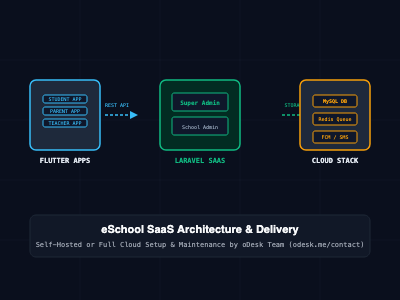
eSchool SaaS solves these liabilities by providing a production-grade, multi-tenant Education Enterprise Resource Planning (ERP) platform. It pairs a centralized Laravel administrative core with native cross-platform Flutter applications for students, parents, and teachers.
What Is eSchool SaaS?
eSchool SaaS is a comprehensive, turnkey school management platform engineered by WRTeam. Built on a modular monolithic architecture, the system pairs a scalable PHP/Laravel backend engine with Flutter-based mobile applications and responsive web dashboards.
The platform functions simultaneously as a single-institution ERP and a multi-tenant Software-as-a-Service (SaaS) business engine:
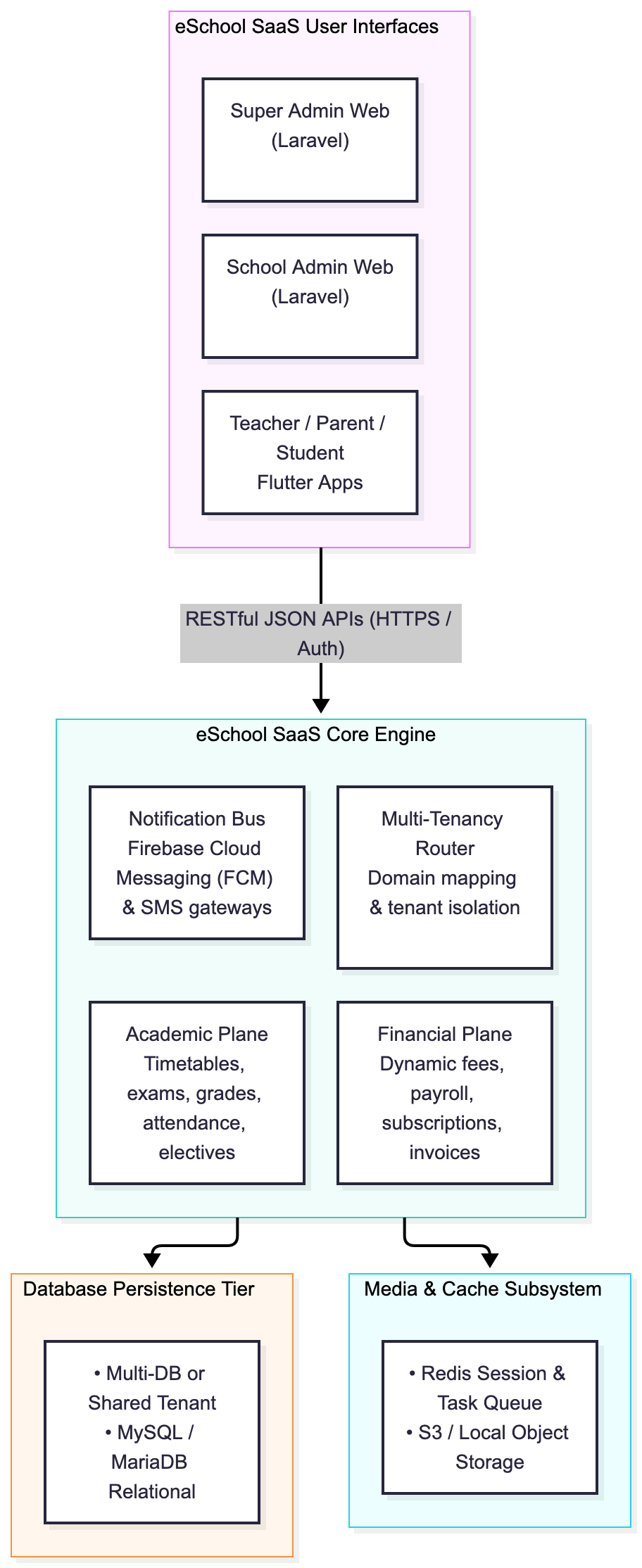
- Super Admin SaaS Console: Enables platform operators to create, manage, bill, and monitor unlimited independent schools, configuring subscription tiers, active student/staff billing quotas, custom domains, and payment gateways.
- School Admin Workspace: Grants campus directors and administrators full governance over academics, admissions, faculty payroll, class timetables, online/offline examinations, fee structures, and attendance tracking.
- Teacher / Faculty Mobile App & Web: Allows educators to submit daily attendance, grade assignments, publish study resources, evaluate exam papers, manage student leaves, and message parents directly.
- Student & Parent Mobile Apps: Delivers real-time push notifications, timetables, live bus tracking, fee payment receipts, report cards, and digital student diaries to Android and iOS devices.
Core Architecture and System Capabilities
1. Multi-Tenant School Governance & Subscriptions
eSchool SaaS supports both centralized multi-campus administration and commercial SaaS monetization:
- Subscription Package Builder: The Super Admin can define granular billing plans based on active student counts, staff quotas, and feature flags (e.g., toggling chat, online exams, or custom domains).
- Tenant Isolation Architecture: The system supports school-wise segregated databases or shared relational schemas with strict tenant ID scoping, ensuring strict data privacy between participating educational institutions.
- Custom Domain Support: Individual schools can map their custom corporate domains (portal.schoolname.edu) to their school admin panel and front-facing public website.
2. Academic Lifecycle & Examination Engine
The academic engine handles complete lifecycle management from initial inquiry to graduation:
- Dynamic Admission & Inquiries: Online student application forms with automated document uploads and Google reCAPTCHA protection.
- Dual Examination Modalities: Supports traditional offline exams (with CSV-based bulk mark submissions and printable PDF report cards) alongside automated online examinations featuring anti-cheating restrictions.
- Attendance Automation: Manual class registers and biometric/QR-code-based scanning for staff and student tracking.
3. Cross-Platform Flutter Mobile Apps
The client applications are built on the Flutter framework, ensuring 60fps rendering, unified UI/UX, and native platform integration across Android and iOS:
- Unified Student & Parent App: Guardians can seamlessly toggle between multiple children enrolled in the same school from a single session.
- Dedicated Staff & Teacher App: Enables teachers to mark attendance in seconds, inspect class schedules, and review student leave requests directly from their mobile devices.
- Offline Caching & Push Notifications: Leverages SQLite/Hive for local data caching and Firebase Cloud Messaging (FCM) for critical alerts (e.g., fee due reminders, school closures).
Technical Stack and Implementation Details
1. Backend Stack (Laravel Core)
The application leverages standard enterprise PHP conventions:
- Framework: Laravel 10.x / 11.x
- Database Engine: MySQL 8.0+ / MariaDB 10.6+
- Cache & Background Processing: Redis / Laravel Queue Workers
- Authentication: Laravel Sanctum / Token-based API Authentication
- Payment Gateways: Stripe, PayPal, Razorpay, Paystack, Flutterwave, and manual bank/cheque processing
2. Mobile Client Stack (Flutter Core)
- SDK: Flutter 3.x / Dart 3.x
- State Management: BLoC / Provider architecture
- Network & Serialization: Dio HTTP client with JSON serialization
- Hardware Integration: Camera (document scanning), GPS (live bus tracking), Local Auth (Biometric login)
3. Production Database Optimization Pattern
To maintain sub-second query execution across thousands of concurrent student queries during exam season, eSchool SaaS utilizes compound relational indexing across tenant boundaries:
-- Schema indexing pattern for tenant-isolated student examination queries
ALTER TABLE `exam_marks`
ADD INDEX `idx_tenant_exam_student` (`school_id`, `exam_id`, `student_id`);

ALTER TABLE `attendances`
ADD INDEX `idx_tenant_date_class` (`school_id`, `date`, `class_section_id`);
Deployment Models: Self-Hosted vs. Turnkey Managed Infrastructure
Organizations purchasing eSchool SaaS generally adopt one of two operational deployment pathways:
Model A: Self-Managed Infrastructure (Internal IT Deployment)
Institutions with dedicated internal DevOps teams can purchase the full source code package and manage the server stack independently:
- Provision an Ubuntu 22.04/24.04 LTS cloud instance (minimum 4 vCPUs, 8GB RAM).
- Install and configure Nginx, PHP-FPM, MySQL 8, and Redis.
- Configure automated Let's Encrypt SSL certificates and wildcard DNS routing for tenant subdomains.
- Build and compile Android (.aab) and iOS (.ipa) binaries using Flutter toolchains, managing Google Play Console and Apple App Store distribution independently.
Model B: Turnkey Cloud Deployment & Managed Operations via oDesk Team
For schools, school districts, and EdTech founders seeking zero operational overhead, the oDesk Team provides complete end-to-end engineering, cloud deployment, and system maintenance.
Clients can acquire the full software package directly through the oDesk Team and commission custom infrastructure deployment:
- Turnkey Cloud Provisioning: Deploying eSchool SaaS onto hardened cloud infrastructure (AWS, DigitalOcean, Google Cloud, or high-performance private VPS) with automated backups, Redis caching, and Nginx reverse proxies.
- White-Label App Publishing: Compiling, branding, and submitting the customized Flutter applications directly to the client's Google Play Console and Apple App Store accounts.
- Custom Feature Engineering: Integrating localized SMS gateways, regional payment processors, custom biometric hardware interfaces, or enterprise Single Sign-On (SAML/OAuth).
- Managed SLA & Maintenance: Handling ongoing server monitoring, security patching, database optimization, and software updates for an agreed-upon recurring service retainer.
To order the full production package or request custom enterprise deployment and maintenance pricing, contact the oDesk Team directly:
- Official Contact Portal: https://odesk.me/contact
Architectural Comparison: eSchool SaaS vs. Traditional School ERPs
| Architectural Dimension | Legacy School Software | Proprietary Cloud ERP (e.g., PowerSchool) | eSchool SaaS (WRTeam / oDesk Stack) |
| Licensing Model | High upfront + annual support | Expensive recurring per-student subscription | Full package ownership with optional managed services |
| Data Sovereignty | Local server bound (isolated) | Vendor-cloud locked (Proprietary data silos) | 100% On-Premise or Private Cloud Sovereignty |
| Mobile Architecture | Outdated web-wrappers | Native or separate vendor apps | Native cross-platform Flutter (Student, Parent, Staff) |
| Multi-Tenancy | Single school per install | Multi-tenant SaaS | Built-in SaaS Super Admin with custom domain routing |
| Customizability | Closed source (Rigid) | Closed APIs (Vendor dependent) | Full Laravel & Flutter source code customizability |
| Deployment Flexibility | Physical on-premise hardware | Vendor hosting only | Self-hosted or fully managed cloud via oDesk Team |
SRE and Production Best Practices
- Decouple Heavy Queue Tasks: Never execute bulk notifications, PDF report card generation, or fee invoice dispatches synchronously. Configure Redis-backed Laravel Queue Workers using supervisord to process background jobs asynchronously:php artisan queue:work redis --sleep=3 --tries=3 --max-time=3600
- Automate Nightly Database Backups: Implement automated encrypted database dumps synced to Amazon S3 or Cloudflare R2 storage to protect institutional records against hardware failures.
- Isolate Media Storage: In production environments hosting thousands of student documents, assignment submissions, and ID photos, decouple local disk storage by attaching AWS S3, Google Cloud Storage, or MinIO via Laravel's native Flysystem drivers.
- Enforce Strict TLS and HSTS: Secure all HTTP endpoints with TLS 1.3 encryption and enforce HTTP Strict Transport Security (HSTS) headers to safeguard student Personally Identifiable Information (PII).
Getting Started
To launch your multi-school administrative platform:
- Acquire the Full Package: Purchase your production software license directly through the oDesk Team via https://odesk.me/contact.
- Choose Your Implementation Strategy:Self-Setup: Access the complete Laravel backend and Flutter mobile codebase to configure, customize, and deploy using internal engineering resources.Turnkey Managed Deployment: Engage the oDesk Team to handle server configuration, database tuning, cloud migration, third-party integrations, app store publishing, and ongoing infrastructure maintenance.
- Self-Setup: Access the complete Laravel backend and Flutter mobile codebase to configure, customize, and deploy using internal engineering resources.
- Turnkey Managed Deployment: Engage the oDesk Team to handle server configuration, database tuning, cloud migration, third-party integrations, app store publishing, and ongoing infrastructure maintenance.
- Launch & Scale: Onboard campus administrators, configure subscription packages, import student records via CSV, and invite teachers and parents to connect via native mobile apps.