The Problem Paperless-ngx Solves
In modern personal and enterprise computing environments, handling inbound documentation remains a major source of operational friction. Invoices, contracts, receipts, identity records, and tax filings arrive continuously across physical mail, email attachments, and web portal downloads.
Relying on traditional folder hierarchies or commercial cloud storage introduces critical liabilities:
- Unsearchable Scanned Pixels: Basic flatbed scanners and mobile scanning apps generate image files or unindexed PDFs. Without optical character recognition (OCR), finding a specific tax invoice or serial number requires manual inspection of individual files.
- Context Fragmentation and Taxonomy Drift: Manual folder sorting inevitably breaks down over time. Files get misplaced across desktop downloads, local NAS shares, and cloud drives with inconsistent naming conventions.
- Third-Party SaaS Data Privacy Risks: Uploading sensitive legal, financial, or medical records to commercial cloud document management platforms compromises data sovereignty and exposes confidential records to vendor policy changes or breaches.
- Single-Point Storage Vulnerabilities: Storing unversioned scans without deterministic database records makes auditing, deduplication, and immutable backups difficult to maintain.
Paperless-ngx resolves these problems by providing an open-source, community-driven Document Management System (DMS) that ingests, indexes, tags, and archives documents within a self-hosted, searchable web application.
What Is Paperless-ngx?
Paperless-ngx is an open-source document management platform that organizes physical and digital documents into a searchable, metadata-rich repository. Built as an active community fork of Paperless-ng, the system combines a Python/Django backend with an Angular frontend, backed by modern document processing engines.
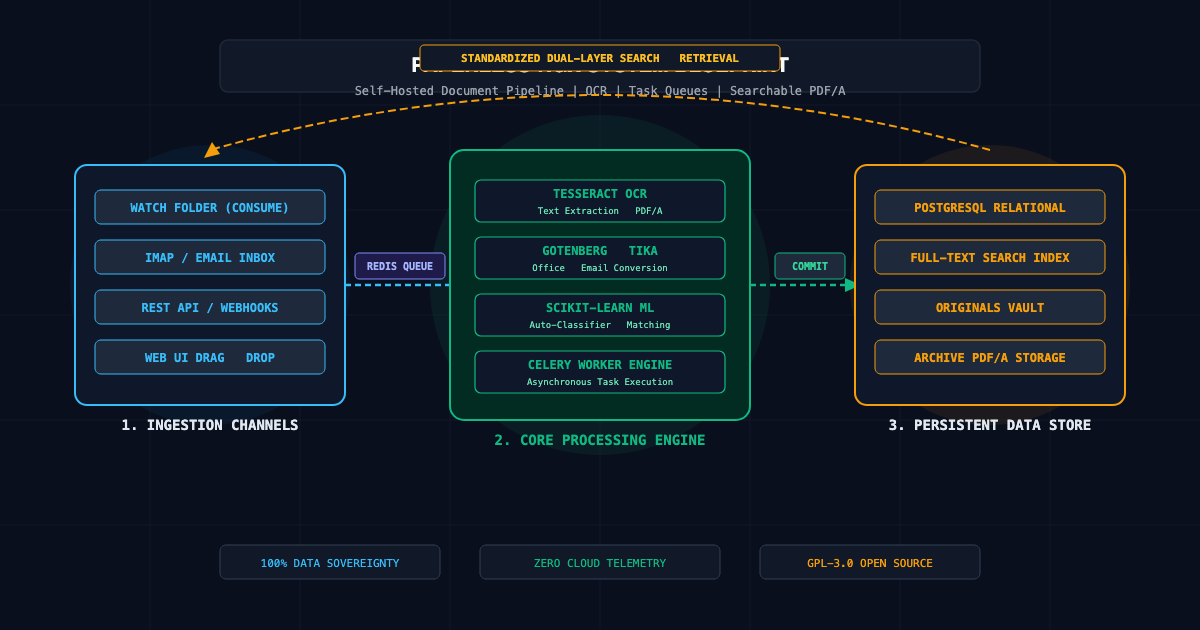
The platform operates around a simple lifecycle:
- Ingestion: Documents are dropped into a designated filesystem watch folder, forwarded via IMAP email rules, submitted through a REST API, or uploaded directly via the web UI.
- Parsing and OCR: Optical Character Recognition via Tesseract extracts text content from scanned PDFs and images. Office documents (Word, Excel) are rendered to PDF via Gotenberg and processed through Apache Tika.
- Machine Learning Classification: A built-in scikit-learn classifier automatically predicts and assigns document types, correspondents, tags, and custom fields based on document text patterns.
- Archival and Full-Text Search: The original unmodified document is stored alongside an archived, standardized PDF/A copy. Text content, metadata, and dates are indexed into a relational database for instant search retrieval.
┌────────────────────────────────────────────────────────┐
│  Ingestion Channels (Consume Dir, IMAP, REST API)      │
└───────────────────────────┬────────────────────────────┘
                            │
              Asynchronous Task Dispatch (Redis)
                            │
                            ▼
┌────────────────────────────────────────────────────────┐
│  Paperless-ngx Worker Engine                           │
│  ├── Tesseract OCR: Text extraction & PDF/A rendering  │
│  ├── Gotenberg / Tika: Office document conversion      │
│  └── scikit-learn Classifier: Auto-tagging & routing   │
└───────────────────────────┬────────────────────────────┘
                            │
               Storage & Metadata Commit
                            │
       ┌────────────────────┴────────────────────┐
       ▼                                         ▼
┌──────────────────────────────┐  ┌──────────────────────────────┐
│ PostgreSQL Relational Store  │  │ File System Media Storage    │
│ (Metadata, Tags, Full-Text)  │  │ (Originals & Archive PDF/A)  │
└──────────────────────────────┘  └──────────────────────────────┘
Core Concepts
Asynchronous Worker Queue
Document processing is computationally heavy. Running OCR on multi-page PDFs or converting multi-megabyte office spreadsheets in real-time would freeze an application web server.
Paperless-ngx decouples processing by running an independent worker process using Celery and Redis. When a document enters the ingestion pipeline, the web service records the metadata and pushes a task ID to Redis. The worker pulls tasks off the queue, delegates heavy compute loops to Tesseract and Gotenberg, updates document states asynchronously, and streams status notifications back to the UI via WebSockets.
Optical Character Recognition (OCR) and PDF/A
Paperless-ngx uses Tesseract OCR to extract machine-readable text layers from rasterized PDF pages and image formats (JPEG, PNG, TIFF).
- PDF/A Standard: The pipeline converts input files into standardized PDF/A documents designed for long-term digital preservation.
- Dual-Layer Architecture: The visual appearance of the original scan is preserved, while an invisible, selectable text layer is aligned behind the image, enabling copy-paste functionality and keyword highlighting.
- Multi-Language OCR: System administrators can install multiple Tesseract language packs (tessdata), configuring default detection languages and fallback dictionaries.
Matching Algorithms and Machine Learning
Rather than forcing users to manually categorize every processed receipt, Paperless-ngx implements matching algorithms:
- Deterministic Matchers: Exact, Any, All, or Regular Expression (Regex) filters that assign correspondents or tags when specific keywords match (e.g., assigning the correspondent "AWS" whenever "Amazon Web Services" appears in the text).
- Automated Classifier: An embedded scikit-learn Naive Bayes and Linear SVM model that trains on previously tagged documents. Once 10 to 20 documents are cataloged, the model automatically predicts correspondents, tags, and document types on newly ingested files.
The Paperless-ngx Deployment Workflow
The recommended production deployment pattern for Paperless-ngx leverages Docker Compose, orchestrating the web server, worker, PostgreSQL database, Redis task queue, and helper microservices (Gotenberg and Apache Tika).
1. Infrastructure Deployment (docker-compose.yml)
The following configuration provides a production-ready Paperless-ngx environment with dedicated volumes, isolated networks, and resource constraints:
version: '3.8'

services:
  broker:
    image: docker.io/library/redis:7-alpine
    container_name: paperless_redis
    restart: unless-stopped
    volumes:
      - redis_data:/data

  db:
    image: docker.io/library/postgres:16-alpine
    container_name: paperless_postgres
    restart: unless-stopped
    environment:
      POSTGRES_DB: paperless
      POSTGRES_USER: paperless
      POSTGRES_PASSWORD: SecureDatabasePassword123!
    volumes:
      - pgdata:/var/lib/postgresql/data

  gotenberg:
    image: docker.io/gotenberg/gotenberg:8
    container_name: paperless_gotenberg
    restart: unless-stopped
    command:
      - "gotenberg"
      - "--chromium-disable-javascript=true"
      - "--chromium-allow-list=file:///tmp/.*"

  tika:
    image: docker.io/apache/tika:latest
    container_name: paperless_tika
    restart: unless-stopped

  webserver:
    image: ghcr.io/paperless-ngx/paperless-ngx:latest
    container_name: paperless_webserver
    restart: unless-stopped
    depends_on:
      - db
      - broker
      - gotenberg
      - tika
    ports:
      - "8000:8000"
    healthcheck:
      test: ["CMD", "curl", "-fs", "-S", "http://localhost:8000"]
      interval: 30s
      timeout: 10s
      retries: 5
    environment:
      PAPERLESS_REDIS: redis://broker:6379
      PAPERLESS_DBENGINE: postgresql
      PAPERLESS_DBHOST: db
      PAPERLESS_DBNAME: paperless
      PAPERLESS_DBUSER: paperless
      PAPERLESS_DBPASS: SecureDatabasePassword123!
      PAPERLESS_TIKA_ENABLED: 1
      PAPERLESS_TIKA_GOTENBERG_ENDPOINT: http://gotenberg:3000
      PAPERLESS_TIKA_ENDPOINT: http://tika:9998
      PAPERLESS_TIME_ZONE: "UTC"
      PAPERLESS_OCR_LANGUAGE: "eng"
      PAPERLESS_SECRET_KEY: "change-this-to-a-secure-random-64-char-string"
      PAPERLESS_URL: "https://dms.yourdomain.com"
      PAPERLESS_TASK_WORKERS: 2
      PAPERLESS_THREADS_PER_WORKER: 2
    volumes:
      - data:/usr/src/paperless/data
      - media:/usr/src/paperless/media
      - ./export:/usr/src/paperless/export
      - ./consume:/usr/src/paperless/consume

volumes:
  data:
  media:
  pgdata:
  redis_data:
2. Automated Email Consumption via IMAP
To bypass manual uploads for digital invoices, configure an automated IMAP ingestion rule inside Settings > Mail Accounts:
[Mail Account Settings]
Server: imap.yourmailserver.com
Port: 993
Security: SSL/TLS
Username: invoices@yourdomain.com
Password: VaultSecuredAppPassword

[Mail Rule Criteria]
Action: Process attachments as documents
Folder: INBOX/Invoices
Filter From: *@accounting.vendor.com
Filter Subject: Invoice OR Receipt
Post-Processing Action: Mark as read, Move to INBOX/Processed
3. Programmatic Document Upload via REST API
To integrate Paperless-ngx into automated CI/CD pipelines, ERP backends, or custom scanner utilities, use the REST API:
import requests

PAPERLESS_URL = "http://localhost:8000/api/documents/post_document/"
API_TOKEN = "your_paperless_api_token_here"

def upload_document(file_path: str, title: str):
    headers = {
        "Authorization": f"Token {API_TOKEN}"
    }

    with open(file_path, "rb") as file_handle:
        files = {
            "document": (title, file_handle, "application/pdf")
        }
        data = {
            "title": title,
            "correspondent": 1,
            "document_type": 2
        }

        response = requests.post(PAPERLESS_URL, headers=headers, files=files, data=data)

    if response.status_code == 200:
        task_id = response.json()
        print(f"Document queued successfully. Processing Task ID: {task_id}")
    else:
        print(f"Upload failed ({response.status_code}): {response.text}")

if __name__ == "__main__":
    upload_document("/tmp/server_invoice.pdf", "Server Hosting Invoice - Oct 2026")
Paperless-ngx vs. Commercial Cloud DMS vs. Basic Cloud Storage
| Feature | Paperless-ngx | Commercial Cloud DMS | Basic Cloud Storage (Nextcloud / Drive) |
| Licensing Model | Open-Source (GPL-3.0) | Proprietary ($15–$50/user/mo) | Open-Source / Freemium |
| Data Sovereignty | 100% On-Premise / Private Cloud | Vendor Cloud Hosted | Self-hosted or Vendor Cloud |
| Native OCR | Tesseract OCR (Searchable PDF/A) | Proprietary Cloud OCR | None or Basic Add-on |
| Auto-Tagging & Routing | Built-in ML + Regex Matchers | Black-box Vendor AI | Manual Folder Management |
| Office Document Parsing | Native (Gotenberg + Apache Tika) | Native Cloud Converters | Requires External Suite |
| Ingestion Channels | Watch folder, IMAP, REST API, Web | Web UI, Vendor API | Drag-and-drop, Sync Client |
| Search Mechanics | Relational Full-Text Search | Vendor Search Index | Filename Queries |
Best Practices
- Use document_exporter for Deterministic Backups: Do not rely solely on raw filesystem backups of the media volume. Use the built-in CLI command document_exporter to generate unencrypted, manifest-verified file exports alongside metadata JSON:docker compose exec webserver document_exporter ../export -d
- Tune Worker Threads to CPU Core Counts: OCR rendering and PDF conversions are CPU-bound operations. Set PAPERLESS_TASK_WORKERS to match physical CPU cores and limit PAPERLESS_THREADS_PER_WORKER to avoid CPU starvation.
- Enable Storage Path Formatting: Use custom storage path templates (PAPERLESS_FILENAME_FORMAT) to keep files organized on disk by correspondent, year, and title rather than random hashes:PAPERLESS_FILENAME_FORMAT="{correspondent}/{created_year}/{title}"
- Harden Web Ingress with Reverse Proxy: Never expose port 8000 directly to the public internet. Terminate TLS using Caddy, Traefik, or Nginx with strict HTTP Basic Auth or OIDC/SSO (Authentik, Authelia) headers.
- Set Up Multi-Language Tessdata: If processing non-English documents, install additional language packs by setting PAPERLESS_OCR_LANGUAGES: "deu fra spa" to prevent corrupted text extraction.
Getting Started
To spin up an instance of Paperless-ngx locally:
# Step 1: Download the official installation script
bash -c "$(curl -fsSL https://raw.githubusercontent.com/paperless-ngx/paperless-ngx/main/install-script/install-paperless-ngx.sh)"

# Step 2: Navigate to your installation directory
cd ~/paperless-ngx

# Step 3: Launch containers via Docker Compose
docker compose up -d

# Step 4: Create an initial superuser account
docker compose exec webserver python3 manage.py createsuperuser
Once running, navigate to http://localhost:8000, log in with your administrative credentials, and begin dragging scans into the consume folder or web interface. Within seconds, your documents will be indexed, searchable, and preserved in standardized PDF/A format.