The Trust Deficit and Operational Bloat in macOS Disk Cleaners
On modern macOS workstations—where internal storage is often soldered to the logic board and carrying high storage-tier premiums—disk space management is an ongoing operational concern. Developers, DevOps engineers, and power users routinely accumulate gigabytes of build artifacts, package manager caches, and application residue.
However, the ecosystem of macOS disk maintenance tools suffers from a fundamental trust deficit:
- Excessive Permissions and Telemetry: A disk cleaner requires the most sensitive entitlement in the operating system: Full Disk Access (FDA). Commercial utilities frequently combine FDA with persistent background daemons, telemetry trackers, and analytics engines that upload user metadata to external analytics servers.
- Fear-Based User Interfaces (FUD): Commercial cleaners often employ artificial urgency badges (such as claiming thousands of benign temporary system caches constitute "critical junk") to push recurring subscription models.
- Incomplete Application Removal: Dragging an application to the macOS Trash leaves behind orphaned files scattered across ~/Library/Application Support, ~/Library/Containers, ~/Library/Group Containers, ~/Library/Caches, and launch daemon directories.
- Aggressive and Unrecoverable Deletions: Poorly architected cleaners execute raw rm -rf system calls on targeted paths. If a path resolver misinterprets a symbolic link or matches a critical system directory, permanent data loss occurs immediately.
- Ignored Developer Artifacts: Generic cleaning utilities rarely target developer workloads, ignoring multi-gigabyte build artifacts like Xcode DerivedData, abandoned Docker layer caches, orphaned Homebrew bottles, and local AI model runtimes (Ollama, LM Studio).
PureMac addresses this divide by providing an auditable, open-source, and native SwiftUI macOS cleaner that executes transparent system scans with zero telemetry and safe deletion semantics.
What Is PureMac?
PureMac is an open-source macOS system cleaner and application manager created by Momen Basel under the MIT license. Developed entirely in native Swift and SwiftUI without web-wrapper frameworks like Electron, PureMac runs as an unprivileged or FDA-granted utility that strictly isolates its actions to user-approved paths.
The tool operates under a strict architectural contract:
- Zero Telemetry: PureMac contains zero analytics SDKs, crash-reporting daemons, or remote network calls. Local scans run completely offline.
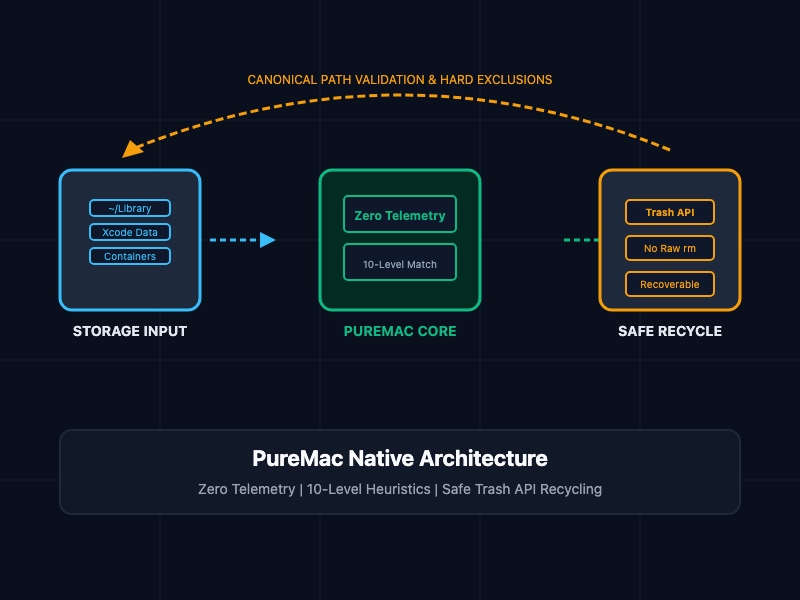
- System Trash API by Default: Destructive operations default to the macOS system Trash (NSWorkspace.shared.recycle) rather than irreversible shell-level unlinking. Users can inspect and restore any removed asset directly from Finder.
- Explicit Review Workflows: PureMac provides exact filesystem paths and item sizes before deletion, hard-coding exclusion safeguards for critical macOS system directories.
- Universal Binary: Compiled natively for both Apple Silicon (ARM64) and Intel (x86_64) architectures starting with macOS 13 (Ventura) and later.
┌────────────────────────────────────────────────────────┐
│  PureMac UI / CLI Interface (Native SwiftUI & Swift)   │
└───────────────────────────┬────────────────────────────┘
                            │
               Security & Safety Gatekeeper
         (Symlink Resolution & System Hard Exclusions)
                            │
       ┌────────────────────┼────────────────────┐
       ▼                    ▼                    ▼
┌──────────────┐    ┌──────────────┐    ┌──────────────┐
│ App Engine   │    │ Dev Cleaners │    │ Storage Core │
│ - 10-Level   │    │ - Xcode Data │    │ - Duplicate  │
│   Heuristic  │    │ - Homebrew   │    │   Finder     │
│ - Container  │    │ - Docker VM  │    │ - Space Tree │
│   Discovery  │    │ - AI Logs    │    │ - Orphan Log │
└──────────────┘    └──────────────┘    └──────────────┘
       │                    │                    │
       └────────────────────┼────────────────────┘
                            │
                            ▼
┌────────────────────────────────────────────────────────┐
│  macOS File System Boundary (NSWorkspace Recycle)      │
│  - User Trash (Recoverable via Finder)                 │
└────────────────────────────────────────────────────────┘
Core Concepts and System Architecture
1. The 10-Level Heuristic Application Uninstaller Engine
Standard macOS uninstallers rely on simple string matching against application names, which misses containerized app state. PureMac deploys a 10-level heuristic matching engine that correlates multiple system markers:
- Bundle Identifiers: Canonical IDs (e.g., com.company.app) mapped directly to preferences (~/Library/Preferences/<BundleID>.plist) and HTTP caches.
- Apple Team Identifiers: Cryptographic team signatures extracted from code-signing certificates to detect shared enterprise suite dependencies.
- Entitlements and Sandboxed Containers: Traverses ~/Library/Containers/<BundleID> and ~/Library/Group Containers/<TeamID>.<Group> to capture sandboxed state.
- Spotlight Metadata and Installer Receipts: Evaluates CoreServices metadata and package receipts in /var/db/receipts to locate vendor-specific helper tools and launch agents (~/Library/LaunchAgents).
- Normalized Heuristic Signatures: Resolves vendor-specific naming conventions across filesystem caches without requiring hardcoded static lists.
To prevent system corruption, PureMac enforces a hard-coded whitelist protecting 27 core Apple system processes and root applications (e.g., Finder, Safari, Terminal, kernelmanagerd).
2. Developer-First Smart Scan: Purging Xcode, Docker, and AI Debris
PureMac organizes its scanning framework around high-churn engineering artifacts:
- Xcode Toolchains: Targets abandoned DerivedData directories, legacy device support symbols (~/Library/Developer/Xcode/iOS DeviceSupport), and watchOS/tvOS runtime caches.
- Package Managers: Audits Homebrew's download cache (HOMEBREW_CACHE), purging unlinked bottles and outdated formula tarballs without breaking existing installations. Identifies dangling global modules in npm, yarn, and pnpm.
- Container Runtimes: Detects inactive Docker desktop data images, dangling builder layer caches, and socket listeners.
- Local AI Runtime Artifacts: Detects context caches, generation logs, and incomplete model downloads generated by local LLM runtimes such as Ollama and LM Studio.
3. Orphaned File Archaeology in ~/Library
When an application is deleted manually via Finder, its support files remain indefinitely. PureMac's Orphan Finder scans ~/Library against the complete registry of currently installed applications. Any configuration file, container directory, or application support folder whose parent binary no longer exists on disk is isolated, verified, and surfaced for batch removal.
4. Safety Architecture: Symlink Hardening and the Trash API
A common attack vector in disk utility software is symbolic link manipulation (symlink attacks), where a malicious process places a symlink inside a temporary directory pointing to a protected root file (e.g., /etc/hosts or ~/.ssh/id_rsa).
PureMac mitigates this by fully resolving real standardized paths using canonical POSIX resolution prior to validating candidates against hard-coded blacklists. Furthermore, deletions do not invoke raw unlink() or rm operations; they leverage NSWorkspace.shared.recycle, routing files to the user's Trash folder where they can be restored if necessary.
Implementation Patterns and CLI Workflows
1. Swift Safety Engine: Symlink-Safe Path Resolution and Trash Recycling
The following Swift implementation models PureMac's safety verification pipeline, ensuring paths are normalized, verified against system protected directories, and recycled safely:
// Sources/PureMacCore/SafeFileRecycler.swift
import Foundation
import AppKit

public enum CleanerSecurityError: Error, LocalizedError {
    case protectedSystemPath(String)
    case symlinkTraversalDetected(String)
    case itemNotFound(String)
    case recyclingFailed(String)

    public var errorDescription: String? {
        switch self {
        case .protectedSystemPath(let p): return "Refusing to touch protected path: \(p)"
        case .symlinkTraversalDetected(let p): return "Symlink traversal detected at: \(p)"
        case .itemNotFound(let p): return "Target file does not exist: \(p)"
        case .recyclingFailed(let p): return "macOS Workspace failed to recycle: \(p)"
        }
    }
}

public final class SafeFileRecycler {

    // Critical system paths hard-excluded from any destructive action
    private static let protectedDirectories: Set<String> = [
        "/System",
        "/usr",
        "/bin",
        "/sbin",
        "/private/var/db",
        "/Library/Apple",
        "/Library/Application Support/Apple"
    ]

    /// Normalizes, validates, and safely moves a filesystem path to the user Trash.
    public static func recycleTarget(at rawURL: URL) throws {
        let fileManager = FileManager.default
        let standardizedURL = rawURL.standardizedFileURL.resolvingSymlinksInPath()
        let path = standardizedURL.path

        // 1. Verify existence
        guard fileManager.fileExists(atPath: path) else {
            throw CleanerSecurityError.itemNotFound(path)
        }

        // 2. Symlink Traversal Verification
        let values = try rawURL.resourceValues(forKeys: [.isSymbolicLinkKey])
        if values.isSymbolicLink == true {
            // Confirm the resolved destination does not escape into restricted territories
            for restricted in protectedDirectories {
                if path.hasPrefix(restricted) {
                    throw CleanerSecurityError.symlinkTraversalDetected(rawURL.path)
                }
            }
        }

        // 3. System Directory Guard
        for restricted in protectedDirectories {
            if path == restricted || path.hasPrefix(restricted + "/") {
                throw CleanerSecurityError.protectedSystemPath(path)
            }
        }

        // 4. Safe Deletion via macOS Workspace API (Avoids raw POSIX unlinking)
        var resultingURL: NSURL?
        do {
            try fileManager.trashItem(at: standardizedURL, resultingItemURL: &resultingURL)
        } catch {
            throw CleanerSecurityError.recyclingFailed(error.localizedDescription)
        }
    }
}
2. Headless Automation with the PureMac CLI
PureMac includes a dedicated command-line binary (puremac-cli) for headless scripting, cron automation, and remote SSH administration.
# Preview developer artifacts cleanup without touching files
puremac clean dev --dry-run

# Output discovered system cache statistics in JSON format for automated pipelines
puremac scan system --json

# Execute targeted uninstallation of an application and all its containers
puremac uninstall --app "/Applications/Slack.app" --confirm

# Remove orphaned library directories older than 90 days
puremac clean orphans --min-age 90d
Architectural Comparison Matrix
| Architectural Dimension | Generic Cleaners (CleanMyMac) | Legacy Open-Source (OnyX) | PureMac |
| Licensing Model | Proprietary Commercial ($40+/yr) | Proprietary Freeware | Open-Source (MIT) |
| Telemetry & Network Calls | Active usage metrics & pingbacks | None | Zero telemetry (Strictly offline) |
| Application Uninstallation | Proprietary heuristics | Script-based cleaning | 10-level heuristic matching |
| Deletion Mechanism | Direct file destruction | Scripted shell utilities | System Trash API (trashItem) |
| Developer Artifact Support | Limited (Basic caches) | Low | Native (Xcode, Docker, Homebrew, AI) |
| UI Framework | Custom cross-platform layer | AppKit / Objective-C | Pure native SwiftUI |
| CLI Availability | None | Limited shell scripts | Dedicated native CLI (puremac-cli) |
macOS System Administrator and Production Best Practices
- Audit Full Disk Access (FDA) Entitlements: PureMac functions for user-space caches without elevated rights, but complete orphan discovery across sandboxed containers requires Full Disk Access. Grant FDA inside System Settings > Privacy & Security > Full Disk Access only to signed, notarized application binaries.
- Use Dry-Run Modes in CI/CD Workflows: When using puremac-cli on self-hosted macOS runner fleets (e.g., GitHub Actions or GitLab CI on Apple Silicon), execute commands with --dry-run to verify target directories before automating cleanup tasks.
- Differentiate Between APFS Purgeable and Actual Debris: Understand that APFS local snapshots and purgeable space are managed dynamically by the macOS kernel. Do not rely on aggressive disk shredding to force purgeable allocations; allow the APFS snapshot engine to recycle pages naturally.
- Review AI and Local Model Storage: Frameworks like Ollama store multiple model weights in ~/.ollama/models. Configure explicit folder exclusions in PureMac if maintaining active offline language models to prevent accidental re-download cycles.
Getting Started
To install PureMac on macOS using Homebrew or direct binary download:
# Option 1: Install GUI application via Homebrew Cask
brew install --cask puremac

# Option 2: Install CLI utility for headless administration
brew install momenbasel/tap/puremac-cli

# Option 3: Verify the binary code-signature and Gatekeeper notarization
spctl --assess --type execute --verbose /Applications/PureMac.app
Launch the interactive scanner or execute an initial developer cache audit directly from the command line:
# Inspect Xcode, Homebrew, and Docker cache footprints
puremac clean dev --dry-run
By replacing opaque, subscription-gated utilities with PureMac, system administrators and developers reclaim storage space transparently while preserving complete data sovereignty across macOS environments.