The Problem of Ephemeral Container Storage
By default, the filesystem of a Kubernetes container is ephemeral. When a container crashes, restarts, or moves to another worker node due to cluster autoscaling, any data written to its local root filesystem is permanently lost.
For stateless microservices, this behavior is ideal. However, for stateful applications—such as relational databases, search indexes, cache persistence layers, or log aggregators—data loss on pod termination is unacceptable.
To support stateful workloads, Kubernetes decouples storage management from compute nodes using three core primitives:
- StorageClass: Defines the underlying storage provider parameters (such as AWS EBS gp3 or io2) and dynamic provisioning rules.
- PersistentVolume (PV): Represents the physical storage resource provisioned in the cloud infrastructure.
- PersistentVolumeClaim (PVC): Represents an application developer's request for specific storage capacity and access modes.
On Amazon Elastic Kubernetes Service (EKS), integration with Amazon Elastic Block Store (EBS) is powered by the Container Storage Interface (CSI) driver.
What Is the Amazon EBS CSI Driver Architecture?
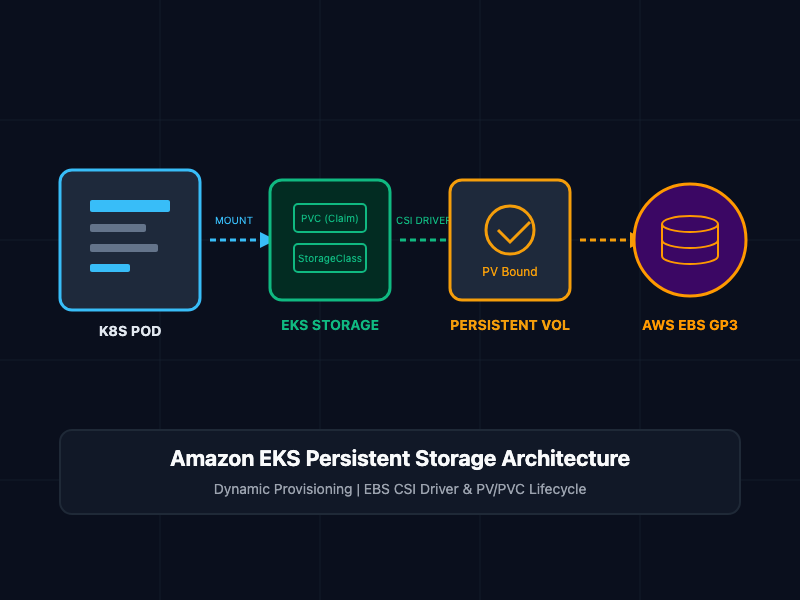
The Amazon EBS Container Storage Interface (CSI) driver manages the lifecycle of Amazon EBS volumes for EKS clusters. Rather than requiring administrators to manually pre-provision EBS volumes in AWS and bind them to static PersistentVolume manifests, the EBS CSI driver enables dynamic provisioning.
When a developer submits a PersistentVolumeClaim, the following automated sequence occurs:
- PVC Submission: The developer creates a PersistentVolumeClaim specifying a StorageClass handled by ebs.csi.aws.com.
- CSI Controller Execution: The EBS CSI Controller running in the kube-system namespace intercepts the request and calls the AWS EC2 API (CreateVolume) to provision an EBS volume.
- PV Binding: The CSI driver creates a matching PersistentVolume in the cluster and binds it 1-to-1 with the PersistentVolumeClaim.
- Volume Attachment: The CSI Node daemon (running as a DaemonSet on every worker node) attaches the EBS volume to the specific EC2 worker node hosting the Pod (AttachVolume).
- Mounting: The volume is formatted (e.g., ext4 or xfs) and mounted inside the container at the designated volumeMounts path.
Core Concepts and Implementation
Step 1: Installing the AWS EBS CSI Driver Add-On
Before Kubernetes can interact with the AWS EBS API, the cluster must host the EBS CSI Driver with appropriate IAM permissions (via IAM Roles for Service Accounts - IRSA or EKS Pod Identity).
Run the following commands using eksctl to attach the IAM policy and deploy the managed EKS add-on:
# Define cluster variables
export CLUSTER_NAME="production-eks-cluster"
export REGION="us-east-1"

# Associate IAM OIDC Provider with the EKS cluster
eksctl utils associate-iam-oidc-provider \
  --cluster $CLUSTER_NAME \
  --region $REGION \
  --approve

# Create the EBS CSI Driver IAM Role and Service Account (IRSA)
eksctl create iamserviceaccount \
  --name ebs-csi-controller-sa \
  --namespace kube-system \
  --cluster $CLUSTER_NAME \
  --role-name AmazonEKS_EBS_CSI_DriverRole \
  --role-only \
  --attach-policy-arn arn:aws:iam::aws:policy/service-role/AmazonEBSCSIDriverPolicy \
  --approve

# Install the Amazon EBS CSI Add-on
eksctl create addon \
  --name aws-ebs-csi-driver \
  --cluster $CLUSTER_NAME \
  --service-account-role-arn arn:aws:iam::123456789012:role/AmazonEKS_EBS_CSI_DriverRole \
  --force
Step 2: Defining a Custom StorageClass (gp3)
Define a custom StorageClass that utilizes modern Amazon EBS gp3 volumes with encrypted storage enabled by default.
# ebs-storageclass.yaml
apiVersion: storage.k8s.io/v1
kind: StorageClass
metadata:
  name: ebs-sc-gp3
provisioner: ebs.csi.aws.com
volumeBindingMode: WaitForFirstConsumer
allowVolumeExpansion: true
reclaimPolicy: Delete
parameters:
  type: gp3
  encrypted: "true"
  iops: "3000"
  throughput: "125"
Key Parameter: volumeBindingMode: WaitForFirstConsumer delays volume creation until the Pod requesting the PVC is scheduled. This ensures the EBS volume is provisioned in the exact Availability Zone (AZ) where the worker node resides, avoiding cross-AZ attachment errors.
Step 3: Creating the PersistentVolumeClaim (PVC)
Developers declare storage requirements without needing AWS infrastructure permissions by applying a PersistentVolumeClaim manifest.
# ebs-pvc.yaml
apiVersion: v1
kind: PersistentVolumeClaim
metadata:
  name: postgres-pvc
  namespace: database
spec:
  accessModes:
    - ReadWriteOnce
  storageClassName: ebs-sc-gp3
  resources:
    requests:
      storage: 20Gi
Note: EBS volumes only support the ReadWriteOnce (RWO) access mode, meaning a single volume can only be mounted for read-write operations by nodes in a single Availability Zone.
Step 4: Mounting the PVC to a Stateful Pod
Mount the provisioned storage into an application container by referencing the claimName under volumes and mapping it to a filesystem path under volumeMounts.
# postgres-pod.yaml
apiVersion: v1
kind: Pod
metadata:
  name: postgres-db
  namespace: database
  labels:
    app: postgres
spec:
  containers:
    - name: postgres
      image: postgres:15-alpine
      env:
        - name: POSTGRES_PASSWORD
          value: "SecureProductionPassword123"
        - name: PGDATA
          value: "/var/lib/postgresql/data/pgdata"
      ports:
        - containerPort: 5432
      volumeMounts:
        - name: postgres-persistent-storage
          mountPath: /var/lib/postgresql/data
  volumes:
    - name: postgres-persistent-storage
      persistentVolumeClaim:
        claimName: postgres-pvc
SRE and Production Storage Best Practices
- Enforce Encryption at Rest: Always specify encrypted: "true" inside the StorageClass definition to enforce AWS KMS encryption for all dynamically created block devices.
- Enable Volume Expansion: Set allowVolumeExpansion: true on your StorageClass. This allows SREs to resize storage dynamically by updating the spec.resources.requests.storage value in the PVC without destroying the pod or stopping the application.
- Account for Availability Zone Scoping: Amazon EBS volumes are strictly bound to a single Availability Zone. If a node fails in us-east-1a, Kubernetes cannot attach the existing EBS volume to a node running in us-east-1b. For multi-AZ read-write shared access across nodes, utilize Amazon EFS (efs.csi.aws.com) instead of EBS.
- Use StatefulSets for Cluster Deployments: When running clustered databases (like PostgreSQL, MySQL, or MongoDB), use Kubernetes StatefulSet objects paired with volumeClaimTemplates rather than standalone Pods or basic Deployments.
Getting Started
To verify persistent storage functionality in your EKS cluster:
# Step 1: Apply the StorageClass, PVC, and Pod manifests
kubectl apply -f ebs-storageclass.yaml
kubectl apply -f ebs-pvc.yaml
kubectl apply -f postgres-pod.yaml

# Step 2: Verify PVC binding and dynamic PV creation
kubectl get pvc -n database
kubectl get pv

# Step 3: Confirm data persistence by writing a file inside the mounted volume
kubectl exec -it postgres-db -n database -- sh -c "echo 'Stateful Data' > /var/lib/postgresql/data/test.txt"

# Step 4: Delete the Pod to simulate a crash
kubectl delete pod postgres-db -n database

# Step 5: Re-apply the Pod and verify the data remains intact
kubectl apply -f postgres-pod.yaml
kubectl exec -it postgres-db -n database -- cat /var/lib/postgresql/data/test.txt
By decoupling storage definition using Kubernetes PVCs and the AWS EBS CSI driver, engineering teams build fault-tolerant stateful applications that maintain data persistence across container restarts and node migrations.