The Vulnerabilities and Costs of Proprietary Remote Access
In modern enterprise and IT infrastructure management, remote desktop access is an essential operational requirement. However, relying on closed-source, proprietary SaaS remote desktop utilities introduces critical business liabilities:
- Third-Party Relay Exposure: Traffic routed through third-party vendor servers creates a high-value attack target. A single compromise at the SaaS provider level can grant unauthorized access to internal corporate endpoints.
- Escalating SaaS Licensing Overhead: Commercial providers frequently lock enterprise features—such as centralized address books, access control lists (ACLs), and custom relay servers—behind expensive per-user or per-device subscription tiers.
- Bandwidth and Latency Bottlenecks: When remote sessions are forced through overloaded commercial relay nodes located far from local regional offices, users experience severe screen lag and degraded input response times.
- Regulatory Non-Compliance: Storing connection metadata or passing video feeds through unverified cloud relays violates strict data sovereignty frameworks such as GDPR, HIPAA, and PCI-DSS.
RustDesk eliminates these operational risks by providing a fully open-source, high-performance remote desktop infrastructure written in Rust.
What Is RustDesk?
RustDesk is an open-source remote desktop application designed as a self-hostable alternative to tools like TeamViewer and AnyDesk. Built with Rust for memory safety and processing efficiency, RustDesk operates without requiring third-party cloud infrastructure.
The platform provides out-of-the-box support for Windows, macOS, Linux, Android, iOS, and Web clients. Organizations can maintain absolute control over their network traffic by deploying two lightweight backend server binaries:
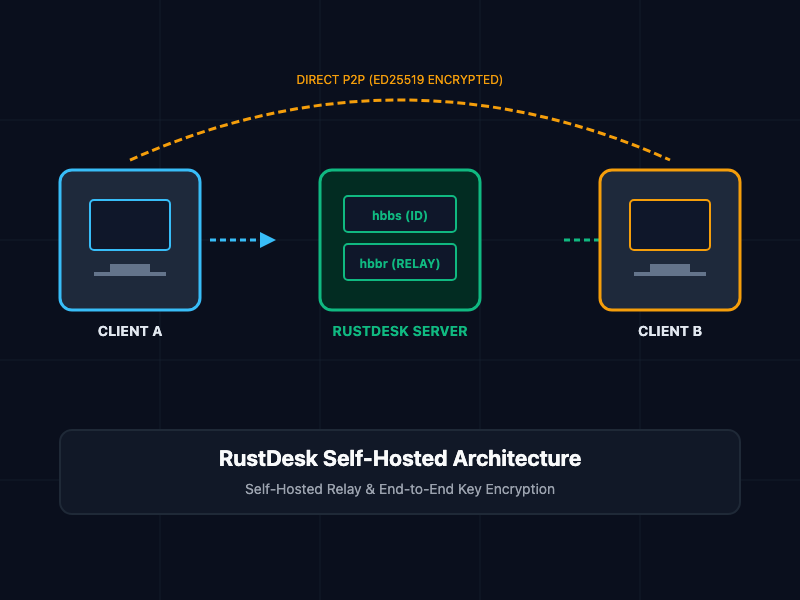
- hbbs (RustDesk ID / Rendezvous Server): Handles client registration, initial connection negotiations, peer-to-peer (P2P) address discovery, and authentication key exchanges.
- hbbr (RustDesk Relay Server): Acts as a high-speed data relay when direct peer-to-peer connection establishment is blocked by strict NAT rules or corporate firewalls.
Core Concepts and Self-Hosted Implementation
1. Architecture and Traffic Flow
RustDesk prioritizes direct peer-to-peer (P2P) connections using TCP and UDP punch-through mechanisms. When Client A attempts to connect to Client B:
- Both clients register with the central ID server (hbbs).
- hbbs facilitates NAT traversal, attempting to establish a direct, end-to-end encrypted TCP connection between Client A and Client B.
- If direct P2P connection fails due to symmetric NAT structures, hbbs redirects both clients to the Relay Server (hbbr), which securely relays encrypted video frames and input signals.
2. Deploying a Self-Hosted Server via Docker Compose
To run your own private signaling and relay infrastructure, deploy hbbs and hbbr behind a persistent storage volume with mandatory public-key encryption enabled.
The following docker-compose.yml file configures a complete self-hosted RustDesk server setup:
# some new version ignore this key but just warning
version: '3.8'

services:
  hbbs:
    container_name: rustdesk-hbbs
    image: rustdesk/rustdesk-server:latest
    command: hbbs -r rustdesk.yourdomain.com:21117 -k _
    volumes:
      - ./data:/root
    network_mode: host
    restart: unless-stopped

  hbbr:
    container_name: rustdesk-hbbr
    image: rustdesk/rustdesk-server:latest
    command: hbbr -k _
    volumes:
      - ./data:/root
    network_mode: host
    restart: unless-stopped
Key Parameter: The -k _ flag enforces mandatory public-key authentication. When hbbs starts for the first time, it automatically generates a public/private keypair (id_ed25519 and id_ed25519.pub) inside the ./data directory. Clients must supply this public key to establish connection channels.
3. Enterprise Port Allocation
To ensure uninterrupted connectivity, open the following network ports on your firewall or cloud security group:
| Port | Protocol | Service | Function |
| 21115 | TCP | hbbs | NAT location and discovery service |
| 21116 | TCP / UDP | hbbs | ID registration and heartbeat signals |
| 21117 | TCP | hbbr | Encrypted session relay service |
| 21118 | TCP | hbbs | Web client HTML5 console interface |
| 21119 | TCP | hbbr | Web client relay interface |
Security and Infrastructure Best Practices
- Enforce Key Authentication Everywhere: Never run hbbs without the -k _ enforcement flag. Unencrypted relays allow unauthorized third parties to route arbitrary traffic through your server endpoints.
- Restrict Public Key Distribution: Distribute your id_ed25519.pub string securely to authorized end-user clients using centralized configuration management tools (such as Ansible or Group Policy Objects).
- Utilize Custom Domain Name Aliases: Configure explicit DNS A records (e.g., relay.enterprise.com) for your server IP addresses rather than binding clients to static public IPs to allow seamless migration during cloud maintenance.
- Implement Systemd Service Watchdogs: If running outside Docker, manage hbbs and hbbr via systemd services with auto-restart policies to maintain high availability across system reboots.
Getting Started
To launch your private remote access infrastructure:
# Step 1: Create storage directory for server keys and configuration
mkdir -p /opt/rustdesk && cd /opt/rustdesk

# Step 2: Create docker-compose.yml with your server parameters
# [Paste the docker-compose template from above]

# Step 3: Launch the self-hosted services
docker compose up -d

# Step 4: Extract your public key for client distribution
cat ./data/id_ed25519.pub

# Step 5: Configure your RustDesk Client
# Open RustDesk Client -> ID/Relay Server Settings:
# - ID Server: rustdesk.yourdomain.com:21116
# - Relay Server: rustdesk.yourdomain.com:21117
# - Key: <Contents of id_ed25519.pub>
By decoupling remote desktop capabilities from proprietary SaaS vendors and self-hosting RustDesk on your own private infrastructure, you eliminate recurring vendor fees, reduce network latency, and secure complete control over your remote access boundaries.