The Illusion of Container "Magic"
To most developers, launching a container feels like pure magic. You type a single command into your terminal:
docker run -d nginx
And within a fraction of a second, an isolated environment springs to life with its own network stack, filesystem, and process space. But containers aren't virtual machines, and Docker isn't running a hypervisor.
So what is actually happening beneath the surface?
Underneath that slick CLI interface lies a highly orchestrated chain of system daemons, OCI (Open Container Initiative) runtimes, and deep Linux kernel capabilities. Demystifying this startup process turns Docker from black-box magic into predictable, tunable engineering logic.
What Is a Docker Container (Really)?
Before diving into the execution flow, let's clear up the biggest misconception in modern DevOps:
A container is NOT a virtual machine.
A virtual machine emulates an entire physical computer, including a guest operating system, virtual CPU, memory, and kernel layer running on top of a hypervisor.
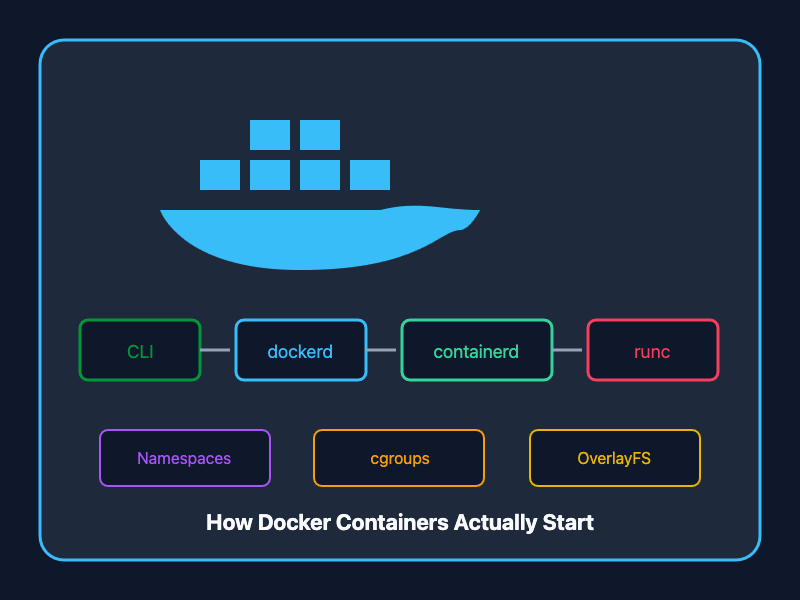
A container, on the other hand, is simply a standard Linux process running on your host machine's kernel, isolated from other processes using three core Linux kernel features:
- Namespaces (for isolation)
- Control Groups / cgroups (for resource limits)
- OverlayFS / UnionFS (for lightweight layered filesystems)
The 8-Step Container Execution Lifecycle
When you trigger docker run -d nginx, Docker initiates an 8-step journey across the host system to transform your CLI command into a running, isolated container process.
[ Docker Client ] ➔ [ dockerd ] ➔ [ containerd ] ➔ [ runc ] ➔ [ Linux Kernel ]
Step 1: The docker run Request (Docker Client)
You execute the command in your shell. The Docker Client (docker) formats your options into an HTTP REST API request and sends it over a local Unix domain socket (/var/run/docker.sock) to the background daemon.
Step 2: Request Validation & Handling (Docker Daemon / dockerd)
The Docker Daemon (dockerd) listens for API calls, validates your CLI arguments, and checks whether the required container image (nginx) exists locally in /var/lib/docker/.
- If the image isn't found locally, dockerd pulls the image layers from Docker Hub or your configured private registry.
- It then creates a high-level container object in its internal state.
Step 3: Lifecycle Management (containerd)
dockerd doesn't handle low-level container runtime execution directly. Instead, it delegates the container lifecycle to containerd—a high-performance, industry-standard container runtime manager.
- containerd manages image storage, metadata, network setup, and snapshot management.
- It prepares the execution request and hands it off to the OCI execution engine.
Step 4: Low-Level OCI Execution (runc)
containerd spawns runc, the lightweight reference implementation of the Open Container Initiative (OCI) runtime specification.
- runc interacts directly with the Linux kernel to assemble the container's isolated runtime environment.
- It sets up the execution container context and spawns the container's initial process.
Step 5: Process & System Isolation (Linux Namespaces)
runc asks the Linux kernel to create isolated namespaces for the process. Namespaces restrict what the container process can see:
- PID (Process ID): Isolates process IDs so the container sees its main process as PID 1.
- NET (Network): Gives the container its own virtual network interfaces, IP address, and routing table.
- IPC (Inter-Process Communication): Isolates shared memory and message queues.
- MNT (Mount): Isolates filesystem mount points so the container only sees its root filesystem.
- UTS (UNIX Timesharing System): Allows the container to have its own hostname and domain name.
- USER (User IDs): Maps container root users to unprivileged users on the host machine for enhanced security.
Step 6: Resource Boundaries & Limits (cgroups)
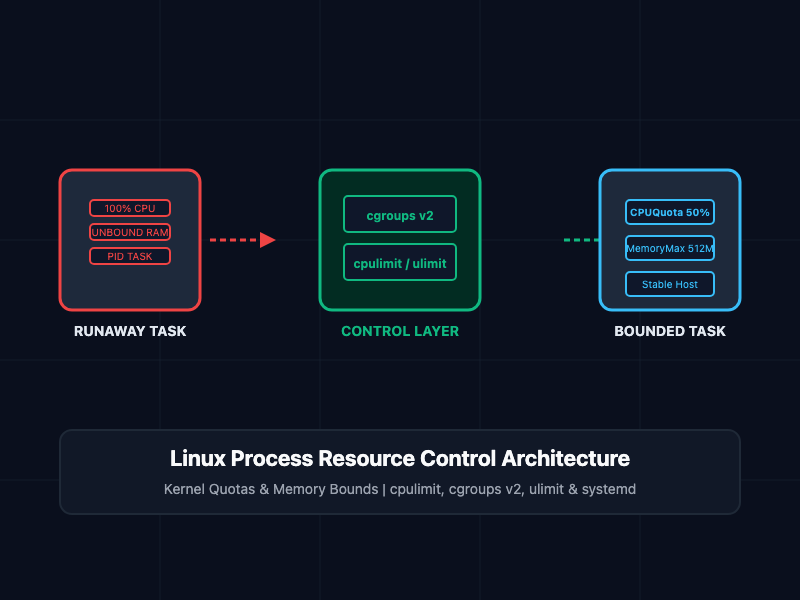
While namespaces control what a container can see, Control Groups (cgroups) control what a container can use. runc configures cgroup constraints on the host kernel:
- CPU: Limits CPU cores, throttling, and execution shares.
- Memory: Sets strict RAM limits and OOM (Out Of Memory) killer rules.
- PIDs: Caps the maximum number of processes to prevent fork-bomb attacks.
- Block I/O: Restricts disk read/write throughput rates.
- Network: Controls network bandwidth allocations.
Step 7: Root Filesystem Preparation (OverlayFS / Union FS)
containerd and runc prepare the container's root directory (/) using OverlayFS (Union File System):
+-------------------------------------------------+
| Writable Container Layer  (Read/Write)          |
+-------------------------------------------------+
| Image Layer 3: Application Code (Read-Only)    |
| Image Layer 2: Environment Dependencies (R/O)  |
| Image Layer 1: Base OS - Alpine/Ubuntu (R/O)    |
+-------------------------------------------------+
- Read-only base layers from the container image are stacked together.
- A thin, ephemeral read/write container layer is mounted on top.
- Any files modified during runtime are copied up to this writable layer without altering the underlying image layers.
Step 8: Container Process Launch (PID 1)
With namespaces configured, cgroups enforced, and OverlayFS mounted, runc executes the container's entrypoint/command (e.g., nginx -g 'daemon off;').
- The application runs as PID 1 inside its own PID namespace.
- Once the container process is successfully initialized, runc exits, leaving containerd-shim to monitor the running container without keeping unnecessary daemon threads alive.
Key Files & Directories Every Engineer Should Know
Understanding where Docker stores state on host Linux machines is essential for debugging and performance tuning:
| File / Path | Purpose & Function |
| /var/run/docker.sock | Unix socket used for communication between Docker CLI and dockerd |
| /var/lib/docker/ | Storage for local images, container layers, volumes, and networks |
| /var/lib/containerd/ | Storage for containerd snapshots, content store, and metadata |
| /var/run/docker/containerd/ | Runtime state and active execution sockets |
| /proc/<pid>/ns/ | Kernel directory containing namespace symlinks for a specific process |
| /sys/fs/cgroup/ | Pseudo-filesystem exposing kernel cgroup resource controls |
Docker Architecture High-Level Summary
+-------------------------------------------------------------------+
|                           Docker Client                           |
|                       (CLI / API Requests)                        |
+-------------------------------------------------------------------+
                                  |
                                  v
+-------------------------------------------------------------------+
|                        Docker Daemon (dockerd)                    |
|                (Image management, high-level API)                 |
+-------------------------------------------------------------------+
                                  |
                                  v
+-------------------------------------------------------------------+
|                            containerd                             |
|          (Container lifecycle, snapshotter, image pull)          |
+-------------------------------------------------------------------+
                                  |
                                  v
+-------------------------------------------------------------------+
|                               runc                                |
|                   (OCI low-level execution engine)                |
+-------------------------------------------------------------------+
           |                      |                      |
           v                      v                      v
    [ Namespaces ]           [ cgroups ]           [ OverlayFS ]
    (PID, NET, MNT)        (CPU, RAM, Disk)       (Layered Storage)
           |                      |                      |
           +----------------------+----------------------+
                                  |
                                  v
               +-------------------------------------+
               |    Running Container Process (PID 1) |
               +-------------------------------------+
Why Understanding Docker Internals Matters
- Faster Troubleshooting: Knowing that network issues often stem from NET namespace configuration or socket permissions speeds up incident response.
- Performance Optimization: Understanding how OverlayFS copy-on-write works helps you write leaner Dockerfiles with optimized layer caching.
- Enhanced Security: Knowing how cgroups and USER namespaces work allows you to harden containers against breakout exploits.
- Demystifying Kubernetes: Modern K8s nodes drop dockerd and interface directly with containerd via CRI (Container Runtime Interface)—learning these components directly prepares you for cloud-native engineering.
Getting Started
Next time you execute docker run, inspect your host system to see these abstractions in real-time! Run ls -l /proc/self/ns to view your current shell's namespaces, check /sys/fs/cgroup to inspect resource control files, or query ctr (the containerd CLI) to bypass dockerd entirely.