The Risk of Unbounded Process Execution
In high-concurrency Linux production environments, executing unconstrained background workers, data-processing scripts, or third-party binaries introduces severe operational risks:
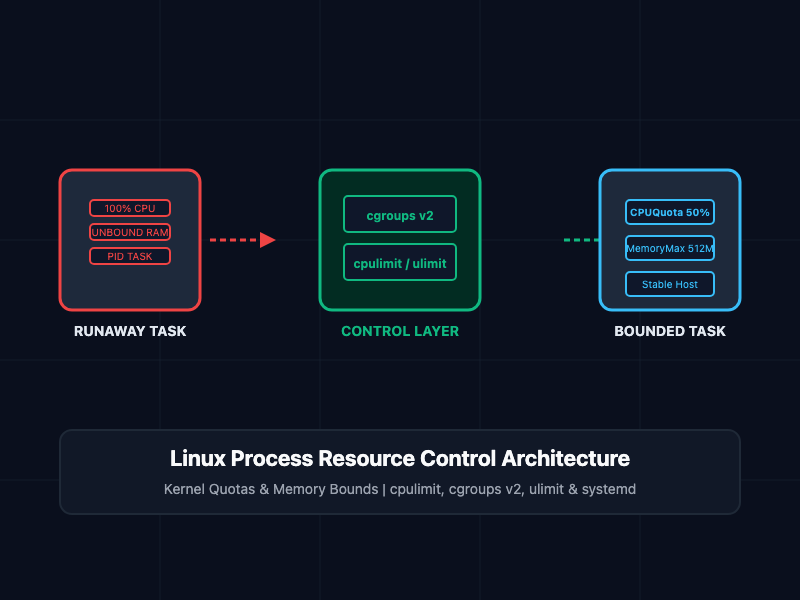
- CPU Core Saturation: A single single-threaded runaway process or infinite loop can consume 100% of an allocated CPU core, degrading the throughput of co-located services.
- Kernel Out-Of-Memory (OOM) Panics: Unbounded memory allocation triggers system-wide swap thrashing. Once physical RAM and swap are exhausted, the Linux kernel OOM killer activates, terminating critical processes unpredictably.
- Cascading Service Degradation: In multi-tenant environments or shared compute nodes, a single "noisy neighbor" application can starve neighboring microservices of file descriptors, execution threads, and disk bandwidth.
- Denial of Wallet in Cloud Deployments: Auto-scaling clusters reacting to unbounded CPU spikes continuously provision expensive cloud instances to compensate for unoptimized code.
To guarantee system stability and resource availability, system administrators and Site Reliability Engineers (SREs) must enforce strict execution boundaries at the kernel and user levels.
What Are Linux Resource Control Mechanisms?
Linux provides several decoupled tools and kernel subsystems to throttle and isolate process resource consumption:
- cpulimit: A user-space utility that dynamically pauses and resumes a process using OS signals (SIGSTOP and SIGCONT) to maintain a target CPU utilization percentage.
- cgroups v2 (Control Groups): The core Linux kernel mechanism that organizes processes into hierarchical groups to enforce hard CPU, memory, I/O, and network boundaries.
- ulimit: A shell-builtin mechanism that sets per-user resource limits—such as maximum open file descriptors, virtual memory size, and execution time—for processes spawned within that shell session.
- systemd-run: A systemd utility that executes commands inside ephemeral, transient systemd scope or service units with native cgroup resource limits (CPUQuota, MemoryMax).
Core Commands and Implementation
1. Real-Time CPU Throttling with cpulimit
The cpulimit utility monitors target process IDs (PIDs) or executable names and restricts CPU consumption by forcefully suspending and resuming execution loops.
To limit an existing running process (PID 14209) to a maximum of 50% of a single CPU core:
# Throttle process ID 14209 to 50% CPU utilization
sudo cpulimit -p 14209 -l 50
To launch a new CPU-intensive task (e.g., video encoding or compilation) throttled to 150% CPU utilization across multi-core systems:
# Execute command with 150% CPU cap (1.5 cores) in background mode (-b)
sudo cpulimit -e ffmpeg -l 150 -b
Operational Note: Because cpulimit relies on signal-based pausing (SIGSTOP/SIGCONT), it does not reduce physical memory footprint or I/O load.
2. Enforcing Kernel-Level Boundaries with cgroups v2
Modern Linux distributions (RHEL 9+, Ubuntu 22.04+, Debian 11+) enable unified cgroups v2 by default under /sys/fs/cgroup. cgroups v2 provides hard resource containment enforced directly by the kernel scheduler.
To create a dedicated control group named untrusted_tasks and assign CPU and memory limits:
# Create custom cgroup hierarchy directory
sudo mkdir -p /sys/fs/cgroup/untrusted_tasks

# Set hard memory limit to 512MB (MemoryMax)
echo "536870912" | sudo tee /sys/fs/cgroup/untrusted_tasks/memory.max

# Set CPU quota to 50% of one core (50,000 microseconds per 100,000 microsecond period)
echo "50000 100000" | sudo tee /sys/fs/cgroup/untrusted_tasks/cpu.max

# Attach target process PID 18420 to the control group
echo "18420" | sudo tee /sys/fs/cgroup/untrusted_tasks/cgroup.procs
3. Shell-Level Limits with ulimit
The ulimit builtin sets environment constraints for the current shell session and child processes spawned from it.
To restrict max virtual memory allocation to 1GB and limit open file descriptors to 2048 within a deployment script:
# Display all active shell limits
ulimit -a

# Set hard limit on virtual memory to 1,048,576 KB (1GB)
ulimit -v 1048576

# Set maximum open file descriptors to 2048
ulimit -n 2048

# Launch process inherit limits
python3 data_processor.py
4. Transient Service Resource Scoping with systemd-run
For modern systemd-based distributions, systemd-run provides the cleanest interface for running ad-hoc scripts with explicit cgroup constraints without manually creating persistent systemd unit files.
Execute a heavy script inside an isolated transient scope capped at 2 CPU cores (CPUQuota=200%) and 1GB RAM (MemoryMax=1G):
# Run ad-hoc command under transient systemd resource constraints
systemd-run --scope -p CPUQuota=200% -p MemoryMax=1G --unit=adhoc-batch-job python3 heavy_job.py
Inspect real-time resource utilization for the active transient scope:
# Query status and resource usage of the active scope
systemctl status adhoc-batch-job.scope
Comparative Utility Matrix
Review the primary scope and target use cases for each resource control mechanism:
| Mechanism | Enforcement Level | CPU Limiting Capability | Memory Limiting Capability | Production Use Case |
|---|---|---|---|---|
| cpulimit | User-space (SIGSTOP/SIGCONT) | Soft limit (% single core) | No memory control | Ad-hoc CPU capping of legacy binaries |
| cgroups v2 | Kernel space | Hard quota (cpu.max) | Hard cap (memory.max) | Container runtimes & system-level slicing |
| ulimit | Per-shell session | Cumulative CPU time (-t) | Virtual memory (-v) | User session safety & CI/CD job bounds |
| systemd-run | Systemd cgroup wrapper | Precision quota (CPUQuota) | High/Max limits (MemoryMax) | Ephemeral background batch processing |
SRE and Production Best Practices
- Prefer cgroups v2 or systemd-run in Production: Avoid using cpulimit for critical infrastructure services. Signal manipulation introduces thread-scheduling overhead and can trigger race conditions in complex multi-threaded runtimes (such as Java or Go).
- Differentiate Between MemoryHigh and MemoryMax: When using systemd or cgroups v2, set MemoryHigh as a soft throttle limit to trigger kernel page reclamation before the process hits MemoryMax and gets killed by the OOM killer.
- Adjust Kernel OOM Scores for Critical Services: Protect critical core services (e.g., SSH, monitoring daemons) from OOM termination while making sacrificial batch workers higher priority targets:
# Decrease OOM killer likelihood for critical PID (-1000 to 1000 range)
echo "-500" | sudo tee /proc/PID/oom_score_adj
- Combine CPU and Memory Caps for Batch Jobs: Always pair CPU quotas with memory bounds. Constraining CPU without restricting RAM allows memory leaks to run unchecked until system-wide failure occurs.
Getting Started
To install and verify resource control tools across major Linux distributions:
# Ubuntu / Debian Installation
sudo apt update && sudo apt install -y cpulimit cgroup-tools

# RHEL / Rocky Linux / AlmaLinux Installation
sudo dnf install -y cpulimit libcgroup-tools

# Verify cgroups v2 mount status
mount | grep cgroup2

# Test ad-hoc process throttling with systemd-run
systemd-run --user --scope -p MemoryMax=256M -p CPUQuota=30% stress --cpu 1 --vm 1
By mastering cpulimit, cgroups v2, ulimit, and systemd-run, system administrators and SREs establish absolute control over host resource allocation, preventing runaway processes from threatening production availability.