The Friction of Context-Switching in Terminal Workflows
Software engineers and Site Reliability Engineers (SREs) operating on Linux servers perform most of their daily tasks directly inside the terminal using text editors (vim, neovim), version control (git), and system diagnosis tools (grep, htop, journalctl).
However, incorporating AI assistance into terminal-native Linux workflows traditionally introduces operational friction:
- Context-Switching Overhead: Copying error logs or source code back and forth between a Linux terminal and a web-based LLM chat interface breaks focus and slows down debugging loops.
- Lack of Local Execution Awareness: Web interfaces cannot inspect running system states, check active Git branches, read local directory structures, or execute test suites directly.
- Fragile IDE Extension Dependencies: Heavy graphical IDEs (such as VS Code or JetBrains) consume significant RAM and CPU overhead, making them impractical for remote SSH sessions or resource-constrained Linux instances.
- Unsanitized Payload Submissions: Manually pasting terminal outputs into external tools increases the risk of leaking internal environment variables, API tokens, or server paths.
Anthropic's Claude Code CLI resolves these liabilities by bringing agentic AI workflows natively into the Linux terminal.
What Is Claude Code for Linux?
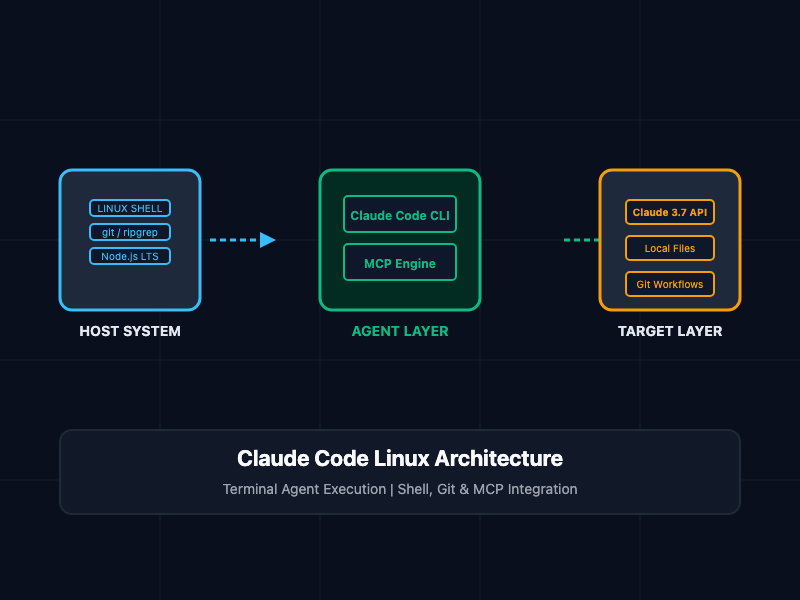
Claude Code is an agentic command-line tool developed by Anthropic that operates directly inside Linux shell environments. Built on Node.js and powered by Claude models (such as Claude 3.7 Sonnet), it functions as an autonomous terminal assistant capable of reading, editing, and executing tasks across local codebases.
Unlike standard code-completion plugins, Claude Code understands project architecture by leveraging native terminal tools (git, ripgrep). It can inspect directory trees, run build scripts, execute automated test suites, write commit messages, and create pull requests—all within your active Linux terminal session.
Installation and System Preparation
Step 1: Installing Prerequisites across Linux Distributions
Claude Code requires Node.js (v18 or higher), npm, Git, and optionally ripgrep for fast project-wide code indexing.
On Ubuntu / Debian / Linux Mint:
# Update package index and install required dependencies
sudo apt update && sudo apt install -y curl git ripgrep

# Install Node.js LTS (v20.x) via NodeSource repository
curl -fsSL https://deb.nodesource.com/setup_20.x | sudo -E bash -
sudo apt install -y nodejs

# Verify Node.js and npm versions
node -v
npm -v
On RHEL / Rocky Linux / AlmaLinux / Fedora:
# Install Git and ripgrep
sudo dnf install -y git ripgrep curl

# Install Node.js LTS module stream
sudo dnf module enable -y nodejs:20
sudo dnf install -y nodejs npm

# Confirm installation
node -v
npm -v
Step 2: Global Installation of Claude Code CLI
Once Node.js and npm are configured, install the official @anthropic-ai/claude-code package globally:
# Install Claude Code globally via npm
sudo npm install -g @anthropic-ai/claude-code

# Verify installation path and version
claude --version
Step 3: Configuring API Authentication
Claude Code authenticates with Anthropic servers using an API key or an OAuth web flow. For automated Linux environments or remote SSH sessions, export the ANTHROPIC_API_KEY environment variable directly in your shell profile (~/.bashrc or ~/.zshrc):
# Add Anthropic API Key to shell profile
echo 'export ANTHROPIC_API_KEY="sk-ant-api03-YOUR_API_KEY_HERE"' >> ~/.bashrc

# Reload profile configurations
source ~/.bashrc
Core Commands and Configuration
1. Launching and Interacting with Claude Code
To start an interactive session inside any project directory, execute the claude binary:
# Navigate to your target project directory
cd /home/developer/projects/core-api

# Launch the interactive agentic session
claude
Once initialized, issue natural language commands directly to the prompt:
# Example interactive prompt inputs
> "Analyze the project structure and list all unhandled exceptions in src/controllers."
> "Run npm test, catch any failing assertions, and apply necessary code fixes."
> "Create a new Git feature branch named fix/jwt-expiry and commit current changes."
2. Managing Configuration Files (~/.claude.json)
Claude Code maintains user-level and project-level configurations inside ~/.claude.json. This file declares custom environment flags, tool execution permissions, and registered Model Context Protocol (MCP) servers.
{
  "autoUpdaterStatus": "enabled",
  "preferredNotifChannel": "terminal_bell",
  "mcpServers": {
    "postgresql": {
      "command": "npx",
      "args": [
        "-y",
        "@modelcontextprotocol/server-postgres",
        "postgresql://devuser:password@localhost:5432/dev_db"
      ]
    }
  }
}
3. Execution Control and Permission Modes
By default, Claude Code requests user confirmation before modifying local files or running bash commands. In trusted Linux development environments, you can adjust these permission boundaries:
# Run Claude in non-interactive single-prompt mode
claude "Summarize last 5 commits and format output into CHANGELOG.md"

# Bypass interactive approvals for automated batch jobs (Use with caution)
claude --dangerously-skip-permissions "Run linter and fix all formatting errors"
Comparative Utility Matrix
Review the operational features of Claude Code compared to alternative AI development tools on Linux:
| Feature / Dimension | Claude Code CLI | IDE Extensions (Cursor/VS Code) | Raw LLM Web Interfaces |
|---|---|---|---|
| Execution Environment | Native Linux Terminal / SSH | Graphical Desktop GUI | Web Browser |
| System Resource Footprint | Extremely Low (~50MB RAM) | High (~500MB - 2GB RAM) | Browser-dependent |
| Local Shell Execution | Native (bash, git, npm) | Sandbox / Restricted terminal | Non-existent |
| Remote SSH Compatibility | Full native support | Requires SSH tunnels/extensions | Manual copy-pasting |
| Context Protocol (MCP) | Native stdio & SSE support | Varies | Non-existent |
SRE and Production Security Best Practices
- Isolate API Keys in Restricted Vaults: Avoid hardcoding ANTHROPIC_API_KEY inside plain-text shell scripts. Store credentials using secret managers or encrypted environment files (chmod 600 ~/.bashrc).
- Run inside Containerized Development Environments: When executing Claude Code with automated command execution flags (--dangerously-skip-permissions), run the process inside isolated Docker containers or unprivileged user accounts to prevent accidental system file overwrites.
- Audit Model Context Protocol (MCP) Configs: Regularly review ~/.claude.json to ensure third-party MCP servers do not expose unnecessary write access to production database systems or infrastructure endpoints.
- Utilize Project-Level .gitignore Rules: Ensure sensitive environment files (.env, credentials.json) are listed in .gitignore. Claude Code respects .gitignore rules and will not ingest excluded files into context windows.
Getting Started
To install, configure, and launch Claude Code on your Linux machine within minutes:
# Step 1: Install CLI tool globally
sudo npm install -g @anthropic-ai/claude-code

# Step 2: Set your Anthropic API Key
export ANTHROPIC_API_KEY="sk-ant-api03-YOUR_KEY"

# Step 3: Launch interactive workspace inside project repository
cd /path/to/your/codebase
claude

# Step 4: Issue your first terminal command
claude "Inspect current git status, check for broken imports, and suggest optimizations."
By deploying Claude Code directly into your Linux environment, you combine terminal speed with agentic AI capabilities, accelerating software development without leaving the command line.