


The Collapse of Package Manager Trust Boundaries
In Debian and Ubuntu environments, the Advanced Package Tool (apt) serves as the foundational trust boundary for system installation, daemon patching, and container provisioning. Because package installation occurs with superuser privileges (root), the system depends on strict cryptographic integrity verification:
- The repository metadata (Release / InRelease) is signed by Canonical's or the repository maintainer's trusted GPG key.
- The signed release index lists cryptographically secure SHA-256 hashes for all package files (.deb).
- During download, apt calculates the SHA-256 checksum of the incoming file and matches it against the signed index before handing the archive to dpkg.
- dpkg unpacks the archive and executes maintainer lifecycle scripts (preinst, postinst) directly under the root account (UID 0).
Historically, this cryptographic chain meant that even if an attacker executed a Man-in-the-Middle (MitM) interception over unencrypted HTTP or compromised a mirror server, they could not inject malicious code: any altered byte resulted in a hash mismatch, and apt rejected the file.
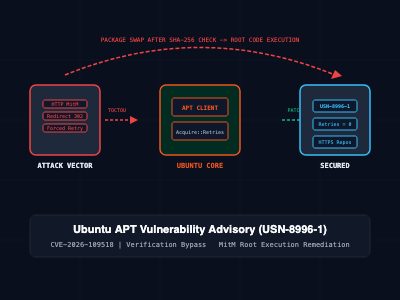
On November 4, 2026, Canonical published Ubuntu Security Notice USN-8996-1 detailing CVE-2026-109518 (CVSS v4.0: 7.7 High; rated Critical by package maintainers). Discovered by security researcher Max Justicz, this vulnerability breaks the core integrity model of APT. Under specific retry and redirect conditions, an on-path attacker or compromised repository mirror can swap a verified package file with an arbitrary malicious archive after cryptographic checks have passed, achieving instant, unauthenticated root-level code execution.
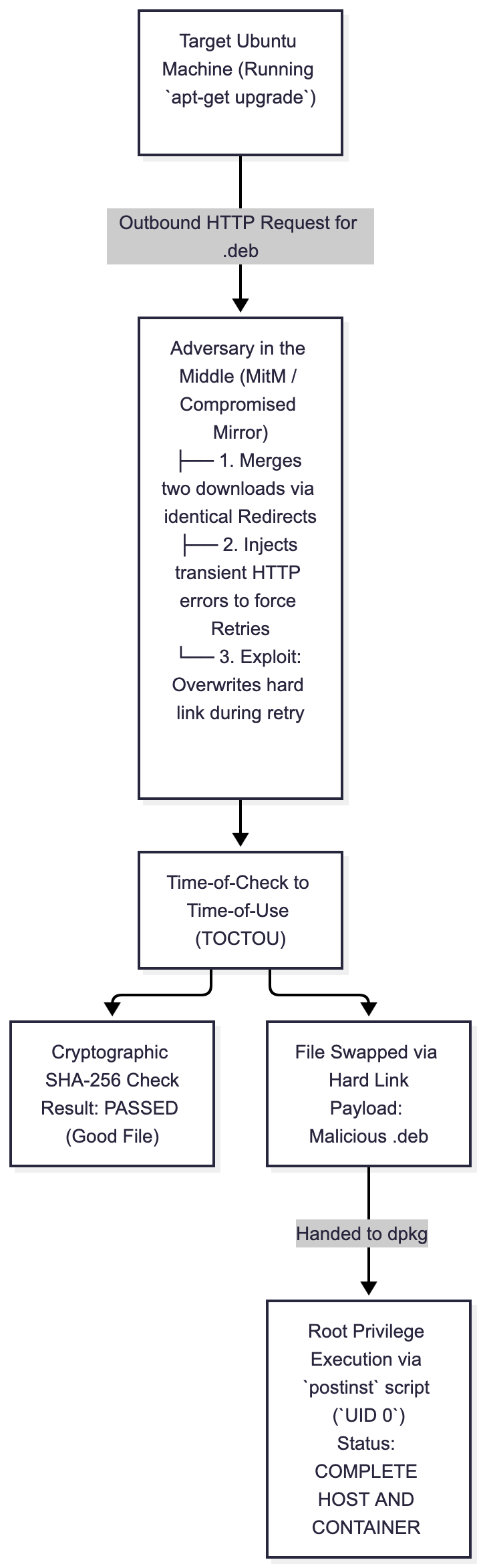
Root Cause Analysis: The Download Retry & Hard Link TOCTOU Flaw
The vulnerability is rooted in how APT manages interrupted package downloads and file reuse.
Starting with APT version 2.3.2—which became the default baseline in Ubuntu 22.04 LTS (Jammy Jellyfish) and Debian 12 (Bookworm)—the configuration setting Acquire::Retries defaults to 3 (previously 0). If a package download is interrupted, APT attempts to resume the transfer rather than discarding partial blocks and restarting from byte zero.
An attacker positioned on the network path (or operating a malicious package mirror) exploits this through a three-stage race sequence:
1. Download Merging via HTTP Redirects
When an administrator executes apt-get install or apt-get upgrade, APT requests multiple packages concurrently. The attacker intercepts two distinct package requests (e.g., package-A.deb and package-B.deb) and issues HTTP 302 Found redirects pointing both requests to the identical destination URI. Because of internal URI deduplication, APT treats both transfers as pointing to the same physical file on disk and hard-links them in the partial download directory (/var/lib/apt/lists/partial/).
2. Induced Download Resumption
The attacker serves the legitimate, signed archive for package-A.deb first. When APT begins downloading package-B.deb, the attacker injects transient network errors (such as TCP connection resets or HTTP 503 Service Unavailable). Because Acquire::Retries is greater than zero, APT triggers its resumption routine.
3. Time-of-Check to Time-of-Use (TOCTOU) Race
APT performs the cryptographic hash verification on package-A.deb. The SHA-256 checksum matches the signed repository index. However, before dpkg invokes the installation phase, the background retry thread for package-B.deb resumes.
Because the underlying files were hard-linked during the redirect deduplication phase, the resumed data stream overwrites the content of the already-verified package-A.deb file with the attacker's payload.
When APT invokes dpkg -i, dpkg executes the attacker's substituted archive. The package's postinst shell script executes with full root system authority, granting the attacker reverse shells, persistent backdoor access, or kernel exploitation vectors.
Scope of Exposure: Affected Releases & Default Vectors
Because the vulnerability requires Acquire::Retries to be set to a non-zero value, exposure depends on distribution version and configuration:
- Ubuntu 22.04 LTS (Jammy), 24.04 LTS (Noble), 26.04 LTS (Resolute), and 26.10 (Stonking): Vulnerable by default. These releases ship with Acquire::Retries "3".
- Debian 12 (Bookworm) and Debian 13 (Trixie): Vulnerable by default.
- Ubuntu 20.04 LTS (Focal), 18.04 LTS, 16.04 LTS, and 14.04 LTS: Not vulnerable in default configurations (Acquire::Retries is 0), but vulnerable if CI scripts, system administrators, or custom configuration files manually defined Acquire::Retries above 0.
- Container Environments (Docker / Podman): High risk. Base images using unpatched Ubuntu/Debian tags execute apt-get update && apt-get install over standard HTTP repository mirrors inside CI/CD runners and build clusters.
Official Patched Package Versions
Canonical released emergency security updates across all supported distributions:
| Ubuntu Release | Source Package | Patched Secure Version | Maintenance Channel |
| Ubuntu 26.10 (Stonking) | apt | 3.3.3ubuntu0.1 | Standard Ubuntu Security |
| Ubuntu 26.04 LTS (Resolute) | apt | 3.2.1ubuntu0.1 | Standard Ubuntu Security |
| Ubuntu 24.04 LTS (Noble) | apt | 2.8.4ubuntu0.1 | Standard Ubuntu Security |
| Ubuntu 22.04 LTS (Jammy) | apt | 2.4.15ubuntu0.1 | Standard Ubuntu Security |
| Ubuntu 20.04 LTS (Focal) | apt | 2.0.12+esm1 | Ubuntu Pro (ESM) |
| Ubuntu 18.04 LTS (Bionic) | apt | 1.6.19+esm1 | Ubuntu Pro (ESM) |
| Ubuntu 16.04 LTS (Xenial) | apt | 1.2.36+esm1 | Ubuntu Pro (Legacy ESM) |
| Ubuntu 14.04 LTS (Trusty) | apt | 1.0.1ubuntu2.24+esm4 | Ubuntu Pro (Legacy ESM) |
Fleet Audit and Remediation Workflows
Upgrading a package manager while the package manager itself contains a download interception vulnerability presents a "chicken-and-egg" problem: running a standard unhardened update command could theoretically expose the system during the upgrade process.
Canonical and security engineering teams explicitly recommend disabling retries on the command line during the patch command itself:
Step 1: Fleet-Wide Version Audit
Run the following command to determine whether your host is operating on an unpatched binary:
# Check installed version of the APT core library
apt list --installed '?source-package(^apt$)'
Alternatively, query dpkg directly:
dpkg-query -W -f='${Package}: ${Version}\n' apt libapt-pkg*
Compare the returned version against the table above. If the installed version is lower than the target release, the host must be remediated immediately.
Step 2: The Safe Upgrade Command (Disabling Retries)
To prevent an on-path attacker from triggering the download resumption race condition while fetching the patch, pass -o Acquire::Retries=0 directly into the upgrade execution:
# Safely update repository catalogs and patch APT without allowing download retries
sudo apt-get update -o Acquire::Retries=0
sudo apt-get install -y -o Acquire::Retries=0 --only-upgrade \
    apt \
    apt-utils \
    libapt-pkg*
Note: The -o Acquire::Retries=0 argument applies strictly to this single command invocation. If a transient network drop occurs during download, simply rerun the command.
Step 3: Complete Automated Remediation Script (patch_apt_cve_2026_109518.sh)
For system administrators managing fleets of virtual machines, bare-metal instances, or cloud servers, the following bash script audits the operating system release, enforces the safe upgrade flag, validates the updated package version, and checks repository mirror protocols:
#!/usr/bin/env bash
# patch_apt_cve_2026_109518.sh - Automated remediation for CVE-2026-109518
set -euo pipefail

echo "=== [1/4] Detecting Distribution and Release ==="
if [ ! -f /etc/os-release ]; then
    echo "[ERROR] /etc/os-release not found. Non-systemd or non-standard Linux environment."
    exit 1
fi

. /etc/os-release
echo "[*] System Identified: ${NAME} (${VERSION_ID} - ${VERSION_CODENAME:-unknown})"

echo "=== [2/4] Auditing Active APT Configuration ==="
ACTIVE_RETRIES=$(apt-config dump | grep -i 'Acquire::Retries' || true)
echo "[*] Current Configuration: ${ACTIVE_RETRIES:-'Acquire::Retries not explicitly configured (inherits defaults)'}"

echo "=== [3/4] Executing Safe Upgrade (Acquire::Retries=0) ==="
export DEBIAN_FRONTEND=noninteractive

# Force retries to zero to close the exploitation window during patch fetching
sudo apt-get update -o Acquire::Retries=0
sudo apt-get install -y -o Acquire::Retries=0 --only-upgrade \
    apt \
    apt-utils \
    libapt-pkg* || {
        echo "[ERROR] Failed to upgrade APT packages. Check network route and security sources."
        exit 1
    }

echo "=== [4/4] Verifying Patched Version Baseline ==="
INSTALLED_VERSION=$(dpkg-query -W -f='${Version}' apt)
echo "[*] Upgraded APT Package Version: ${INSTALLED_VERSION}"

# Validate release strings based on distribution codename
case "${VERSION_CODENAME:-}" in
    noble)
        TARGET="2.8.4ubuntu0.1"
        ;;
    jammy)
        TARGET="2.4.15ubuntu0.1"
        ;;
    resolute)
        TARGET="3.2.1ubuntu0.1"
        ;;
    stonking)
        TARGET="3.3.3ubuntu0.1"
        ;;
    *)
        TARGET="unknown"
        echo "[INFO] For older releases under ESM, verify against Canonical USN-8996-1 specifications."
        ;;
esac

echo "[OK] CVE-2026-109518 remediation cycle completed."
Mitigating Attack Surfaces: HTTPS Transports & Mirror Hardening
While binary patching is the only definitive resolution, configuring transport-layer security removes the underlying attack vector entirely.
Enforcing HTTPS for Package Archives
The attack requires an adversary to modify HTTP traffic in transit. If apt communicates with package repositories over encrypted TLS (https://), an on-path MitM attacker cannot inspect or modify HTTP headers, strip Content-Length, or inject rogue redirects.
To transition standard repository definitions from unencrypted HTTP to HTTPS:
Ensure the TLS certificate bundle is present:
sudo apt-get install -y ca-certificatesInspect active source lists (/etc/apt/sources.list or /etc/apt/sources.list.d/ubuntu.sources):
grep -rnE 'http://(archive|security)\.ubuntu\.com' /etc/apt/ Update the URI schemes to HTTPS. For modern deb822-style configurations (/etc/apt/sources.list.d/ubuntu.sources in Ubuntu 24.04+):
Types: deb
URIs: https://archive.ubuntu.com/ubuntu/
Suites: noble noble-updates noble-security
Components: main restricted universe multiverse
Signed-By: /usr/share/keyrings/ubuntu-archive-keyring.gpg
Container and CI/CD Pipeline Remediation
Patching physical host nodes does not protect containerized workloads. Docker containers share the host Linux kernel, but maintain completely independent root filesystems (rootfs) including their own independent installation of apt.
If a Dockerfile pulls an unpatched base image and runs apt-get update && apt-get install, the container build process remains exposed to network-level MitM exploitation inside ephemeral build runners.
Hardening Dockerfiles
Incorporate the retry mitigation flag and upgrade apt explicitly before executing application-level package installations:
# Hardened Dockerfile Pattern for Ubuntu Base Images
FROM ubuntu:24.04

# Prevent interactive prompts during container build
ENV DEBIAN_FRONTEND=noninteractive

# Patch APT immediately with zero retries before installing app dependencies
RUN apt-get update -o Acquire::Retries=0 && \
    apt-get install -y -o Acquire::Retries=0 --only-upgrade \
        apt \
        libapt-pkg* && \
    apt-get install -y --no-install-recommends \
        curl \
        ca-certificates \
        python3 && \
    apt-get clean && \
    rm -rf /var/lib/apt/lists/*

CMD ["python3", "--version"]
Rebuilding and Verifying Container Images
Execute a non-cached build and verify the installed package version:
# Force non-cached container rebuild
docker build --no-cache -t enterprise-app:latest .

# Verify the container image contains the secure APT library version
docker run --rm enterprise-app:latest dpkg-query -W -f='${Version}\n' apt
Architectural Comparison Matrix: Vulnerability State & Mitigations
| Defensive Layer | Unmitigated State | Mitigated State (Retries=0) | Fully Patched State |
| Vulnerability Status | Vulnerable to MitM Root RCE | Mitigated (Resumption Disabled) | Fully Resolved (Code Level) |
| Download Interception Risk | High (Hard link file swap) | Blocked (Failed downloads abort) | Blocked (Secure link handling) |
| HTTP Transport Security | Exposed to plain HTTP tampering | Exposed to plain HTTP tampering | Protected by GPG signature integrity |
| Operational Impact | Full host compromise via dpkg | Transient download failures on packet drops | Normal resilient download handling |
| Network Requirements | Plain HTTP to mirrors | Plain HTTP to mirrors | Plain HTTP or HTTPS supported |
| Unattended Upgrades Action | May fail or get hijacked | Safe execution | Standard automated daily patching |
SRE and Production Security Best Practices
- Audit Automated CI/CD Runners: Cloud-hosted ephemeral GitHub Actions, GitLab CI runners, and Kubernetes build pods frequently provision base Ubuntu environments on the fly. Audit runner deployment scripts to ensure base images are pinned to refreshed versions containing the patched APT package.
- Enforce Zero-Trust Network Egress: Restrict outbound server connections so production nodes can communicate only with whitelisted repository domains over port 443 (HTTPS), blocking unauthorized network nodes from intercepting repository traffic.
- Inspect Internal Package Proxies: If your infrastructure routes package traffic through internal caching proxies (such as apt-cacher-ng or Nexus), audit proxy server logs for anomalous repeated 302 Found redirects or connection resets.
- Enable unattended-upgrades: On long-lived virtual machines, verify that Canonical's automatic security service is running. By default on Ubuntu 16.04 LTS and later, unattended-upgrades executes daily and will apply USN-8996-1 automatically within a 24-hour window.
sudo systemctl status unattended-upgrades Getting Started
To confirm host security posture and eliminate exposure to CVE-2026-109518:
# Step 1: Check active APT package version
apt list --installed '?source-package(^apt$)'

# Step 2: Execute safe, zero-retry update sequence
sudo apt-get update -o Acquire::Retries=0
sudo apt-get install -y -o Acquire::Retries=0 --only-upgrade apt libapt-pkg*

# Step 3: Confirm active version matches or exceeds target release
dpkg-query -W -f='${Version}\n' apt

# Step 4: Rebuild downstream container images
docker build --pull --no-cache -t my-production-service:latest .
By applying official security updates with disabled retries, enforcing HTTPS repository endpoints, and refreshing container base images, infrastructure teams eliminate the package verification bypass and ensure deterministic package integrity across Linux server fleets.