The Liabilities of Proprietary Customer Support SaaS
Modern customer success and technical support teams rely on messaging hubs to handle user inquiries across multiple communication vectors. However, depending on proprietary SaaS utilities (such as Intercom, Zendesk, or Drift) introduces severe operational friction:
- Escalating Per-Seat Licensing Costs: SaaS providers tier pricing around the number of support agents, creating high recurring operational costs as customer support operations scale.
- Data Sovereignty and Compliance Violations: Transmitting user identity attributes, conversation logs, and diagnostic attachments through external third-party cloud servers violates strict data protection regulations such as GDPR, HIPAA, and CCPA.
- Siloed Communication Channels: Inquiries arriving via email, live website chat, WhatsApp, Telegram, and social media platforms remain fragmented across different tools, reducing agent efficiency and context continuity.
- Vendor Lock-in and Limited Extensibility: Customizing routing logic, integrating internal database schemas, or extending chatbot agent workflows is often restricted by proprietary platform APIs.
Chatwoot resolves these liabilities by providing an enterprise-grade, open-source omnichannel customer engagement platform designed for self-hosted infrastructure.
What Is Chatwoot?
Chatwoot is an open-source alternative to proprietary customer service platforms. Built with a Ruby on Rails backend and a Vue.js single-page application (SPA) frontend, Chatwoot unifies multi-channel communication channels into a single dashboard.
By deploying Chatwoot on private cloud or on-premise infrastructure, organizations retain complete control over conversation metadata, message archives, and customer PII (Personally Identifiable Information).
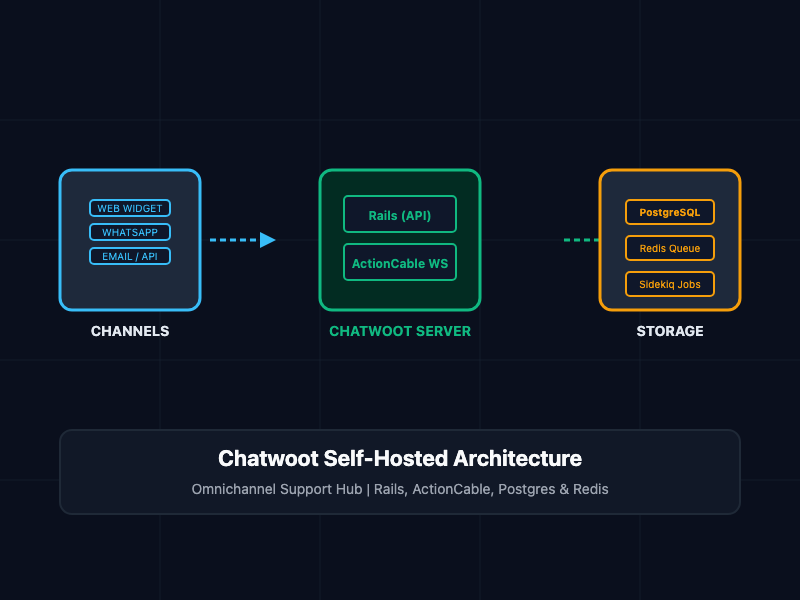
Chatwoot natively integrates multiple interaction channels into a unified inbox:
- Website Live Chat: Lightweight embeddable JavaScript widget supporting real-time WebSockets communication.
- Social and Messaging Gateways: Official integrations for WhatsApp Business API, Telegram, Facebook Messenger, Instagram, and LINE.
- Email Inboxes: Direct IMAP/SMTP synchronization or transactional email webhooks (via SendGrid, Mailgun, or Mandrill).
- API Channels: Custom messaging pipelines allowing backend services or AI agents to programmatically dispatch and receive conversations.
Architecture and Data Flow
Chatwoot operates on a decoupled, microservices-friendly application architecture:
- Rails Application Server: Handles REST API requests, authentication, inbox routing, and business logic execution.
- ActionCable Engine: Manages persistent WebSocket connections between client widgets, external webhooks, and the agent dashboard for real-time messaging.
- Sidekiq Background Processing: Offloads asynchronous tasks—such as sending transactional emails, processing incoming webhooks, and triggering automated bot workflows—using Redis.
- PostgreSQL Database: Serves as the primary relational database storing conversation histories, user accounts, agent permissions, and account configurations.
- Redis In-Memory Data Store: Acts as the caching layer, WebSocket pub/sub bus, and Sidekiq task queue.
Core Implementation: Deploying Chatwoot via Docker Compose
To run a production-ready, self-hosted Chatwoot instance, deploy the core web application, background workers, PostgreSQL database, and Redis cache using Docker Compose.
The following docker-compose.yml manifest deploys the complete Chatwoot infrastructure stack:
version: '3.8'

services:
  postgresql:
    image: postgres:15-alpine
    container_name: chatwoot_postgres
    restart: always
    volumes:
      - postgres_data:/var/lib/postgresql/data
    environment:
      POSTGRES_DB: chatwoot_production
      POSTGRES_USER: postgres
      POSTGRES_PASSWORD: SecureDatabasePassword123

  redis:
    image: redis:7-alpine
    container_name: chatwoot_redis
    restart: always
    command: ["redis-server", "--appendonly", "yes"]
    volumes:
      - redis_data:/data

  base: &base
    image: chatwoot/chatwoot:latest
    env_file: .env
    volumes:
      - storage_data:/app/storage
    depends_on:
      - postgresql
      - redis

  web:
    <<: *base
    container_name: chatwoot_web
    command: bundle exec rails s -p 3000 -b '0.0.0.0'
    ports:
      - "3000:3000"
    restart: always

  worker:
    <<: *base
    container_name: chatwoot_worker
    command: bundle exec sidekiq -g default,interactive,scheduled_jobs,low
    restart: always

volumes:
  postgres_data:
  redis_data:
  storage_data:
Environment Configuration (.env)
Configure the required core variables inside your .env file to initialize database connections and encryption secrets:
# Application Settings
NODE_ENV=production
RAILS_ENV=production
PORT=3000
FRONTEND_URL=https://support.yourdomain.com

# Cryptographic Keys (Generate using `openssl rand -hex 32`)
SECRET_KEY_BASE=c8f1a23849bc0d1e2f3a4b5c6d7e8f90a1b2c3d4e5f6a7b8c9d0e1f2a3b4c5d6
LOG_LEVEL=info

# Database Credentials
POSTGRES_HOST=postgresql
POSTGRES_PORT=5432
POSTGRES_DATABASE=chatwoot_production
POSTGRES_USERNAME=postgres
POSTGRES_PASSWORD=SecureDatabasePassword123

# Redis Credentials
REDIS_URL=redis://redis:6379

# Storage Configuration
STORAGE_PROVIDER=local
Embedding the Web Chat Widget
Once the backend service is active, integrate the Chatwoot live widget into any frontend web application by placing the following asynchronous script tag before the closing </body> element:
<script>
  (function(d,t) {
    var BASE_URL = "https://support.yourdomain.com";
    var g = d.createElement(t), s = d.getElementsByTagName(t)[0];
    g.src = BASE_URL + "/packs/js/sdk.js";
    g.defer = true;
    g.async = true;
    s.parentNode.insertBefore(g,s);
    g.onload = function() {
      window.chatwootSDK.run({
        websiteToken: 'YOUR_WEBSITE_INBOX_TOKEN',
        baseUrl: BASE_URL
      });
    }
  })(document, "script");
</script>
SRE and Production Best Practices
- Separate Sidekiq Queues: Split Sidekiq worker processes across high-priority queues (interactive, default) and scheduled background tasks (scheduled_jobs, low) to prevent long-running email exports from delaying live message delivery.
- Configure Reverse Proxies: Deploy Chatwoot behind Nginx or Caddy with strict SSL termination, WebSockets pass-through (Upgrade and Connection headers), and client payload limits to prevent buffer exhaustion.
- Enable Object Storage Backends: Transition from local storage volumes to AWS S3, Google Cloud Storage, or MinIO by setting STORAGE_PROVIDER=s3 inside .env to allow stateless container scaling.
- Monitor ActionCable Connections: Monitor Redis memory consumption and open WebSocket file descriptors when handling large concurrent visitor surges.
Getting Started
To launch your private customer engagement platform:
# Step 1: Create installation directory
mkdir -p /opt/chatwoot && cd /opt/chatwoot

# Step 2: Create docker-compose.yml and .env files
# [Paste configuration templates from above]

# Step 3: Run initial database setup and migration
docker compose run --rm web bundle exec rails db:chatwoot_prepare

# Step 4: Start all services in detached mode
docker compose up -d

# Step 5: Verify running container instances
docker compose ps
By self-hosting Chatwoot on your own private cloud infrastructure, you eliminate per-agent SaaS subscription fees, enforce absolute data privacy, and maintain a flexible customer communication framework.