The Operational Overhead of Manual Vault Unsealing
In modern cloud environments, centralized secret management platforms like HashiCorp Vault serve as the single source of truth for sensitive API keys, database credentials, and TLS certificates. However, deploying Vault in production introduces operational friction around server state management:
- Post-Reboot Sealing State: By default, HashiCorp Vault initializes in a sealed state. Following any node reboot, system patch, or crash, Vault locks its storage engine, rendering all secrets inaccessible until an operator unseals it.
- Manual Unseal Bottlenecks: Standard manual unsealing relies on Shamir's Secret Sharing scheme, requiring multiple key holders to input distinct key shards. This human-in-the-loop requirement breaks automated recovery workflows during disaster recovery (DR) events or routine autoscaling resets.
- Inadequate Static Alternatives: Encrypting playbooks using tools like Ansible Vault offers local static protection, but fails to provide dynamic credential leasing, centralized audit logging, or programmatic key rotation.
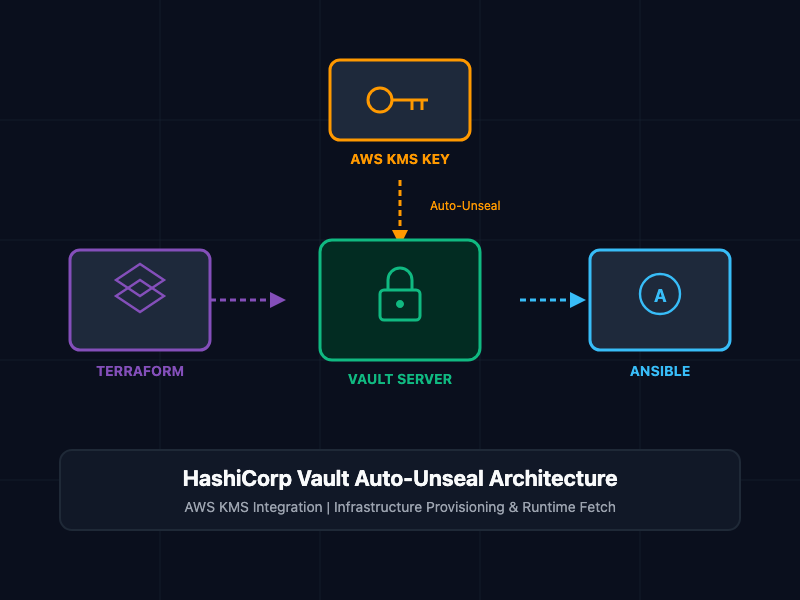
Integrating HashiCorp Vault with AWS Key Management Service (KMS) resolves these failure points by enabling zero-touch auto-unsealing. When paired with Terraform for infrastructure provisioning and Ansible for configuration management, engineering teams achieve high availability and seamless post-reboot recovery.
Architectural Overview: AWS KMS Auto-Unseal Pipeline
The automated secret pipeline decouples key decryption from human intervention using three core components:
- AWS Key Management Service (KMS): Acts as the external Key Encryption Key (KEK) provider. Vault uses an AWS KMS symmetric key to encrypt and decrypt its internal Master Key.
- IAM Execution Role: Grants the Vault EC2 instance explicit kms:Encrypt, kms:Decrypt, and kms:DescribeKey permissions via instance profile credentials, avoiding hardcoded static secrets.
- Vault Seal Stanza: A dedicated configuration block inside vault.hcl pointing to the target AWS KMS Key ID and Region. On startup, the Vault daemon automatically invokes AWS KMS to decrypt the stored master key and enter an unsealed operational state.
Core Concepts and Implementation
1. AWS KMS Key and IAM Policy Definition via Terraform
To provision the infrastructure required for auto-unsealing, define an AWS KMS key alongside an IAM role attached to the Vault EC2 instance:
# main.tf - AWS KMS Key Definition for Vault Auto-Unseal
resource "aws_kms_key" "vault_unseal" {
  description             = "KMS Key for HashiCorp Vault Auto-Unseal"
  deletion_window_in_days = 30
  enable_key_rotation     = true

  tags = {
    Environment = "production"
    Service     = "vault-secrets"
  }
}

resource "aws_kms_alias" "vault_unseal_alias" {
  name          = "alias/vault-auto-unseal-key"
  target_key_id = aws_kms_key.vault_unseal.key_id
}

# IAM Policy allowing Vault EC2 instance to interact with KMS
resource "aws_iam_policy" "vault_kms_unseal_policy" {
  name        = "VaultKMSAutoUnsealPolicy"
  description = "Allows Vault instance to perform KMS decryption for auto-unseal"

  policy = jsonencode({
    Version = "2012-10-17"
    Statement = [
      {
        Sid    = "VaultKMSUnsealAccess"
        Effect = "Allow"
        Action = [
          "kms:Encrypt",
          "kms:Decrypt",
          "kms:DescribeKey"
        ]
        Resource = aws_kms_key.vault_unseal.arn
      }
    ]
  })
}
2. Vault Configuration for AWS KMS Auto-Unseal (vault.hcl)
Configure the Vault server daemon to delegate unsealing to AWS KMS by specifying the seal "awskms" block inside /etc/vault.d/vault.hcl:
# /etc/vault.d/vault.hcl
storage "file" {
  path = "/opt/vault/data"
}

listener "tcp" {
  address     = "0.0.0.0:8200"
  tls_disable = 0
  tls_cert_file = "/etc/certbot/live/vault.domain.com/fullchain.pem"
  tls_key_file  = "/etc/certbot/live/vault.domain.com/privkey.pem"
}

# Configure AWS KMS Auto-Unseal Stanza
seal "awskms" {
  region     = "us-east-1"
  kms_key_id = "alias/vault-auto-unseal-key"
}

ui = true
api_addr = "https://vault.domain.com:8200"
cluster_addr = "https://vault.domain.com:8201"
3. Provisions and Secret Injection via Terraform and Ansible
Once Vault starts and auto-unseals, Terraform provisions application secrets, and Ansible playbooks dynamically fetch credentials at runtime.
Ansible Playbook snippet retrieving dynamic secrets from Vault:
---
- name: Fetch Dynamic Secrets from HashiCorp Vault
  hosts: application_servers
  gather_facts: false
  tasks:
    - name: Read Database Credentials from Vault API
      community.hashi_vault.vault_read:
        url: "https://vault.domain.com:8200"
        path: "secret/data/production/database"
        engine_mount_point: "secret"
      register: vault_db_secret

    - name: Configure Application Database Connection
      ansible.builtin.template:
        src: templates/db_config.j2
        dest: /etc/application/db.conf
        owner: appuser
        group: appgroup
        mode: '0600'
      vars:
        db_user: "{{ vault_db_secret.secret.data.data.username }}"
        db_pass: "{{ vault_db_secret.secret.data.data.password }}"
SRE and DevSecOps Best Practices
- Enforce Least Privilege IAM Scopes: Restrict the KMS IAM policy strictly to the KMS Key ARN designated for Vault auto-unseal, preventing instance profile credentials from decrypting unauthorized KMS keys.
- Enable KMS Key Rotation: Activate automatic annual key rotation inside AWS KMS. Vault handles rotated key versions seamlessly without requiring manual configuration updates.
- Backup Root Recovery Keys: Although AWS KMS handles unsealing automatically, initialization still generates recovery keys. Securely store these recovery shards offline in HSMs or physical safes for emergency administrative overrides.
- Monitor AWS CloudTrail Logs: Audit all kms:Decrypt requests generated by the Vault instance role in AWS CloudTrail to detect unexpected access patterns or unauthorized decryption attempts.
Getting Started
To initialize the Vault server and verify auto-unseal functionality across reboots:
# Step 1: Initialize the Vault cluster (Generates recovery keys instead of unseal keys)
vault operator init

# Step 2: Check Vault status to confirm auto-unsealed state (Sealed: false)
vault status

# Step 3: Reboot the host EC2 instance to test automated recovery
sudo reboot

# Step 4: After reboot completes, inspect status to confirm zero-touch unseal
vault status
By pairing HashiCorp Vault's KMS auto-unseal capabilities with Terraform infrastructure declarations and Ansible orchestration, engineering teams eliminate manual operational bottlenecks while maintaining high-availability secret delivery across cloud infrastructure.