The Problem of Cloud Cost Blind Spots
Engineering teams operating in public cloud environments frequently encounter financial friction during monthly billing cycles:
- End-of-Month Bill Shock: Without continuous tracking, unexpected resource provisioning or runaway compute jobs remain undetected until the monthly invoice arrives.
- Frictionful AWS Console Inspections: Expecting engineers or team leads to log into the AWS Billing Dashboard daily is impractical, leading to neglected cost monitoring.
- Lack of Historical Context: Single-point cost figures do not indicate whether spending is trending upward or downward compared to previous days.
- Siloed Cost Visibility: Finance and engineering teams often lack a shared, real-time channel to monitor infrastructure burn rates.
Automating daily cost notifications directly into a shared Slack channel solves these operational challenges. By pairing AWS Lambda with Boto3 and EventBridge Scheduler, engineering teams maintain continuous visibility over cloud expenditures without manual effort.
What Is the AWS Cost Alerting Architecture?
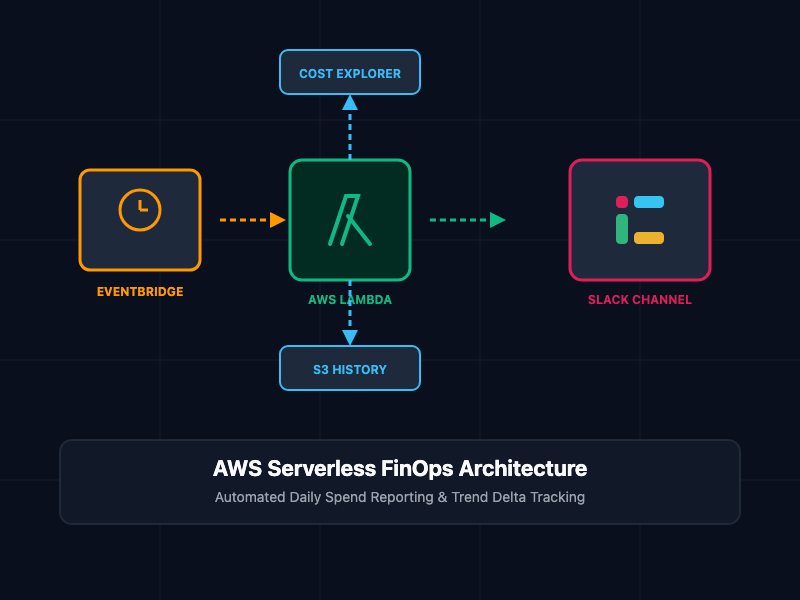
The cost-reporting pipeline operates as a serverless, event-driven workflow consisting of four AWS and third-party services:
- Amazon EventBridge Scheduler: Triggers the reporting pipeline on a recurring cron schedule (e.g., daily at 08:00 UTC).
- AWS Lambda (Python Boto3): Executes the core logic by querying the AWS Cost Explorer API for yesterday's unblended cost data across services.
- Amazon S3: Acts as a lightweight state store, holding historical daily cost metrics to calculate day-over-day spending trends and percentage changes.
- Slack Webhook / WebClient: Receives the formatted Markdown payload from Lambda and renders the cost breakdown inside the target operational Slack channel.
Core Concepts and Implementation
1. IAM Permissions and Least Privilege Policy
To allow the Lambda function to retrieve cost data and store historical metrics, create an IAM Execution Role containing the required API action scopes:
{
  "Version": "2012-10-17",
  "Statement": [
    {
      "Sid": "CostExplorerReadAccess",
      "Effect": "Allow",
      "Action": [
        "ce:GetCostAndUsage"
      ],
      "Resource": "*"
    },
    {
      "Sid": "S3StateBucketAccess",
      "Effect": "Allow",
      "Action": [
        "s3:GetObject",
        "s3:PutObject"
      ],
      "Resource": "arn:aws:s3:::your-finops-cost-reports-bucket/*"
    },
    {
      "Sid": "CloudWatchLoggingAccess",
      "Effect": "Allow",
      "Action": [
        "logs:CreateLogGroup",
        "logs:CreateLogStream",
        "logs:PutLogEvents"
      ],
      "Resource": "arn:aws:logs:*:*:*"
    }
  ]
}
2. The Lambda Cost Explorer and Slack Engine
This Python function queries the AWS Cost Explorer API (ce:GetCostAndUsage), calculates yesterday's total spend broken down by service, retrieves the previous day's metrics from Amazon S3 to derive the cost trend, and dispatches the payload to Slack.
import os
import json
import boto3
from datetime import date, timedelta
from slack_sdk import WebClient
from slack_sdk.errors import SlackApiError

def fetch_aws_costs(ce_client, start_date, end_date):
    """Query AWS Cost Explorer API for unblended costs grouped by SERVICE."""
    response = ce_client.get_cost_and_usage(
        TimePeriod={
            'Start': start_date.strftime('%Y-%m-%d'),
            'End': end_date.strftime('%Y-%m-%d')
        },
        Granularity='DAILY',
        Metrics=['UnblendedCost'],
        GroupBy=[
            {'Type': 'DIMENSION', 'Key': 'SERVICE'}
        ]
    )

    cost_by_service = {}
    total_cost = 0.0

    for result in response.get('ResultsByTime', []):
        for group in result.get('Groups', []):
            service_name = group['Keys'][0]
            amount = float(group['Metrics']['UnblendedCost']['Amount'])
            if amount > 0.01: # Filter negligible micro-charges
                cost_by_service[service_name] = round(amount, 2)
                total_cost += amount

    return cost_by_service, round(total_cost, 2)

def handle_s3_history(s3_client, bucket_name, key_name, current_data):
    """Retrieve previous day's spend from S3 and store current data for tomorrow."""
    previous_cost = None

    # Try fetching previous day's payload
    try:
        s3_obj = s3_client.get_object(Bucket=bucket_name, Key=key_name)
        prev_data = json.loads(s3_obj['Body'].read().decode('utf-8'))
        previous_cost = prev_data.get('total_cost', None)
    except s3_client.exceptions.NoSuchKey:
        print(f"No historical key found for {key_name}. First run initialization.")
    except Exception as e:
        print(f"Warning: Failed to fetch historical S3 object: {str(e)}")

    # Store current run metrics for next comparison
    try:
        s3_client.put_object(
            Bucket=bucket_name,
            Key=key_name,
            Body=json.dumps(current_data),
            ContentType='application/json'
        )
    except Exception as e:
        print(f"Error persisting metrics to S3: {str(e)}")

    return previous_cost

def lambda_handler(event, context):
    slack_token = os.environ.get('SLACK_BOT_TOKEN')
    slack_channel = os.environ.get('SLACK_CHANNEL', '#aws-cost-alerts')
    s3_bucket = os.environ.get('S3_BUCKET_NAME')

    ce_client = boto3.client('ce')
    s3_client = boto3.client('s3')
    slack_client = WebClient(token=slack_token)

    today = date.today()
    yesterday = today - timedelta(days=1)
    day_before_yesterday = today - timedelta(days=2)

    # 1. Fetch yesterday's spend
    current_services, current_total = fetch_aws_costs(ce_client, yesterday, today)

    # 2. Get historical trend delta from S3
    hist_key = f"reports/cost_{day_before_yesterday.strftime('%Y-%m-%d')}.json"
    curr_key = f"reports/cost_{yesterday.strftime('%Y-%m-%d')}.json"

    current_payload = {'total_cost': current_total, 'services': current_services}
    prev_total = handle_s3_history(s3_client, s3_bucket, curr_key, current_payload)

    # 3. Calculate percentage variation
    trend_str = "N/A"
    if prev_total is not None and prev_total > 0:
        diff = current_total - prev_total
        pct = (diff / prev_total) * 100
        direction = "+" if diff >= 0 else ""
        trend_str = f"{direction}${diff:.2f} ({direction}{pct:.1f}%) vs day prior"

    # 4. Format Slack message layout
    top_services = sorted(current_services.items(), key=lambda x: x[1], reverse=True)[:5]
    service_lines = "\n".join([f"* {svc}: ${amt:.2f}" for svc, amt in top_services])

    slack_blocks = [
        {
            "type": "header",
            "text": {
                "type": "plain_text",
                "text": f"AWS Daily Spend Report - {yesterday.strftime('%Y-%m-%d')}"
            }
        },
        {
            "type": "section",
            "fields": [
                {"type": "mrkdwn", "text": f"*Total Daily Spend:*\n${current_total:.2f}"},
                {"type": "mrkdwn", "text": f"*Day-over-Day Trend:*\n{trend_str}"}
            ]
        },
        {"type": "divider"},
        {
            "type": "section",
            "text": {
                "type": "mrkdwn",
                "text": f"*Top 5 Cost Driving Services:*\n{service_lines}"
            }
        }
    ]

    try:
        slack_client.chat_postMessage(
            channel=slack_channel,
            blocks=slack_blocks,
            text=f"AWS Daily Spend Summary: ${current_total:.2f}"
        )
        return {"statusCode": 200, "body": json.dumps("Report delivered successfully")}
    except SlackApiError as e:
        print(f"Slack API Error: {e.response['error']}")
        return {"statusCode": 500, "body": json.dumps(f"Slack API Error: {e.response['error']}")}
3. EventBridge Scheduler Cron Automation
To trigger the Lambda function every morning automatically, deploy an Amazon EventBridge Scheduler rule using AWS CLI or Infrastructure-as-Code (Terraform):
# Create an EventBridge Scheduler rule running daily at 08:00 UTC
aws scheduler create-schedule \
  --name aws-daily-cost-reporter \
  --schedule-expression "cron(0 8 * * ? *)" \
  --flexible-time-window '{"Mode": "OFF"}' \
  --target '{
    "Arn": "arn:aws:lambda:us-east-1:123456789012:function:aws-daily-cost-reporter",
    "RoleArn": "arn:aws:iam::123456789012:role/service-role/EventBridgeLambdaExecutionRole"
  }'
Architectural Component Summary
| Component | Technology | Responsibilities |
|---|---|---|
| Scheduler | EventBridge Scheduler | Cron triggering of daily execution window |
| Compute | AWS Lambda (Python 3.12) | Fetches metrics, processes deltas, formats payloads |
| Analytics Engine | AWS Cost Explorer API | Aggregates daily unblended service usage data |
| State Persistence | Amazon S3 | Stores historical JSON snapshots for trend comparison |
| Notification Sink | Slack Web API / SDK | Renders structured block messages in developer channels |
FinOps and Operational Best Practices
- Filter Credit and Refund Noise: Exclude credits, refunds, and RI/Savings Plan upfront fees inside the Cost Explorer filter parameters to ensure daily usage numbers represent actual operating spend.
- Set Inflation Alerts: Extend the Lambda handler to trigger a high-severity Slack tag (e.g., @oncall) if the day-over-day cost delta exceeds a designated threshold (such as a 20% spike).
- Enforce Environment Isolation: Store Slack bot tokens securely using AWS Systems Manager Parameter Store or Secrets Manager rather than clear-text environment variables.
- Account for Cost Explorer API Latency: AWS Cost Explorer data updates roughly every 24 hours. Scheduling reports for early morning (e.g., 08:00 UTC) ensures yesterday's final charges are fully settled.
Getting Started
- Enable Cost Explorer: Ensure Cost Explorer is activated under the AWS Billing Console.
- Create S3 State Bucket: Provision a dedicated, private S3 bucket to store daily JSON snapshots.
- Build Lambda Layer: Package slack_sdk into a Lambda layer or container image.
- Deploy Function: Deploy the Python script with environment variables (SLACK_BOT_TOKEN, SLACK_CHANNEL, S3_BUCKET_NAME).
- Attach EventBridge Schedule: Create a daily cron schedule target to automate execution.
By establishing this automated FinOps pipeline, engineering teams eliminate cost surprises, maintain shared visibility, and protect cloud infrastructure budgets effortlessly.