The Limitation of Isolated AI Agents
Command-line AI coding assistants have transformed software engineering workflows. However, isolated language models encounter strict execution boundaries when operating inside complex development environments:
- Context Fragmentation: AI models cannot inherently inspect running database schemas, local Git histories, or external issue trackers without manual copy-pasting of payloads.
- Brittle Custom Tooling: Hand-crafting bespoke wrappers for every API endpoint or internal developer script forces engineering teams into vendor-locked, high-maintenance codebases.
- Security Scoping Risks: Granting arbitrary shell execution rights to an autonomous agent creates dangerous risks around unintended file deletion or unauthorized network access.
- Lack of Protocol Standards: Different AI tools utilize incompatible plugin specifications, forcing developers to rewrite tool definitions for every new agentic platform.
The Model Context Protocol (MCP), developed by Anthropic, resolves these liabilities by introducing an open, standardized architecture for connecting AI clients to local and remote resources.
What Is Model Context Protocol (MCP)?
Model Context Protocol (MCP) is an open client-server standard that enables AI applications (such as Claude Code) to securely discover and interact with external data sources, developer tools, and API primitives.
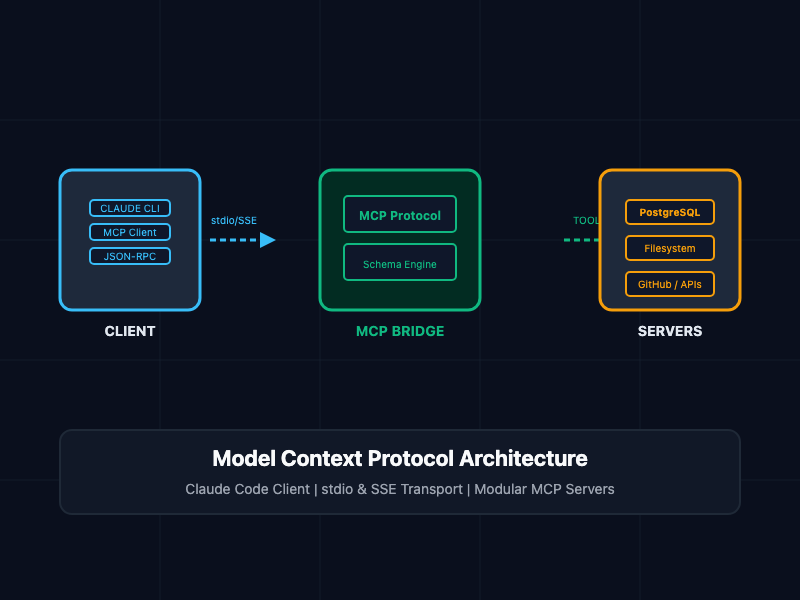
Instead of writing custom integration code for every backend tool, developers run modular MCP Servers. Claude Code acts as an MCP Client, connecting to these servers over standardized transport layers.
┌────────────────────────────────────────────────────────┐
│  Claude Code CLI (MCP Client)                          │
└────────────────────────────────────────────────────────┘
       │
       ▼  JSON-RPC 2.0 (stdio / SSE Transport)
┌────────────────────────────────────────────────────────┐
│  MCP Protocol Bridge                                   │
└────────────────────────────────────────────────────────┘
       │
       ├───────────────────┼───────────────────┐
       ▼                   ▼                   ▼
┌──────────────┐    ┌──────────────┐    ┌──────────────┐
│ Postgres MCP │    │  GitHub MCP  │    │ Filesystem   │
│    Server    │    │    Server    │    │  MCP Server  │
└──────────────┘    └──────────────┘    └──────────────┘
Core MCP Primitives
- Resources: Read-only data sources provided to the model (e.g., local files, database schemas, application logs).
- Prompts: Pre-configured prompt templates that standardize common workflows (e.g., code reviews or incident triage).
- Tools: Executable functions that the model can invoke to perform side-effects (e.g., running a database query, opening a GitHub PR, or querying a web API).
Transport Protocols: stdio vs. SSE
MCP supports two primary communication transports between the client (Claude Code) and server plugins:
- Standard Input/Output (stdio): The MCP server runs as a local child process spawned directly by Claude Code. Communication occurs over standard input and output streams (stdin/stdout). This is ideal for lightweight, local tools (e.g., local SQLite drivers or filesystem access).
- Server-Sent Events (SSE): The MCP server operates as an independent HTTP service. Client-to-server messages use HTTP POST requests, while server-to-client events stream via SSE. This pattern is designed for remote microservices, enterprise integrations, or multi-tenant deployments.
Core Concepts and Implementation
1. Configuring MCP Servers in Claude Code
Claude Code discovers MCP servers through configuration declarations stored in ~/.claude.json or your project-level settings file.
The following configuration demonstrates how to register both local stdio processes and remote SSE endpoints inside your Claude Code environment:
{
  "mcpServers": {
    "postgres-local": {
      "command": "npx",
      "args": [
        "-y",
        "@modelcontextprotocol/server-postgres",
        "postgresql://developer:password@localhost:5432/orders_db"
      ]
    },
    "filesystem-access": {
      "command": "npx",
      "args": [
        "-y",
        "@modelcontextprotocol/server-filesystem",
        "/Users/developer/projects/core-api"
      ]
    },
    "remote-monitoring": {
      "url": "https://mcp.internal.net/sse",
      "transport": "sse"
    }
  }
}
2. Building a Custom Stdio MCP Server in TypeScript
When off-the-shelf MCP servers do not meet internal infrastructure requirements, you can build a custom server using the official @modelcontextprotocol/sdk.
The following TypeScript snippet creates a custom stdio MCP server that exposes an internal system metric inspection tool to Claude Code:
// src/mcp-server.ts - Custom System Metrics MCP Server
import { Server } from "@modelcontextprotocol/sdk/server/index.js";
import { StdioServerTransport } from "@modelcontextprotocol/sdk/server/stdio.js";
import {
  CallToolRequestSchema,
  ListToolsRequestSchema,
} from "@modelcontextprotocol/sdk/types.js";
import os from "node:os";

// 1. Initialize MCP Server Instance
const server = new Server(
  {
    name: "system-metrics-server",
    version: "1.0.0",
  },
  {
    capabilities: {
      tools: {},
    },
  }
);

// 2. Register Available Tools
server.setRequestHandler(ListToolsRequestSchema, async () => {
  return {
    tools: [
      {
        name: "get_system_health",
        description: "Retrieves local memory and CPU load metrics.",
        inputSchema: {
          type: "object",
          properties: {
            includeNetwork: { type: "boolean" },
          },
        },
      },
    ],
  };
});

// 3. Handle Tool Execution Calls
server.setRequestHandler(CallToolRequestSchema, async (request) => {
  if (request.params.name === "get_system_health") {
    const freeMem = os.freemem() / (1024 * 1024);
    const totalMem = os.totalmem() / (1024 * 1024);
    const loadAvg = os.loadavg();

    const payload = {
      freeMemoryMB: freeMem.toFixed(2),
      totalMemoryMB: totalMem.toFixed(2),
      cpuLoadAverage: loadAvg,
    };

    return {
      content: [
        {
          type: "text",
          text: JSON.stringify(payload, null, 2),
        },
      ],
    };
  }

  throw new Error(`Tool not found: ${request.params.name}`);
});

// 4. Connect Transport Layer over stdio
async function main() {
  const transport = new StdioServerTransport();
  await server.connect(transport);
  console.error("System Metrics MCP Server running over stdio");
}

main().catch((error) => {
  console.error("Fatal error starting MCP server:", error);
  process.exit(1);
});
Architectural Comparison: Native Tooling vs. MCP
| Architectural Dimension | Native Monolithic Tooling | Model Context Protocol (MCP) |
| Protocol Standard | Vendor-locked APIs | Open standard (JSON-RPC 2.0) |
| Transport Flexibility | Hardcoded internal calls | Modular stdio & SSE options |
| Reusability | Non-portable across LLM platforms | Shared across Claude Code, Cursor, & custom clients |
| Security Isolation | Broad application permissions | Process-level sandboxing per tool |
| Maintenance Overhead | High (Custom glue code required) | Low (Plug-and-play package ecosystem) |
SRE and Security Best Practices
- Enforce Process Isolation: When executing stdio MCP servers, isolate child processes inside containerized sandboxes or restricted user accounts to prevent directory traversal outside authorized workspaces.
- Implement Strict Input Validation: Always validate arguments inside MCP server request handlers using JSON Schema or Zod. Do not pass un-sanitized string inputs directly into shell execution commands.
- Audit Tool Execution Prompts: Configure Claude Code to request user confirmation prior to executing state-modifying tools (such as database writes or remote deployment triggers).
- Sanitize Sensitive Secrets: Avoid hardcoding static authentication keys in configuration files. Inject environment variables via key vaults or system environment variables (process.env).
Getting Started
To test and verify MCP integrations inside Claude Code:
# Step 1: Install the official MCP Inspector CLI tool
npx @modelcontextprotocol/inspector node build/mcp-server.js

# Step 2: Register your custom server inside ~/.claude.json
# [Add configuration template from Section 1]

# Step 3: Launch Claude Code and inspect available MCP tools
claude

# Step 4: Issue a tool invocation command inside the terminal
claude "Inspect system metrics using the get_system_health tool and report findings."
By leveraging the Model Context Protocol, engineering teams convert standalone command-line AI tools into deeply integrated, context-aware software development platforms.