The Friction of Testing Web Applications Over Plain HTTP
During local application development, engineers frequently host web services on http://localhost:3000 or raw loopback IP addresses (127.0.0.1). However, relying on unencrypted HTTP during development creates critical operational friction:
- Browser Security API Restrictions: Modern browser features—such as Service Workers, Web Crypto APIs, Secure Cookies (SameSite=Strict; Secure), and Geolocation APIs—are blocked or behave differently when served over unencrypted HTTP.
- CORS and Origin Mismatches: Testing multi-tenant microservices or cross-domain frontend-backend integrations fails when origin domains do not match production domain structures.
- Untrusted Certificate Warnings: Using raw openssl self-signed certificates without an established Certificate Authority (CA) triggers intrusive browser security warnings (NET::ERR_CERT_AUTHORITY_INVALID), forcing developers to bypass safety prompts manually.
- Production Behavior Parity: Testing on HTTP masks mixed-content warnings, broken SSL/TLS redirects, and HTTP/2 performance characteristics that only surface after deployment.
Setting up a trusted local Certificate Authority (CA) paired with local DNS domain mapping resolves these issues, enabling production-grade HTTPS testing directly on Linux development machines.
Architectural Overview of Local SSL Resolution
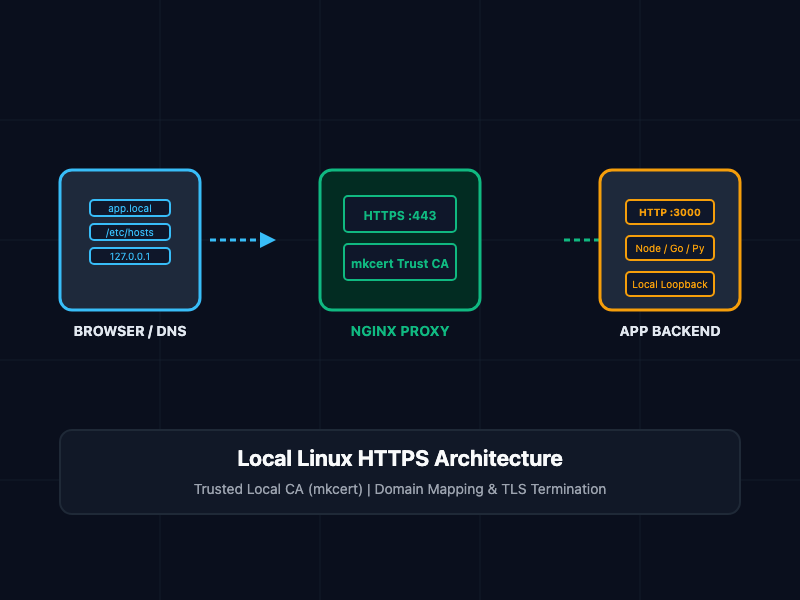
Establishing trusted local HTTPS requires four decoupled components on your Linux workstation:
- Local Domain Resolver (/etc/hosts): Maps a custom local domain name (e.g., app.local or api.dev.internal) directly to the local loopback address (127.0.0.1).
- Local Certificate Authority (mkcert): Generates a dedicated, private Certificate Authority (CA) and automatically registers its root certificate in your system and browser trust stores (/etc/ssl/certs, NSS database).
- Domain SSL Certificate: Issues wildcard or single-domain TLS certificates signed by your local CA, rendering them fully trusted by Chrome, Firefox, and system HTTP clients (such as curl).
- Web Server / Reverse Proxy (Nginx): Terminates TLS traffic on port 443 using the local certificates and routes requests to your running application backend.
Core Concepts and Implementation
Step 1: Defining Custom Local Domains via /etc/hosts
To map custom domain names to your local machine without setting up a full DNS server like dnsmasq, edit the /etc/hosts file.
Append your custom local domain mappings to /etc/hosts:
# /etc/hosts - Local Domain Mappings
127.0.0.1   app.local
127.0.0.1   api.app.local
::1         app.local
::1         api.app.local
Test DNS resolution locally using ping:
ping -c 2 app.local
Step 2: Generating Trusted SSL Certificates with mkcert
While raw openssl commands can generate self-signed certificates, manually trusting them across multiple system stores is error-prone. mkcert automates local CA creation and installation.
Install mkcert and NSS utilities on Ubuntu/Debian or RHEL systems:
# Ubuntu / Debian Installation
sudo apt update
sudo apt install -y libnss3-tools curl

# Download mkcert binary
curl -JLO "https://dl.filippo.io/mkcert/latest?for=linux/amd64"
chmod +x mkcert-v*-linux-amd64
sudo mv mkcert-v*-linux-amd64 /usr/local/bin/mkcert

# Verify installation
mkcert -version
Initialize the local Root CA and register it inside system trust stores:
# Installs the local CA into system and browser trust stores
mkcert -install
Issue SSL certificates for your custom local domains:
# Create directory for local SSL certs
sudo mkdir -p /etc/ssl/certs/local-certs
cd /etc/ssl/certs/local-certs

# Generate cert and key for single and wildcard domains
sudo mkcert app.local "*.app.local"
This creates two files:
- app.local+1.pem: The signed SSL certificate.
- app.local+1-key.pem: The private key.
Step 3: Configuring Nginx Reverse Proxy with TLS/SSL
Configure Nginx to listen on port 443, terminate SSL using the mkcert certificate files, and forward requests to your underlying web application (e.g., running on port 3000).
Create a new Nginx site configuration file at /etc/nginx/sites-available/app.local:
# /etc/nginx/sites-available/app.local

# HTTP -> HTTPS Redirect Block
server {
    listen 80;
    listen [::]:80;
    server_name app.local api.app.local;

    return 301 https://$host$request_uri;
}

# HTTPS Server Block
server {
    listen 443 ssl http2;
    listen [::]:443 ssl http2;
    server_name app.local api.app.local;

    # Local SSL Certificate Paths
    ssl_certificate /etc/ssl/certs/local-certs/app.local+1.pem;
    ssl_certificate_key /etc/ssl/certs/local-certs/app.local+1-key.pem;

    # Recommended TLS Parameters
    ssl_protocols TLSv1.2 TLSv1.3;
    ssl_ciphers HIGH:!aNULL:!MD5;
    ssl_prefer_server_ciphers on;

    # Logging
    access_log /var/log/nginx/app.local.access.log;
    error_log /var/log/nginx/app.local.error.log;

    # Reverse Proxy to Node.js / Go / Python Local Application Server
    location / {
        proxy_pass http://127.0.0.1:3000;
        proxy_http_version 1.1;
        proxy_set_header Upgrade $http_upgrade;
        proxy_set_header Connection 'upgrade';
        proxy_set_header Host $host;
        proxy_set_header X-Real-IP $remote_addr;
        proxy_set_header X-Forwarded-For $proxy_add_x_forwarded_for;
        proxy_set_header X-Forwarded-Proto $scheme;
        proxy_cache_bypass $http_upgrade;
    }
}
Enable the Nginx configuration, test syntax, and reload the service:
# Enable site configuration
sudo ln -s /etc/nginx/sites-available/app.local /etc/nginx/sites-enabled/

# Verify configuration syntax
sudo nginx -t

# Reload Nginx to apply changes
sudo systemctl reload nginx
System Component Summary
| Component | Technology | Responsibilities |
|---|---|---|
| Local Resolver | /etc/hosts | Maps custom domain names (app.local) to loopback IP (127.0.0.1) |
| Root Authority | mkcert Root CA | Signs local domain certificates and inserts CA into browser trust stores |
| Certificate Store | OpenSSL / PEM Files | Houses signed TLS certificate and private key on Linux filesystem |
| Reverse Proxy | Nginx | Handles HTTP-to-HTTPS redirect, terminates TLS, and proxies traffic to backend |
| App Server | Node / Go / Python | Hosts application logic listening on local loopback port |
SRE and Security Best Practices
- Never Share Private Keys: Keep generated .key.pem files restricted (chmod 600) and never commit local CA keys or certificates to public Git repositories.
- Use Reserved Local TLDs: Use official reserved top-level domains for testing—such as .local, .test, or .internal—to prevent name collisions with real-world public domains.
- Test Curl Compatibility: Verify that CLI tools accept the local root certificate by default without using the unsafe -k or --insecure flags.
- Automate Setup via Shell Scripts: Package domain registration and mkcert commands into local onboarding scripts so new team members can set up identical development environments automatically.
Getting Started and Verification
To verify your custom local HTTPS domain:
# Step 1: Execute a secure HTTP GET request via curl
curl -Iv https://app.local

# Step 2: Verify HTTP to HTTPS automatic redirection
curl -I http://app.local
Open your web browser and navigate to https://app.local. You will observe a green secure lock icon without any security warnings, confirming that your local domain is running under trusted HTTPS.