The Problem with Default Case-Insensitive Collations
When storing case-sensitive tokens, secure invite keys, API secret identifiers, or username handles in a MySQL or MariaDB database, developers frequently assume that standard equality comparisons (WHERE token = 'a7f3b9') will perform exact string matching.
However, standard MySQL string comparisons do not evaluate raw bytes. Instead, they evaluate characters through a database collation protocol. The default Laravel collation for MySQL (utf8mb4_unicode_ci) enforces specific matching behaviors:
- Case Insensitivity: The _ci suffix explicitly stands for case-insensitive. As a result, searching for A7f3B9 matches a7f3b9, A7F3B9, and A7f3b9.
- Accent Insensitivity: Accent marks are ignored during evaluation, causing resume to match résumé.
- Padding and Trailing Whitespace: Under PAD SPACE collations, 'token' and 'token ' evaluate as equal values.
This behavior introduces severe application logic vulnerabilities. For example, if a single-use invitation token or password reset hash depends on case-sensitive randomness, an attacker could redeem an invitation or reset a secret using lowercase string permutations.
Historically, developers bypassed this limitation by dropping down into raw SQL statements (whereRaw('token = BINARY ?', [$token])). While functional, raw SQL snippets bypass query builder scope chaining, reduce code readability, and break multi-database abstraction layer consistency.
What Is whereBinary in Laravel 13.27?
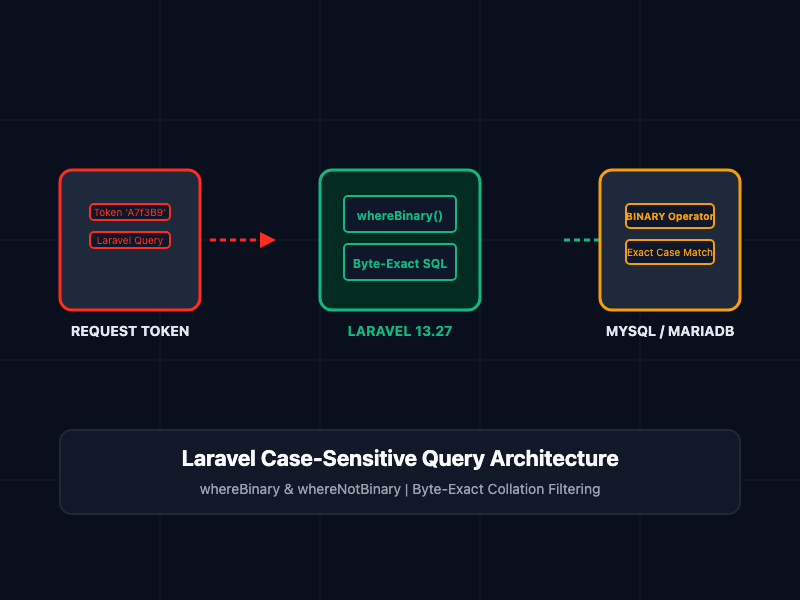
Laravel 13.27 introduces native query builder methods for byte-exact string comparisons: whereBinary(), orWhereBinary(), whereNotBinary(), and orWhereNotBinary().
These methods append a BINARY operator modifier directly to the compiled SQL query string. This forces MySQL and MariaDB to compare strings byte-by-byte rather than through the default character collation rules.
-- Compiled SQL generated by whereBinary('token', $token)
SELECT * FROM `invites` WHERE `token` = BINARY 'a7f3b9' LIMIT 1;
By encapsulating binary comparisons natively within the fluent query builder, developers can seamlessly compose case-sensitive conditions inside Eloquent scopes, conditional when() callbacks, and complex join clauses.
Core Concepts and Implementation
1. Standard Case-Insensitive Lookups vs. whereBinary()
The following PHP example illustrates the behavior difference between standard where() and whereBinary() when querying sensitive invitation records:
<?php

namespace App\Services;

use Illuminate\Support\Facades\DB;
use App\Models\Invite;

class TokenVerificationService
{
    /**
     * Demonstrates standard case-insensitive vs byte-exact binary matching.
     */
    public function verifyToken(string $userSubmittedToken): ?Invite
    {
        // Vulnerable: Standard lookup matches 'A7F3B9' even if database holds 'a7f3b9'
        $standardInvite = Invite::query()
            ->where('token', $userSubmittedToken)
            ->first();

        // Secure: Byte-exact lookup forces binary comparison on MySQL/MariaDB
        $secureInvite = Invite::query()
            ->whereBinary('token', $userSubmittedToken)
            ->first();

        return $secureInvite;
    }

    /**
     * Demonstrates whereNotBinary() for excluding exact-case records.
     */
    public function getSystemAccountsExceptAdmin(string $reservedHandle): \Illuminate\Database\Eloquent\Collection
    {
        // Excludes records matching the exact byte representation of the reserved handle
        return DB::table('users')
            ->whereNotBinary('username', $reservedHandle)
            ->get();
    }
}
2. Cross-Database Engine Behavior
Because different database engines enforce case sensitivity differently by default, whereBinary() behaves dynamically based on your database driver:
- MySQL & MariaDB: Compiles to where column = BINARY ? or where column != BINARY ?.
- PostgreSQL & SQLite: These engines already perform case-sensitive string comparisons by default under standard text types. Attempting to invoke whereBinary() on drivers that compare case-sensitively natively throws a RuntimeException to prevent false assumptions regarding driver capabilities.
3. Index Optimization: Combining where() with whereBinary()
A critical architectural consideration when using whereBinary() is database index utilization.
When a query evaluates a column against a BINARY operand, MySQL converts the comparison into the binary collation domain. Because the column's underlying index was created using utf8mb4_unicode_ci, MySQL generally cannot use the index to satisfy a standalone whereBinary() condition, resulting in a full table scan.
To retain high-speed B-Tree index lookups while guaranteeing byte-exact precision, combine an indexed case-insensitive where() clause with a secondary whereBinary() filter:
<?php

namespace App\Repositories;

use Illuminate\Support\Facades\DB;
use App\Models\ApiCredential;

class ApiCredentialRepository
{
    /**
     * High-performance case-sensitive token lookup.
     * Uses B-Tree index to narrow candidates, then applies binary filter.
     */
    public function findExactKey(string $apiKey): ?ApiCredential
    {
        return ApiCredential::query()
            // 1. Leverages the column B-Tree index (case-insensitive) to narrow to ~1 candidate row
            ->where('key_hash', $apiKey)
            // 2. Filters the candidate row byte-by-byte to guarantee exact case identity
            ->whereBinary('key_hash', $apiKey)
            ->first();
    }
}
Architectural Comparison Matrix
Review the operational parameters across different case-sensitivity strategies in Laravel:
| Strategy | Query Syntax | Index Acceleration | Case Sensitive | Accent Sensitive | Trailing Space Sensitive |
|---|---|---|---|---|---|
| Standard where() | where(‘token’, $val) | Full Index Support | No | No | No |
| Native whereBinary() | whereBinary(‘token’, $val) | Requires Combination | Yes | Yes | Yes |
| Raw SQL whereRaw() | whereRaw(‘token = BINARY ?’) | Requires Combination | Yes | Yes | Yes |
| Binary Collation Migration | $table->string(‘token’)->collation(‘utf8mb4_bin’) | Full Index Support | Yes | Yes | Yes |
Production and Performance Best Practices
- Schema-Level Binary Collations for Permanent Requirements: If a database column must always be evaluated byte-exactly (e.g., unique UUIDs or binary tokens), specify a binary collation directly inside your migration file ($table->string('token')->collation('utf8mb4_bin')->unique()). This ensures both index lookups and uniqueness constraints enforce byte-exact rules natively without requiring special query builder methods.
- Combine Methods for Indexed Queries: For existing columns using standard _ci collations, always pair where('column', $val) with whereBinary('column', $val) on large tables to prevent severe query degradation caused by index suppression.
- Understand Uniqueness Bounds: whereBinary() is a read-time query filter. It does not alter how database unique indexes evaluate new inserts. A unique index on a utf8mb4_unicode_ci column will still reject inserting Ada if ada already exists in the table.
- Differentiate from Case-Sensitive LIKE: Use whereBinary() for exact equality checks. For partial pattern matching with wildcards (%), use whereLike('username', 'ada%', caseSensitive: true) instead.
Getting Started
To utilize whereBinary() in your Laravel application, ensure your framework version is updated to v13.27.0 or higher:
# Step 1: Update framework dependencies via Composer
composer update laravel/framework

# Step 2: Verify active framework version
php artisan --version

# Step 3: Execute tests against your query builder logic
php artisan test --filter=TokenVerificationTest
By incorporating whereBinary() and whereNotBinary() into your Eloquent repositories, you eliminate raw SQL string concatenations, maintain fluent query composition, and protect sensitive application identifiers against collation matching vulnerabilities.