The Scaling Limits of Single-Threaded In-Memory Datastores
For over a decade, Redis and Memcached have formed the backbone of low-latency caching, session storage, and event queuing in modern web applications. However, modern cloud infrastructure has evolved toward high-core-count, multi-gigabyte instances (such as AWS Graviton, AMD EPYC, and Intel Xeon servers with 64+ vCPUs and hundreds of gigabytes of RAM). On this modern hardware, legacy in-memory architectures introduce severe operational bottlenecks:
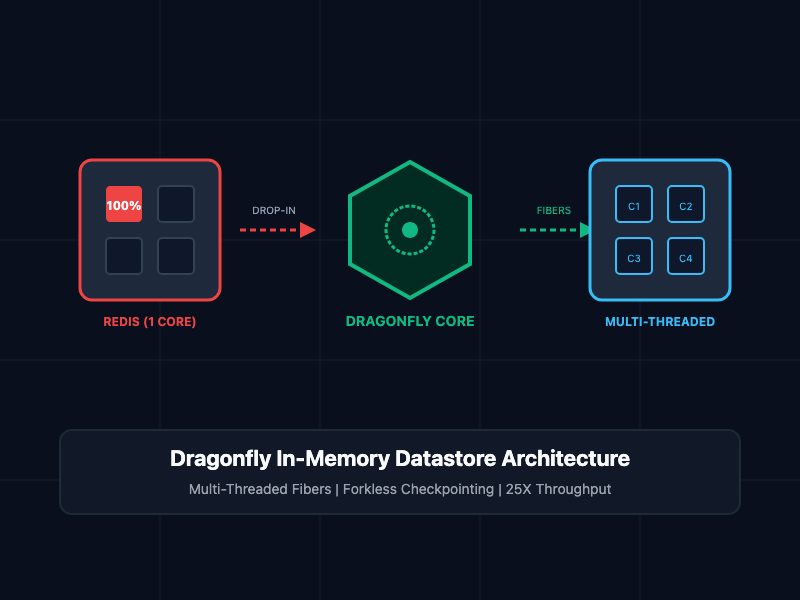
- Single-Threaded CPU Starvation: Redis processes commands inside a single-threaded event loop. When query demand spikes or complex operations (such as multi-key transactions, Lua scripts, or large hash serialization) execute, one CPU core hits 100% saturation while the remaining system cores sit completely idle.
- Cluster Sprawl and Operational Fragility: To scale beyond a single CPU core, engineering teams are forced to deploy Redis Cluster or manage client-side sharding proxies (like Twemproxy or Envoy). This adds network hops, rebalancing overhead, cross-slot transaction restrictions, and partial failure modes during node re-sharding.
- Memory Fork Spikes and OOM Panics: Redis point-in-time snapshotting (BGSAVE) relies on the Linux kernel fork() system call. Under heavy write workloads, copy-on-write (COW) memory duplication can spike physical RAM usage by up to 100%, causing the Linux kernel Out-Of-Memory (OOM) killer to terminate the database process abruptly.
- High Tail Latency Under Load: Contention on hot keys and queue latency can cause P99 and P99.9 latency to deteriorate from sub-millisecond to tens of milliseconds when throughput scales into hundreds of thousands of operations per second.
Dragonfly resolves these liabilities by introducing a multi-threaded, shared-nothing in-memory storage engine designed from the ground up to saturate modern hardware.
What Is Dragonfly?
Dragonfly is an open-source, source-available in-memory data store built as a seamless drop-in replacement for Redis and Memcached. Implemented in C++20 and powered by the Helio asynchronous I/O framework, Dragonfly executes across all available CPU cores without requiring clustering proxies or application code modifications.
A single Dragonfly instance can process over 4 million queries per second (QPS) in single-op benchmarks and upwards of 15 million QPS in pipelined execution, delivering up to 25X the throughput of a single Redis process while consuming up to 80% less memory on comparable datasets.
Key Architectural Differentiators
- Shared-Nothing Threading via Fibers: Instead of relying on traditional POSIX threads and heavy mutex locks that induce thread-scheduling churn, Dragonfly assigns each worker thread a dedicated database shard. Each thread manages concurrent connections and asynchronous operations using lightweight user-space cooperative fibers.
- Forkless Snapshotting Engine: Dragonfly eliminates the memory spikes of fork(). Its snapshotting engine utilizes state-based checkpointing, enabling consistent RDB and CSV persistence without duplicating address spaces or triggering kernel OOM terminations.
- Compact Memory Representation: Custom-engineered hash tables (Dash tables) and entry packaging algorithms cut allocation overhead, allowing Dragonfly to store identical key-value structures using a fraction of the RAM required by Redis.
- 100% Drop-In Protocol Compatibility: Dragonfly speaks the native Redis Serialization Protocol (RESP2/RESP3) and Memcached text/binary protocols. It supports over 185 Redis commands, pub/sub channels, transactions, and Lua scripts.
Core Concepts and Architecture
1. Shared-Nothing Threading and Fiber Scheduling
Dragonfly splits the entire key-space into discrete partitions (shards) matching the number of available CPU hardware threads. Each worker thread runs an independent event loop managing its dedicated partition.
When multi-key commands or transactions span multiple shards, Dragonfly does not use global mutexes. Instead, it utilizes a decentralized VLS (Very Lightweight Scheduling) algorithm:
┌────────────────────────────────────────────────────────┐
│  Client Connection Pool (RESP2 / RESP3 Protocol)       │
└────────────────────────────────────────────────────────┘
                           │
       ┌───────────────────┼───────────────────┐
       ▼                   ▼                   ▼
┌──────────────┐    ┌──────────────┐    ┌──────────────┐
│ Worker 0     │    │ Worker 1     │    │ Worker N     │
│ (Shard 0)    │    │ (Shard 1)    │    │ (Shard N)    │
│  - Fibers    │    │  - Fibers    │    │  - Fibers    │
│  - Dash Table│    │  - Dash Table│    │  - Dash Table│
└──────────────┘    └──────────────┘    └──────────────┘
By scheduling tasks as lightweight cooperative fibers within worker threads, Dragonfly eliminates OS context switching overhead while enabling parallel transaction validation.
2. Forkless Point-in-Time Persistence
Traditional Redis point-in-time snapshots invoke fork() to create a child process that iterates through memory pages. Writes occurring during the snapshot mark pages as dirty, forcing the kernel to allocate duplicate physical pages via Copy-on-Write (COW).
Dragonfly uses a state-based snapshot algorithm:
- When a snapshot begins, worker threads mark their local Dash tables with a version marker.
- In-flight modifications copy only the individual modified key-value entries to a temporary snapshot buffer before applying the update.
- Worker threads stream serialized entries to the output RDB file concurrently.
- RAM consumption during snapshotting scales proportionally only to active write volume, remaining negligible compared to total instance memory.
3. Dash Table Memory Packing
Redis uses traditional chaining hash tables with dictEntry structures and jemalloc padding, consuming up to 32 to 50 bytes of metadata overhead per key. Dragonfly employs Dash (Dynamic and Scalable Hashing) tables:
- Dash tables organize buckets into flat cache-line-sized memory segments.
- Small keys and primitive values are packed inline within the bucket slot, avoiding pointer dereferencing.
- Memory fragmentation is drastically reduced, yielding up to 80% higher density for string, hash, and set datasets.
Implementation Patterns and Code Demos
1. Deploying Dragonfly via Docker Compose
Dragonfly is packaged as a static container binary that can be launched immediately using the standard Redis port (6379).
The following docker-compose.yml manifest deploys Dragonfly with persistent volume mounts, memory caps, and multi-threaded CPU allocations:
services:
  dragonfly:
    image: 'docker.dragonflydb.io/dragonflydb/dragonfly:latest'
    container_name: dragonfly_cache
    restart: always
    ulimits:
      memlock: -1
    ports:
      - '6379:6379'
    volumes:
      - dragonfly_data:/data
    command:
      - '--logtostderr'
      - '--dir=/data'
      - '--dbfilename=dump.rdb'
      - '--maxmemory=16GB'
      - '--cache_mode=true'
      - '--proactor_threads=8'

volumes:
  dragonfly_data:
2. Connecting via Standard Redis Clients (Python & Node.js)
Because Dragonfly adheres strictly to RESP2 and RESP3 specifications, existing application drivers require no SDK changes.
Python Example (redis-py):
import redis

# Connect directly to the Dragonfly instance
client = redis.Redis(
    host="localhost",
    port=6379,
    decode_responses=True,
    socket_timeout=5.0
)

def execute_cache_operations():
    # Standard key-value operations
    client.set("session:usr_1092", "active", ex=3600)
    status = client.get("session:usr_1092")
    print(f"Session status: {status}")

    # Pipeline operations leveraging multi-core parallel dispatch
    pipe = client.pipeline()
    for i in range(1000):
        pipe.hset(f"metrics:node_{i}", mapping={"cpu": 45.2, "mem": 128.4})
    pipe.execute()
    print("Successfully committed 1,000 multi-core hash updates.")

if __name__ == "__main__":
    execute_cache_operations()
Node.js Example (ioredis):
import Redis from 'ioredis';

const dragonfly = new Redis({
  host: '127.0.0.1',
  port: 6379,
  maxRetriesPerRequest: 3,
});

async function runBenchmark() {
  await dragonfly.set('user:882:token', 'eyJhbGciOi...', 'EX', 7200);
  const token = await dragonfly.get('user:882:token');
  console.log(`Retrieved token length: ${token?.length} chars`);

  // Multi-key transactions execute atomically across shards
  const tx = dragonfly.multi();
  tx.incr('counter:total_pageviews');
  tx.sadd('unique_ips', '192.168.1.104');
  const results = await tx.exec();
  console.log('Transaction results:', results);

  await dragonfly.quit();
}

runBenchmark().catch(console.error);
Architectural Comparison Matrix
| Architectural Dimension | Redis (Single Process) | Redis Cluster | Dragonfly |
| Threading Model | Single-threaded event loop | Multiple single-threaded nodes | Multi-threaded shared-nothing fibers |
| Vertical Hardware Scaling | Inefficient (1 core utilized) | Complex (Multiple ports per host) | Native (Saturates all host CPU cores) |
| Throughput (Single Host) | ~100K - 200K QPS | ~500K - 1M QPS (Proxied) | 4M - 15M+ QPS |
| Snapshot Mechanism | Linux fork() (COW memory spike) | Per-node fork() | State-based lockless checkpointing |
| Memory Efficiency | Standard jemalloc chaining | Standard jemalloc chaining | Dense Dash tables (up to 80% savings) |
| Client Sharding Complexity | None (Single node) | High (Hash slots, MOVED redirects) | None (Single endpoint address) |
| Protocol Compatibility | Native RESP2 / RESP3 | Native RESP2 / RESP3 | Drop-in RESP2 / RESP3 & Memcached |
SRE and Production Best Practices
- Replace Cluster Sprawl with Single Large Instances: Instead of deploying a 16-node Redis cluster with multiple sharding proxies, deploy Dragonfly on a single multi-core instance (e.g., AWS c6g.4xlarge or c7g.8xlarge). This eliminates network hops, reduces proxy maintenance, and removes cross-slot transaction restrictions.
- Set Explicit Memory Caps: Always configure the --maxmemory flag in container launch arguments. When running in memory-constrained environments, enable --cache_mode=true to allow proactive eviction of least recently used items under memory pressure.
- Configure Thread Pools Matching vCPUs: Ensure --proactor_threads matches physical vCPUs allocated to the container to prevent thread scheduling contention.
- Tune Linux System Parameters: Adjust host socket and virtual memory parameters to allow Dragonfly to service millions of concurrent network connections:
# Increase system-wide open file limit
sudo sysctl -w fs.file-max=2097152

# Increase connection backlog queue
sudo sysctl -w net.core.somaxconn=65535

# Increase ephemeral port range
sudo sysctl -w net.ipv4.ip_local_port_range="1024 65535"
- Leverage Primary-Replica Replication: For high availability, deploy secondary Dragonfly instances using the --replicaof flag to stream asynchronous replication feeds across availability zones.
Getting Started
To launch a Dragonfly instance and verify drop-in compatibility using the standard redis-cli:
# Step 1: Launch Dragonfly via Docker
docker run --name dragonfly-instance \
  -p 6379:6379 \
  --ulimit memlock=-1 \
  -d docker.dragonflydb.io/dragonflydb/dragonfly:latest

# Step 2: Connect using official redis-cli
redis-cli -p 6379 PING

# Step 3: Check multi-threaded engine metrics
redis-cli -p 6379 INFO server

# Step 4: Run standard benchmark to test local throughput
redis-benchmark -p 6379 -t set,get -n 100000 -q -P 16
By migrating to Dragonfly, infrastructure teams eliminate the architectural complexity of Redis clustering, avoid copy-on-write memory failures, and achieve orders-of-magnitude higher throughput on existing cloud compute.