The Problem of Brand Impersonation and Urgency Tactics
In enterprise security environments, email-borne threats remain the single most common entry point for organizational compromise. Attackers rely on psychological triggers—primarily fear and urgency—to bypass cognitive checks. Phishing campaigns impersonating services like Netflix typically use notifications such as "Payment Declined" or "Membership will be canceled" to trick users into performing immediate actions.
However, modern security awareness is only half the battle. The real danger lies in how modern phishing infrastructure avoids detection by automated security controls:
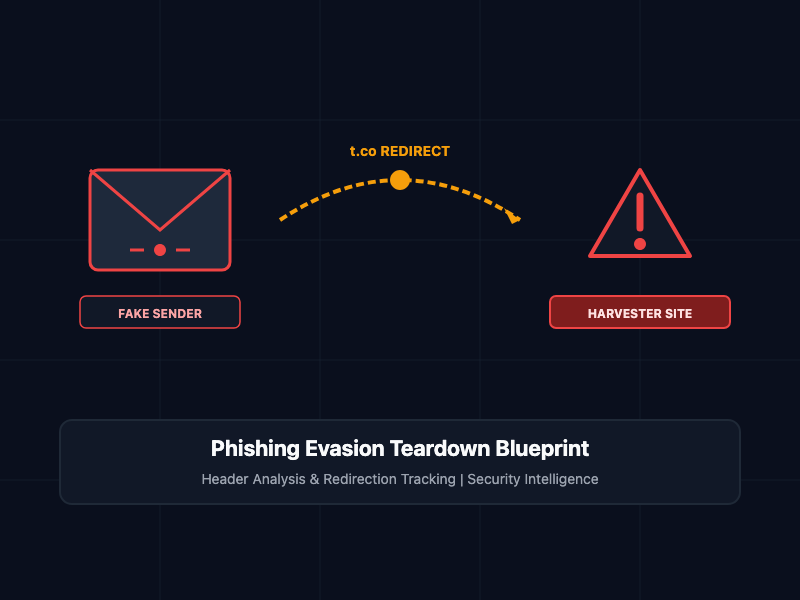
- Redirection Bypass Loops: Automated email scanners evaluate links inside incoming emails. To bypass these checks, attackers route traffic through trusted high-authority domains (such as Twitter/X's t.co shortener or Google redirects) to hide the final malicious landing URL.
- Mismatched Sender Alignment: The display name of the email is forged to say "Netflix," but the actual routing headers and return paths point to completely unrelated, compromised domains.
- Dynamic Credential Harvesting: Once the victim clicks the redirect link, they are sent to a visually indistinguishable proxy site that captures login credentials, payment details, and session cookies in real-time.
To safeguard enterprise networks, security teams must understand the technical signatures of these campaigns, automate header analysis, and block link redirectors before they reach end-user viewports.
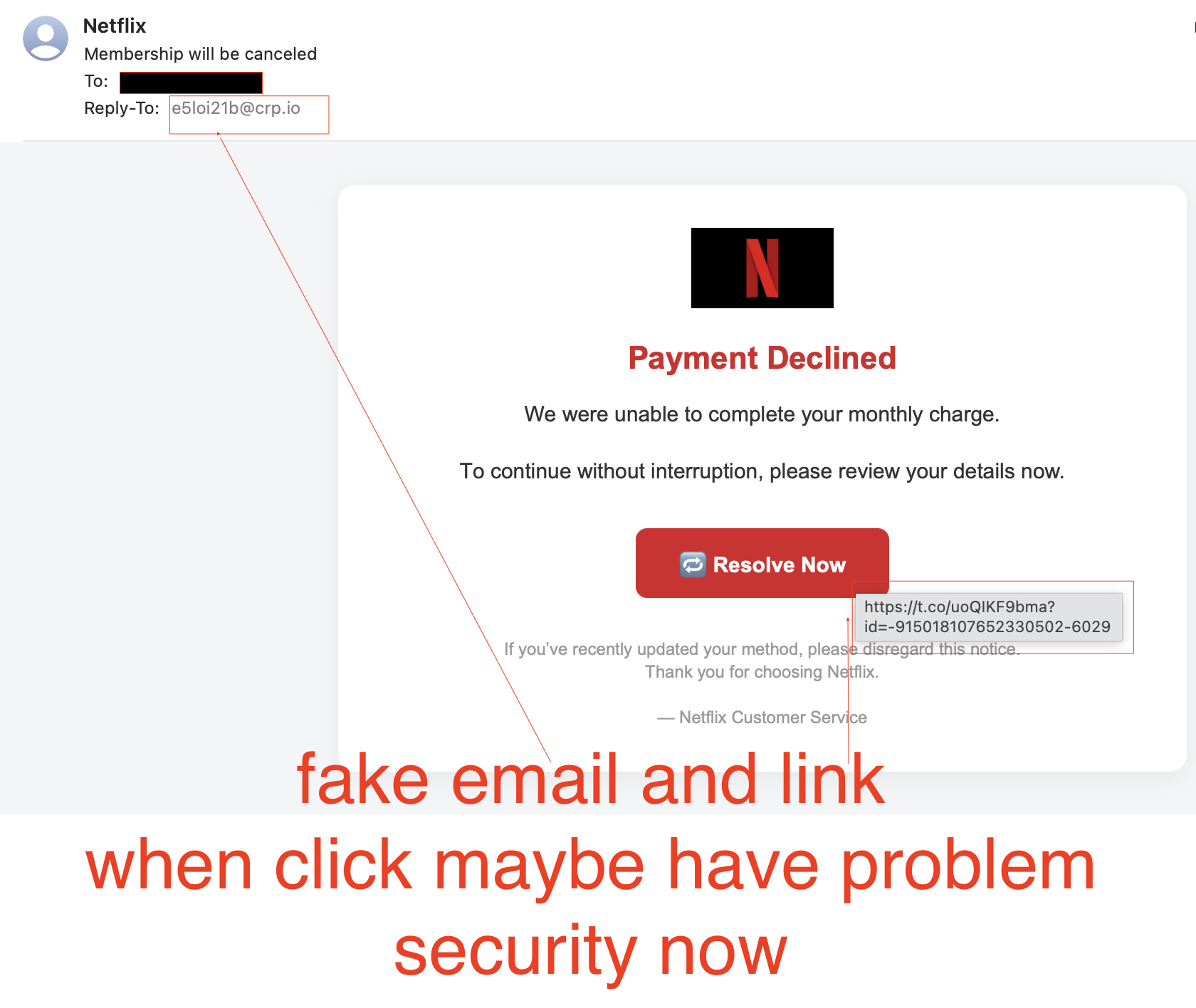
Technical Dissection of the Phishing Artifacts
An analysis of the attack vectors present in modern brand impersonation reveals two critical evasion strategies:
1. Mismatched Reply-To Headers
In the analyzed artifact, while the email header displays "Netflix" as the sender, the actual metadata reveals a mismatch:
- Display Name: Netflix
- Reply-To / Sender Address: e5loi21b@crp.io
The domain crp.io is entirely unrelated to netflix.com. Attackers use automated mail injection scripts on compromised low-reputation web servers or register burner domains to send bulk mail, relying on the user's mobile or desktop mail client to hide the actual email address under the trusted display name.
2. URL Shortener Redirection Evasion
The interactive button "Resolve Now" redirects the user to the following URL:
https://t.co/uoQIKF9bma?id=-915018107652330502-6029
Secure Email Gateways (SEGs) frequently allow links from high-reputation domains like t.co (Twitter/X's official link shortener) to pass through without inspection. When clicked, the shortener issues an HTTP 301 or 302 redirect, sending the victim's browser to the actual credential harvesting endpoint hosted on a malicious server.
Core Concepts and Implementation
To defend against these vectors, security teams must automate the triage process. Below are two operational implementations for parsing mail headers and unrolling redirection URLs.
1. Python Parser for Mismatched SMTP Headers
This script programmatically inspects raw email files (.eml), extracting the visible sender, the actual envelope sender, and checking if the alignment matches the claimed domain:
import email
from email.parser import BytesParser
from email.policy import default
import urllib.parse

class EmailHeaderAnalyzer:
    def __init__(self, raw_eml_path):
        self.raw_eml_path = raw_eml_path

    def analyze_headers(self):
        try:
            with open(self.raw_eml_path, 'rb') as f:
                msg = BytesParser(policy=default).parse(f)

            from_header = msg.get('From', '')
            reply_to_header = msg.get('Reply-To', '')
            subject_header = msg.get('Subject', '')

            print(f"Subject: {subject_header}")
            print(f"Claimed From: {from_header}")
            print(f"Reply-To: {reply_to_header}")

            # Simple alignment check
            claimed_domain = self._extract_domain(from_header)
            reply_domain = self._extract_domain(reply_to_header)

            if claimed_domain and reply_domain and claimed_domain != reply_domain:
                print("Alert: Mismatched domain alignment detected.")
                print(f"Claimed Source: {claimed_domain} | True Reply-To: {reply_domain}")
                return True
            return False

        except Exception as e:
            print(f"Error parsing email file: {str(e)}")
            return None

    def _extract_domain(self, header_value):
        if '<' in header_value:
            email_part = header_value.split('<')[1].split('>')[0]
        else:
            email_part = header_value.strip()
        if '@' in email_part:
            return email_part.split('@')[1].lower()
        return None

# Usage Example
# analyzer = EmailHeaderAnalyzer("suspect_email.eml")
# is_spoofed = analyzer.analyze_headers()
2. Python Script to Unroll Suspicious Redirect Chains
To inspect links without exposing analyst machines to active browser payloads, this script performs a controlled execution of HTTP HEAD requests to trace redirect paths without loading JavaScript or detonating drive-by downloads:
import requests
import sys

def trace_redirect_chain(shortened_url):
    print(f"Initiating defensive trace for: {shortened_url}")
    current_url = shortened_url
    hop_count = 1

    headers = {
        "User-Agent": "Mozilla/5.0 (Windows NT 10.0; Win64; x64) ThreatAnalysis/3.0"
    }

    try:
        while True:
            # Execute HEAD request with manual redirect handling
            response = requests.head(current_url, headers=headers, allow_redirects=False, timeout=5)

            print(f"Hop {hop_count}: Status Code {response.status_code}")
            print(f"Current Destination: {current_url}\n")

            # Check for redirect status codes (301, 302, 307, 308)
            if response.status_code in [301, 302, 307, 308] and 'Location' in response.headers:
                next_url = response.headers['Location']
                # Resolve relative paths if necessary
                if not next_url.startswith('http'):
                    next_url = urllib.parse.urljoin(current_url, next_url)
                current_url = next_url
                hop_count += 1

                # Prevent infinite redirection loop exploits
                if hop_count > 10:
                    print("Error: Exceeded maximum limit of 10 redirect hops.")
                    break
            else:
                # Terminal destination reached
                print("Trace completed. Terminal landing page discovered:")
                print(f"Final URL: {current_url}")
                break

    except requests.exceptions.RequestException as e:
        print(f"Network error during trace: {e}")

if __name__ == "__main__":
    # Test execution with the suspicious link from the artifact
    test_url = "[https://t.co/uoQIKF9bma](https://t.co/uoQIKF9bma)"
    trace_redirect_chain(test_url)
Defensive Best Practices for SRE and SecOps
- Enforce strict DMARC, SPF, and DKIM Checks: Configure your inbound mail exchange to quarantine or reject emails that fail SPF and DKIM domain alignment validation.
- Implement Protective DNS Filtering: Use enterprise DNS filtering systems (such as Cisco Umbrella, Cloudflare Gateway, or NextDNS) to block outbound connections to newly registered domains or known malicious IP blocks.
- Enforce Phishing-Resistant MFA: Standard SMS or Authenticator app codes are easily bypassed by dynamic proxy harvesting kits. Transition your identity providers to FIDO2/WebAuthn standards (such as security keys or Passkeys) that bind the authentication flow explicitly to the legitimate domain.
- Block Outbound Redirects on Corporate Gateways: Configure web proxy rules to inspect, intercept, or block traffic to public shorteners containing unverified metadata or tracking parameters on endpoints.
Getting Started with Incident Response
If an employee reports clicking a suspicious link:
# Step 1: Immediately isolate the affected workstation from the local network
networksetup -setnetworkserviceenabled "Wi-Fi" off

# Step 2: Use the trace script to determine the actual landing domain
python trace_redirect_chain.py "[https://t.co/uoQIKF9bma](https://t.co/uoQIKF9bma)"

# Step 3: Query active directory to force-revoke all current active sessions for the user account
az ad user revoke-sign-in-sessions --id user@enterprise.com
By prioritizing automated verification, restricting browser redirection pathways, and utilizing robust, phishing-resistant access methodologies, you establish a resilient defense posture capable of neutralizing brand impersonation tactics before they can result in security breaches.