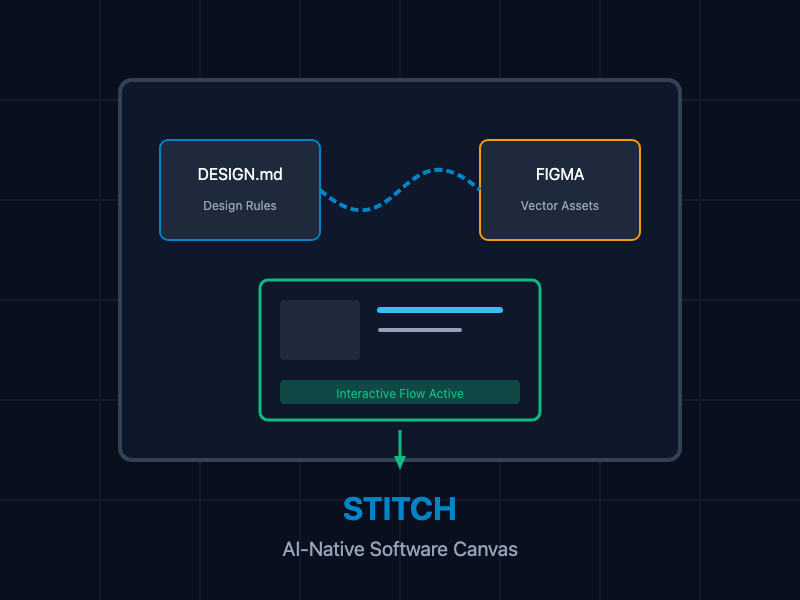
In standard product design cycles, the handoff between design and development is filled with friction. Product managers, designers, and software engineers struggle with several issues:
- Diverging Truth Sources: Figma files, design tokens, and functional React/HTML templates frequently diverge during rapid iterations.
- High Friction in Prototyping: Generating interactive user flows requires linking screens manually, which is highly time-consuming.
- Context-Free Generation: Generative AI tools often build generic layouts because they cannot ingest existing brand guidelines, spacing grids, or component definitions.
- Asymmetric Workflows: Non-technical team members cannot easily modify frontend layouts, and developers must manually inspect pixels to write CSS stylesheets.
Google Stitch, developed by Google Labs, solves these problems by functioning as an AI-native, infinite canvas. By reading design files, images, natural language, and code directly, Stitch allows teams to go from conceptual "vibes" to functional, interactive layouts instantly.
What Is Google Stitch?
Google Stitch is a visual design tool built on Gemini 3. It utilizes generative AI to transform user intentions—expressed as text, sketches, or videos—into component-driven user interfaces.
Unlike simple layout builders, Stitch operates as a unified workspace. It handles multi-screen state transitions, auto-generates logical next steps in user flows, and bridges the gap between design and production by exporting standard-compliant frontend components.
Core Workflows and Integrations
1. Design Systems with DESIGN.md
To enforce brand consistency, Stitch introduces DESIGN.md. This is an agent-friendly Markdown format designed to specify layouts, color variables, typographic scales, and branding constraints in plain, structured text. Because it is written in Markdown, both AI models and standard version control systems can read and modify it natively.
You declare your design rules in a DESIGN.md file in the root of your project:
# Design System Specification (DESIGN.md)

## Brand Foundations
- **Primary Color**: `#0284C7` (Sky Blue)
- **Secondary Color**: `#0F172A` (Slate Dark)
- **Accent Color**: `#F59E0B` (Amber)
- **Border Radius**: `8px` (Medium rounding for containers and buttons)

## Typography Scale
- **Header Font**: Inter, sans-serif (Font weight 700)
- **Body Font**: Roboto, sans-serif (Font weight 400)
- **Base Size**: `16px`

## Component Styling Rules
- **Buttons**:
  - Primary button must use `Primary Color` as background and `#FFFFFF` for text.
  - Secondary button must feature a `1px` border of `Secondary Color` on a transparent background.
  - Hover states should slightly dim background opacity to 90%.
- **Input Fields**:
  - `1px` solid border using `#E2E8F0`.
  - Focused state triggers an accent-colored outer shadow with `2px` blur.
When you import a DESIGN.md document onto the Stitch canvas, the underlying Gemini agent automatically applies these rules to all subsequently generated screens and component edits.
2. Screenshot-to-Code Pipelines
When you need to iterate on an existing website or translate a whiteboard layout, Stitch allows you to upload raw imagery. The multimodal vision capabilities of Gemini 3 parse structural lines, visual relationships, text hierarchies, and interface elements to convert the image into customizable HTML/Tailwind CSS blocks.
<!-- Example of structural output generated from a screenshot import -->
<div class="max-w-md mx-auto bg-white rounded-lg shadow-md overflow-hidden md:max-w-2xl">
  <div class="md:flex">
    <div class="md:shrink-0">
      <img class="h-48 w-full object-cover md:h-full md:w-48" src="/assets/hero.jpg" alt="Featured Location">
    </div>
    <div class="p-8">
      <div class="uppercase tracking-wide text-sm text-sky-500 font-semibold font-sans">Travel Guide</div>
      <a href="#" class="block mt-1 text-lg leading-tight font-bold text-slate-900 hover:underline">Explore Hidden Getaways</a>
      <p class="mt-2 text-slate-500 font-sans">Stitch generated this responsive card component directly from a raw jpeg mockup upload.</p>
    </div>
  </div>
</div>
3. Video-to-Code Flows
For complex interactions—such as a specific dropdown transition, accordion expansion, or custom mobile swipe-away menu—static text or screenshots are often insufficient. Stitch supports uploading short screen recordings. The platform's video-to-code engine analyzes the timeline, tracks moving UI elements, and generates the required client-side Javascript logic to replicate the interactive states.
I have searched for and verified the official, high-quality YouTube demo and tutorial videos for Google Stitch. Here are the top resources found
Google Stitch Just Changed Web Design Forever (Overview & Infinite Canvas Walkthrough)
No design skills? Use this free AI-powered design tool from Google (Featuring David East, DevRel Engineer at Google Labs)
How to Use Google Stitch to Make Sites 10X More Beautiful (Details on using Claude Code alongside design.md files)
Google Stitch Tutorial: How to Design a Mobile App with AI in Minutes
4. Dual-Mode Figma Integration
Stitch works side-by-side with industry-standard tooling. Depending on your current objectives, you can choose between two primary operational modes:
- Standard Mode: Best suited for design-to-production pipelines. In this mode, Stitch generates fully aligned component structures that can be exported directly into Figma with functional styling properties intact.
- Experimental Mode: Optimized for rapid prototyping, user flow testing, and image context indexing. It supports screenshot inputs and automatically generates multi-screen prototypes, but has limited Figma vector export capabilities.
Step-by-Step Implementation and Demonstration
To show how these features interact in real-world environments, we have detailed the system-wide execution loop below.
Video Demo: Running Video-to-Code Prototyping
In this recorded overview, we demonstrate importing a rough interface recording and watching Google Stitch reconstruct the structural layout and interactive animations.
Mock Interactive App Layout Refinement
[System Input: DESIGN.md & Landing_Mock.png]
                      │
                      ▼
┌──────────────────────────────────────────┐
│          Google Stitch Agent             │
├──────────────────────────────────────────┤
│ - Parses Brand Colors from DESIGN.md     │
│ - Detects Grid Layout from Image         │
│ - Synthesizes Interface Architecture     │
└──────────────────────────────────────────┘
                      │
                      ▼
┌──────────────────────────────────────────┐
│          Generated Outputs               │
├──────────────────────────────────────────┤
│ - High-Fidelity UI Screens on Canvas     │
│ - Responsive Tailwind CSS Codebase       │
│ - Vector Design Exportable to Figma      │
└──────────────────────────────────────────┘
Best Practices
- Begin with a Consolidated DESIGN.md: Do not prompt the AI repeatedly for font choices and base borders. Place those constraints in your DESIGN.md file first to standardize the canvas environment.
- Separate Layout Alterations from Component Styles: When modifying an interface, make layout prompts (e.g., "Add a search bar to the navbar") separately from style prompts (e.g., "Change background colors to slate gray").
- Audit Token Allocations inside Settings: Keep track of your daily design credits. Optimize standard runs using standard layouts before employing the heavier Redesign/Pro modes.
- Maintain Clear Image Contrast: When executing screenshot-to-code imports, ensure images are well-lit and crop out unnecessary browser borders or system toolbars.
Getting Started
To launch your first workspace, navigate to stitch.withgoogle.com, log in with your credentials, and select your target workspace mode. Import your project's brand definitions using a basic Markdown format, and watch as raw text and layout images translate into standard-compliant, interactive frontend designs within seconds.