The Problem Teams Face with AI Agent Context Window Management
As AI coding assistants transition from simple autocomplete widgets to fully autonomous terminal agents like Claude Code, software developers face new engineering hurdles:
- Context Bloat & Drift: Dumping entire codebases into an agent's memory pollutes the context window, causing hallucinated method signatures and forgotten project constraints.
- Repetitive Prompting: Developers waste time re-instructing the agent on code style, linting rules, test commands, and deployment scripts for every new session.
- Lack of Guardrails: Autonomous agents can inadvertently run destructive commands, overwrite critical configurations, or break architectural boundaries without automated checks.
- Inconsistent Developer Workflows: Individual team members prompt the AI differently, leading to fragmented code styling and unstandardized commit histories across the repository.
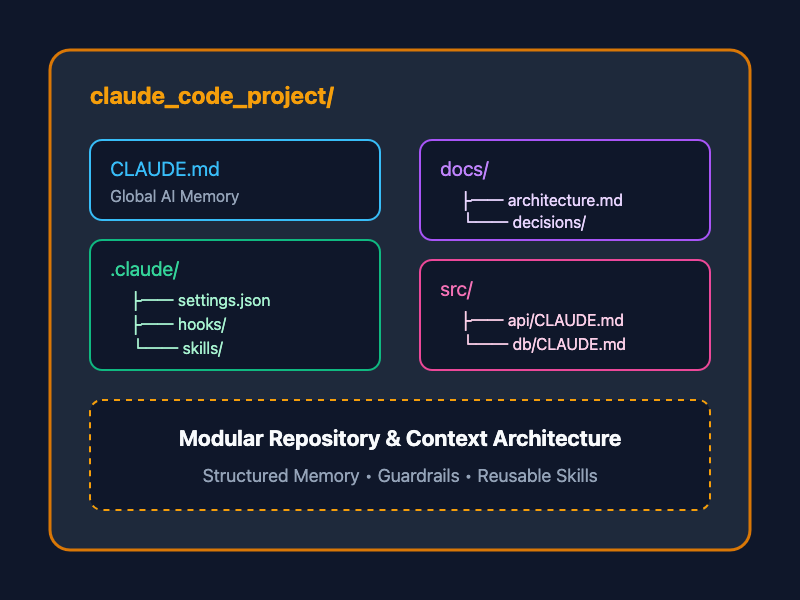
Adopting a structured Claude Code Project Architecture solves these bottlenecks by establishing dedicated project memory (CLAUDE.md), modular sub-context files, reusable skill workflows, and automated safety hooks directly inside your repository.
The Complete Claude Code Project Directory Structure
claude_code_project/
├── CLAUDE.md
├── README.md
├── docs/
│   ├── architecture.md
│   ├── decisions/
│   └── runbooks/
├── .claude/
│   ├── settings.json
│   ├── hooks/
│   └── skills/
│       ├── code-review/
│       │   └── SKILL.md
│       ├── refactor/
│       │   └── SKILL.md
│       └── release/
│           └── SKILL.md
├── tools/
│   ├── scripts/
│   └── prompts/
└── src/
    ├── api/
    │   └── CLAUDE.md
    └── persistence/
        └── CLAUDE.md
Key Components Breakdown
1. Root CLAUDE.md: Global Project Memory
The CLAUDE.md file at the root of your repository acts as the primary brain for Claude Code. Whenever a terminal session starts, Claude automatically reads this file to understand build steps, coding standards, environment setup, and operational guidelines.
# Project Memory & Guidelines

## Tech Stack
- Runtime: Node.js v20+ / TypeScript 5.x
- Framework: Express.js
- Testing: Vitest

## Command Shortcuts
- Build: `npm run build`
- Test: `npm test`
- Lint: `npm run lint`

## Architecture Rules
- Follow clean architecture boundaries (Controllers -> Services -> Repositories).
- Never write inline SQL queries; use the query builder pattern.
- All new API endpoints must have associated Vitest unit tests in `tests/`.
2. Reusable AI Skills (.claude/skills/)
Skills are modular, single-responsibility instruction packages stored in .claude/skills/<skill-name>/SKILL.md. They define repeatable automated workflows such as code reviews, refactoring patterns, or release preparation.
Example .claude/skills/code-review/SKILL.md:
# Skill: Code Review

When performing a code review:
1. Check for proper TypeScript typing (no explicit `any`).
2. Verify input validation on all API endpoints using Zod schemas.
3. Ensure error logging includes context objects.
4. Run `npm run lint` and `npm test` before approving changes.
3. Automated Guardrails & Hooks (.claude/hooks/)
Hooks enforce automated pre-execution and post-execution checks. They prevent Claude Code from committing broken code, running dangerous shell commands, or violating safety policies.
Example .claude/settings.json configuring hooks:
{
  "permissions": {
    "allowRunCommand": true
  },
  "hooks": {
    "preCommand": ".claude/hooks/check-safety.sh",
    "postEdit": "npm run format"
  }
}
4. Modular Context Scoping (src/subfolder/CLAUDE.md)
For large enterprise codebases, placing localized CLAUDE.md files inside specific directories (e.g., src/api/CLAUDE.md or src/persistence/CLAUDE.md) provides laser-focused context without bloating the root memory. Claude Code dynamically reads localized instructions when navigating inside subdirectories.
Architectural Blueprint: Monolithic Prompt vs. Structured Repo
| Feature | Unstructured Prompting | Claude Code Repository Pattern |
| Context Memory | Lost after every session | Persisted via CLAUDE.md |
| Workflow Reuse | Manual copy-paste prompts | Modular .claude/skills/ |
| Safety Guardrails | Human observation | Automated .claude/hooks/ |
| Context Scope | Entire codebase (High noise) | Scoped sub-folder CLAUDE.md files |
| Team Standardization | Variable across team members | Version-controlled in Git |
Step-by-Step Setup Guide
Step 1: Initialize the Directory Structure
Create the recommended folder hierarchy inside your existing repository:
mkdir -p .claude/skills/code-review .claude/skills/refactor .claude/skills/release .claude/hooks
mkdir -p docs/decisions docs/runbooks tools/scripts tools/prompts
Step 2: Define Your Root CLAUDE.md
Create CLAUDE.md in the root folder with clear, concise directives. Keep guidelines short and precise—avoid long essays so you don't exhaust token limits unnecessarily.
Step 3: Implement Reusable Skills & Hooks
Define custom task workflows in .claude/skills/ and configure project permissions inside .claude/settings.json. Commit these configurations to Git so your entire engineering team shares identical AI behavior.
Best Practices for Claude Code Architecture
- Keep CLAUDE.md Minimal and Concise: Focus strictly on build commands, code conventions, and non-negotiable constraints.
- Use Skills for Repeated Workflows: Offload multi-step routines (like generating changelogs or refactoring database calls) into .claude/skills/.
- Enforce Hooks for Automated Checks: Automate formatting, linting, and safety checks on every file write or tool execution.
- Document Architecture Decisions: Store system design records in docs/decisions/ so Claude can query historical rationale when making refactoring proposals.
- Leverage Sub-folder Memory Scopes: Place directory-specific CLAUDE.md files inside modules like src/api/ or src/persistence/ to keep context razor-sharp.
Getting Started
To transform your repository into an AI-native workspace, clone your repo, create a root CLAUDE.md with your essential build commands, add your first skill in .claude/skills/code-review/SKILL.md, and launch claude in your terminal. You'll instantly experience faster, safer, and remarkably context-aware agentic development.