The Problem Developer Teams Face with Cloud LLM Coding Assistants
AI coding assistants have revolutionized software development, but relying exclusively on cloud-hosted closed models presents significant challenges for modern engineering teams:
- High token costs: Running continuous agentic coding tasks, large codebase indexings, and multi-file refactoring across big engineering teams rapidly inflates monthly API bills.
- Privacy & security concerns: Sharing proprietary corporate source code or client credentials with external LLM APIs violates strict enterprise data compliance policies.
- Network dependency & rate limits: Offline development becomes impossible, and cloud API throttling interrupts automated CI/CD and coding workflows.
- Lack of control over model behavior: Cloud APIs hide hyperparameter tuning, preventing developers from tweaking sampling parameters like temperature or top-$p$ for reasoning models.
Running Qwen3.5 locally via Claude Code eliminates these bottlenecks by pairing Anthropic's powerful terminal-based agentic CLI with open-weights LLMs hosted on local hardware.
What Is the Qwen3.5 + Claude Code Stack?
Claude Code is an agentic command-line interface (CLI) created to search, edit, test, and execute commands across your codebase autonomously.
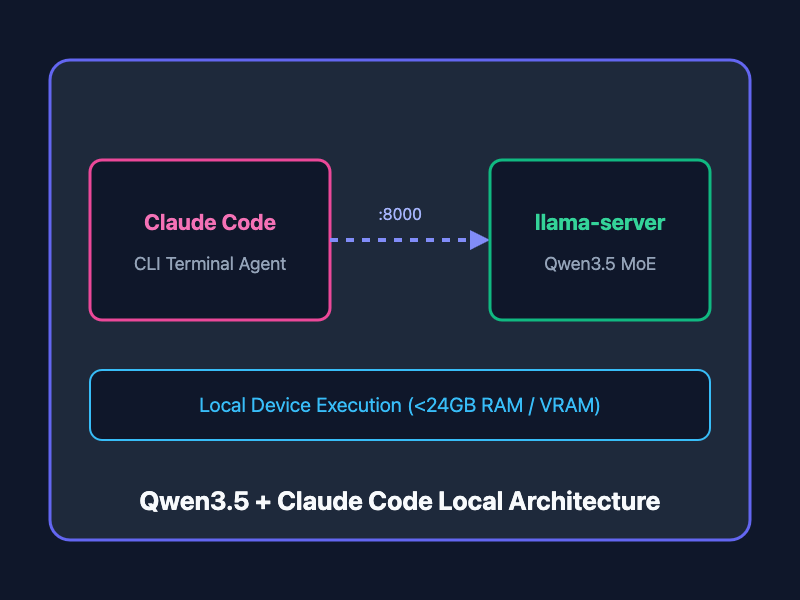
By taking advantage of the ANTHROPIC_BASE_URL environment variable, developers can seamlessly re-route Claude Code's network calls away from Anthropic's remote servers and directly into a local instance of llama.cpp running open models like Qwen3.5-35B-A3B.
Qwen3.5-35B-A3B is an advanced Mixture-of-Experts (MoE) model optimized for agentic tool use and software development. When quantized (Q4_K_XL), it executes smoothly on consumer devices with under $24\text{GB}$ of unified memory or VRAM (such as Apple Silicon M-series Macs or single-GPU Linux workstations).
Step-by-Step Setup Guide
+-------------------+        HTTP        +-----------------------+
|  Claude Code CLI  | -----------------> |   llama.cpp Server    |
| (Terminal Agent)  |  localhost:8000    | (Qwen3.5-35B-A3B MoE) |
+-------------------+                    +-----------------------+
          |                                          |
          v                                          v
[ Executes Local Shell ]                  [ Local VRAM / Hardware ]
Step 1: Deploy Qwen3.5 via llama-server
To handle complex agentic coding tasks, start llama-server using Qwen's recommended thinking-mode sampling parameters: temp = 0.6, top_p = 0.95, and top_k = 20.
Run the server execution command in a background terminal session or tmux window:
./llama.cpp/llama-server \
  --model unsloth/Qwen3.5-35B-A3B-GGUF/Qwen3.5-35B-A3B-UD-Q4_K_XL.gguf \
  --mmproj unsloth/Qwen3.5-35B-A3B-GGUF/mmproj-F16.gguf \
  --alias "unsloth/Qwen3.5-35B-A3B"
Step 2: Install Claude Code and Set Endpoint Redirection
Install the Claude Code CLI tool on macOS, Linux, or WSL:
curl -fsSL https://claude.ai/install.sh | bash
Next, redirect Claude Code to target your local llama.cpp server by exporting the ANTHROPIC_BASE_URL environment variable:
export ANTHROPIC_BASE_URL="http://localhost:8000"
Step 3: Run Autonomous Coding Tasks
Launch Claude Code inside your target project repository and issue agentic instructions. For example, to set up an Unsloth fine-tuning script automatically:
You can only work in the cwd project/. Do not search for CLAUDE.md - this is it.
Install Unsloth via a virtual environment via uv. See https://unsloth.ai/docs/get-started/install/pip-install on how.
Then do a simple Unsloth finetuning run with 1 GPU.
Claude Code will parse your repository, create the uv virtual environment, resolve dependencies, write the Python fine-tuning script, and execute the job locally.
Choosing the Right Qwen3.5 Model Variant
Depending on your local VRAM and system memory constraints, choose the model tier that best fits your hardware capabilities:
| Model Variant | Architecture | Recommended Hardware / VRAM | Primary Strengths |
|---|---|---|---|
| Qwen3.5-35B-A3B | MoE (~30B parameters) | 24GB24\text{GB}24GB Unified RAM / GPU | Best overall agentic reasoning & speed balance |
| Qwen3.5-27B | Dense | 32GB32\text{GB}32GB+ VRAM | High accuracy, slower execution speed |
| Qwen3.5-9B | Dense | 12GB12\text{GB}12GB - 16GB16\text{GB}16GB VRAM | Lightweight, ultra-fast local iteration |
| Qwen3.5-4B / 2B | Dense | 4GB4\text{GB}4GB - 8GB8\text{GB}8GB VRAM | Edge devices & quick local test scripts |
Best Practices for Local Claude Code Workflows
- Keep llama-server Active in tmux: Run your server process inside a tmux or screen session so terminal disconnects don't terminate your model server.
- Use Quantized GGUF Models: Formats like Q4_K_XL provide near-lossless accuracy while drastically reducing VRAM consumption.
- Explicit Scope Rules: Restrict autonomous local agent edits by specifying project boundaries directly in your initial prompts.
- Leverage uv for Fast Environment Isolation: Pair Claude Code with modern Python tools like uv to speed up dependency installation times.
Getting Started
To experience zero-cost, privacy-first local AI development, install llama.cpp, download the quantized Qwen3.5-35B-A3B model weights from Unsloth on Hugging Face, point ANTHROPIC_BASE_URL to http://localhost:8000, and start issuing autonomous terminal commands through Claude Code today!