


The Hidden Tax of Full-Docker Local Development Stacks
Containerizing an entire microservice architecture in a single docker-compose.yml file became the default developer experience (DevEx) pattern over the last decade. In theory, running 12 services—web APIs, frontend dev servers, cron schedulers, background workers, PostgreSQL, Redis, and message brokers—inside Docker guarantees identical environments across every laptop.
In practice, containerizing application source code and language runtimes during active local development introduces severe operational drag:
- Massive Disk Bloat from Duplicate Layers: Each service builds its own image containing an OS userland (Debian/Alpine), language runtime (Node.js, Python, Go, or Ruby), package manager caches (node_modules, .venv, Go module caches), and system libraries (openssl, libpq). Across 9 application and worker containers, gigabytes of identical dependencies are duplicated across image layers and overlay filesystems.
- Bind-Mount Filesystem Latency: Mounting host source directories into containers to support hot-reloading incurs heavy filesystem translation penalties (especially across VirtioFS or gRPC-FUSE on macOS and WSL2). File watchers lag, bundlers stall, and test suites run significantly slower than native execution.
- Hypervisor RAM and CPU Overhead: Keeping 12 containers running simultaneously forces the Docker Linux VM to reserve 6GB–12GB of RAM, draining laptop batteries and starving local IDEs and language servers (LSPs).
- Slow Rebuild Loops: Adding a single dependency often invalidates Docker layer caches, forcing developers to wait minutes for docker compose build before testing a two-line change.
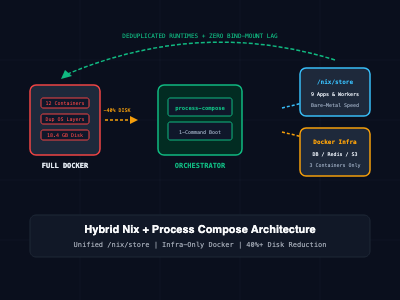
You do not need to abandon reproducibility to fix these bottlenecks. By splitting the stack—running stateful infrastructure in Docker, executing all applications and workers natively on the host via Nix, and orchestrating the entire lifecycle with process-compose—you can cut local disk footprint by over 40% while running services at bare-metal speed with a single startup command.
The Hybrid Architecture: Unified /nix/store + Infra-Only Docker + Process Compose
Instead of forcing Docker to manage both databases and active development runtimes, this architecture assigns each tool to the problem it solves best:
- Nix (flake.nix + Unified /nix/store): Provides bit-for-bit reproducible language runtimes, compilers, and native shared libraries directly on the host. Every service shares a single, content-addressed /nix/store. If 6 services use Node.js 22 and OpenSSL 3, those binaries exist exactly once on disk.
- Slim docker-compose.yml (Infra Only): Retains only the 3–4 stateful infrastructure dependencies (PostgreSQL, Redis, MinIO, RabbitMQ/Kafka). Databases benefit from isolated network ports, pinned data volumes, and zero host pollution.
- process-compose.yml (One-Command Orchestrator): Replaces the ergonomic workflow of docker compose up. It boots the Docker infrastructure, waits on health checks, launches all host-native apps and workers in dependency order, aggregates live logs in a clean TUI, and tears everything down cleanly on exit.
┌────────────────────────────────────────────────────────────────────────┐
│                One-Command Entry: `nix develop -c pc up`               │
│                 (process-compose TUI & Dependency DAG)                 │
└───────────────────────────────────┬────────────────────────────────────┘
                                    │
         ┌──────────────────────────┴──────────────────────────┐
         ▼ (Host-Native Processes)                             ▼ (Docker Infra)
┌────────────────────────────────────────┐    ┌────────────────────────────────┐
│   9 App & Worker Services (Bare Metal) │    │   3 Stateful Infra Containers  │
│  ├── api-gateway      (Go / Node)      │    │  ├── postgres:16-alpine        │
│  ├── billing-api      (Node / Python)  │    │  ├── redis:7-alpine            │
│  ├── web-frontend     (Vite / Next)    │    │  └── minio / rabbitmq          │
│  ├── email-worker     (Queue Consumer) │    │                                │
│  ├── webhook-worker   (Queue Consumer) │    │  Managed via slim              │
│  └── cron-scheduler   (Background Job) │    │  docker-compose.yml            │
└───────────────────┬────────────────────┘    └───────────────┬────────────────┘
                    │ Zero Duplication                        │ Localhost Ports
                    ▼                                         │ (5432, 6379)
┌────────────────────────────────────────┐                    │
│          Unified `/nix/store`          │◄───────────────────┘
│  - Single pinned Node.js, Go, Python   │
│  - Single shared glibc / OpenSSL / pq  │
│  - Zero VM bind-mount I/O overhead     │
└────────────────────────────────────────┘
Step-by-Step Implementation
1. Pinning Shared Runtimes in flake.nix
Define every runtime, CLI tool, and native library required by your 9 application and worker services in a single flake.nix at the root of your repository. Because Nix hashes every package into /nix/store, all projects and services on your machine reuse the exact same immutable binaries.
# flake.nix - Unified host-native runtimes for all apps and workers
{
  description = "Hybrid local development stack with Nix and process-compose";

  inputs = {
    nixpkgs.url = "github:NixOS/nixpkgs/nixos-unstable";
    flake-utils.url = "github:numtide/flake-utils";
  };

  outputs = { self, nixpkgs, flake-utils }:
    flake-utils.lib.eachDefaultSystem (system:
      let
        pkgs = import nixpkgs { inherit system; };
      in
      {
        devShells.default = pkgs.mkShell {
          name = "platform-dev-shell";

          # Shared runtimes deduplicated in /nix/store across all services
          packages = with pkgs; [
            nodejs_22
            pnpm
            go_1_24
            python312
            uv
            process-compose
            postgresql_16 # Provides psql CLI client only
            redis         # Provides redis-cli only
            jq
            curl
          ];

          shellHook = ''
            export DATABASE_URL="postgres://dev:devpass@127.0.0.1:5432/app_dev?sslmode=disable"
            export REDIS_URL="redis://127.0.0.1:6379/0"
            export NODE_ENV="development"
            echo "Nix devShell active: Node $(node -v) | Go $(go version | awk '{print $3}') | Python $(python3 --version)"
          '';
        };
      }
    );
}
2. Stripping docker-compose.yml Down to Infrastructure Only
Remove all application build contexts, Node/Python base images, and source-code bind mounts from docker-compose.yml. Keep only stateful backing services with explicit healthchecks so process-compose knows when it is safe to boot application workers.
# docker-compose.yml - Stateful infrastructure only (3 services instead of 12)
services:
  postgres:
    image: postgres:16-alpine
    container_name: dev_postgres
    ports:
      - "127.0.0.1:5432:5432"
    environment:
      POSTGRES_USER: dev
      POSTGRES_PASSWORD: devpass
      POSTGRES_DB: app_dev
    volumes:
      - pg_data:/var/lib/postgresql/data
    healthcheck:
      test: ["CMD-SHELL", "pg_isready -U dev -d app_dev"]
      interval: 3s
      timeout: 3s
      retries: 10

  redis:
    image: redis:7-alpine
    container_name: dev_redis
    ports:
      - "127.0.0.1:6379:6379"
    command: ["redis-server", "--save", "", "--appendonly", "no"]
    healthcheck:
      test: ["CMD", "redis-cli", "ping"]
      interval: 3s
      timeout: 3s
      retries: 10

  minio:
    image: minio/minio:latest
    container_name: dev_minio
    command: server /data --console-address ":9001"
    ports:
      - "127.0.0.1:9000:9000"
      - "127.0.0.1:9001:9001"
    environment:
      MINIO_ROOT_USER: minioadmin
      MINIO_ROOT_PASSWORD: minioadmin
    volumes:
      - minio_data:/data
    healthcheck:
      test: ["CMD", "mc", "ready", "local"]
      interval: 5s
      timeout: 5s
      retries: 10

volumes:
  pg_data:
  minio_data:
3. Orchestrating the Full Stack with process-compose.yml
process-compose provides a Docker Compose-like declarative YAML schema for non-containerized host processes, complete with dependency graphs (depends_on), HTTP/command readiness probes, automatic restarts, and an interactive terminal UI.
# process-compose.yml - One-command orchestration for infra + host-native apps
version: "0.5"

log_level: info

processes:
  # 1. Start stateful infra containers and wait until healthy
  infra:
    command: "docker compose up --wait"
    shutdown:
      command: "docker compose stop"
    readiness_probe:
      exec:
        command: "pg_isready -h 127.0.0.1 -p 5432 -U dev && redis-cli -h 127.0.0.1 ping | grep -q PONG"
      initial_delay_seconds: 2
      period_seconds: 2
      timeout_seconds: 3

  # 2. Run database migrations once infra is ready
  db-migrate:
    command: "pnpm --filter @app/db migrate:dev"
    depends_on:
      infra:
        condition: process_healthy

  # 3. Core API Gateway (Go binary running natively on host)
  api-gateway:
    working_dir: "./services/api-gateway"
    command: "go run ./cmd/server"
    depends_on:
      db-migrate:
        condition: process_completed_successfully
    readiness_probe:
      http_get:
        host: 127.0.0.1
        port: 8080
        path: /healthz
      period_seconds: 2
    availability:
      restart: on_failure
      backoff_seconds: 2

  # 4. Billing Service (Node.js native with instant file watching)
  billing-service:
    working_dir: "./services/billing"
    command: "pnpm dev"
    depends_on:
      db-migrate:
        condition: process_completed_successfully
    availability:
      restart: on_failure

  # 5. Async Background Workers (Email, Webhooks, PDF Exports)
  worker-email:
    working_dir: "./services/workers"
    command: "uv run python -m workers.email_consumer"
    depends_on:
      infra:
        condition: process_healthy
    availability:
      restart: on_failure

  worker-webhooks:
    working_dir: "./services/workers"
    command: "uv run python -m workers.webhook_dispatcher"
    depends_on:
      infra:
        condition: process_healthy
    availability:
      restart: on_failure

  # 6. Frontend Web Application (Vite HMR at native filesystem speed)
  web-frontend:
    working_dir: "./apps/web"
    command: "pnpm dev --port 3000"
    depends_on:
      api-gateway:
        condition: process_healthy
4. Launching Everything with One Command
With flake.nix, docker-compose.yml, and process-compose.yml in place, any developer can boot all 12 services (3 infra containers + 9 host-native services) with a single command:
# Enter the pinned Nix shell and start the entire 12-service stack
nix develop --command process-compose up
To make this even faster in daily workflows, add a .envrc file with direnv (use flake) so entering the project directory automatically loads the Nix environment, allowing you to simply run:
# Start all 12 services with live TUI log multiplexing
process-compose up
Real-World Benchmark Comparison: Full Docker vs. Hybrid Nix Stack
Measured on a 12-service polyglot monorepo (Go API, 3 Node.js services, 3 Python workers, Vite frontend, Scheduler, PostgreSQL, Redis, MinIO):
| Operational Metric | Full Docker Stack (12 Containers) | Hybrid Nix + Process Compose Stack | Measured Improvement |
| Total Local Disk Footprint | 18.4 GB (Images + Layers + Volumes) | 9.8 GB (Unified /nix/store + 3 Infra Images) | ~46.7% Disk Reduction |
| Cold Stack Boot Time | 48–90 seconds (Image builds + VM I/O) | 6–11 seconds (Native exec + 3 Alpine containers) | ~7X Faster Startup |
| Frontend / API Hot-Reload | 1,200 ms – 3,500 ms (Bind-mount lag) | 40 ms – 150 ms (Native OS inotify/FSEvents) | ~20X Faster HMR |
| Idle Memory Consumption | 6.8 GB (Docker VM + 12 OS userlands) | 2.1 GB (3 Infra containers + Host processes) | ~69% Less RAM |
| Dependency Deduplication | Duplicated per Dockerfile base image | Content-addressed once in /nix/store | Zero Runtime Duplication |
| IDE / LSP Integration | Requires Remote-Containers / DevContainers | Native host paths, direct debugger attach | Zero IDE Friction |
SRE and DevEx Best Practices
Keep Production Dockerfiles Intact: Moving local development to Nix and process-compose does not mean abandoning Docker in production. Continue building immutable multi-stage Docker images (or Nix-built OCI images via dockerTools.buildLayeredImage) in CI/CD for Kubernetes or ECS deployments.
Schedule Periodic /nix/store Garbage Collection: Nix retains older package generations to support instant rollbacks. Run garbage collection periodically to reclaim unused derivations and keep disk savings locked in:
# Remove unreachable store paths and optimize hard links
nix-collect-garbage -d
nix store optimise
Use a Team Binary Cache (Cachix or Attic): If your flake.nix builds custom native packages, configure a shared Nix binary cache so new team members download pre-built binaries in seconds instead of compiling locally.
Bind Infra Ports Strictly to 127.0.0.1: Always map Docker infrastructure ports to the local loopback interface (127.0.0.1:5432:5432) rather than 0.0.0.0 to prevent exposing development databases on shared office or coffee-shop networks.
Leverage process-compose Graceful Shutdowns: Define explicit shutdown.command hooks on the infra process (such as docker compose stop) so pressing F10 or Ctrl+C in the TUI cleanly halts both native host workers and Docker containers without leaving orphaned processes or locked ports.
Getting Started
To migrate your local stack from full Docker to the hybrid Nix + Process Compose workflow:
# Step 1: Install Nix (Determinate Nix Installer recommended for macOS/Linux)
curl --proto '=https' --tlsv1.2 -sSf -L https://install.determinate.systems/nix | sh -s -- install

# Step 2: Reclaim disk space from legacy application Docker images
docker compose down --rmi local
docker builder prune -af

# Step 3: Initialize flake.nix, slim docker-compose.yml, and process-compose.yml
git add flake.nix docker-compose.yml process-compose.yml

# Step 4: Launch the entire 12-service stack with a single command
nix develop --command process-compose up
By confining Docker to stateful infrastructure, deduplicating all application runtimes in a unified /nix/store, and unifying process management with process-compose, engineering teams reclaim over 40% of local disk capacity while enjoying near-instant boot times and bare-metal hot-reloading.