The Challenge of Modern Cross-Platform Development
Engineering teams that target multiple operating systems and platforms frequently encounter severe architectural trade-offs:
- Resource-Heavy Desktop Footprints: Frameworks like Electron bundle full Chromium browsers and Node.js runtimes, resulting in high baseline memory usage (200MB+) and bloated binary sizes for simple applications.
- Context Switching Across Stacks: Developers often write web frontends in TypeScript/React, native mobile UI in Swift/Kotlin, and backend services in Rust or Go, forcing duplication of business logic and complex serialization boundaries.
- Garbage Collection Latency: Interpreted or garbage-collected UI runtimes can suffer from frame drops (jank) during heavy background computation or data parsing tasks.
- Brittle API Contracts: Hand-crafting REST or GraphQL bindings between client UIs and backend servers often leads to runtime type mismatches during rapid iteration.
Dioxus resolves these challenges by bringing React-like component abstractions to Rust, compiling to native machine code or WebAssembly without requiring a JavaScript runtime or heavy browser engine.
What Is Dioxus?
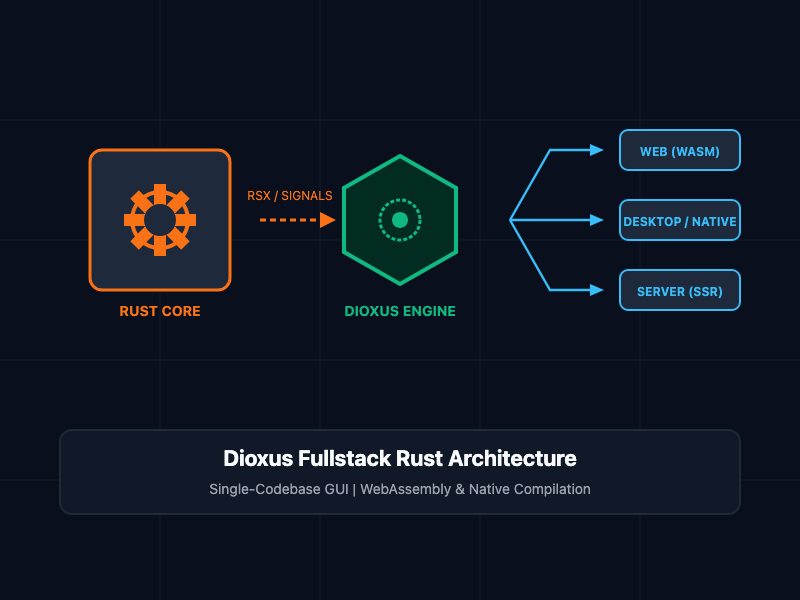
Dioxus is a portable, fullstack GUI library for Rust created by DioxusLabs. It provides a familiar, reactive programming model utilizing virtual DOM reconciliation, signal-based state management, and an HTML-like macro syntax (rsx!).
Unlike single-target GUI frameworks, Dioxus decouples the core UI renderer from the platform target. A single Dioxus codebase can render to:
- Web: Compiles directly to WebAssembly (Wasm) interacting with the browser DOM.
- Desktop: Renders natively via Webview (OS native webview engine) or directly via WGPU/Skia graphics pipelines, consuming a fraction of the RAM required by Electron.
- Mobile: Targets iOS and Android using native system webviews.
- Server / SSR: Renders static HTML on the server with hydrated interactive client components.
- Terminal: Renders directly to terminal user interfaces (TUI) for CLI dashboards.
Core Concepts
1. Reactive Signals and the RSX Macro
Dioxus uses a macro named rsx! to declare HTML-like user interfaces with full compile-time type safety. State changes are tracked using fine-grained signals (use_signal), which automatically trigger component re-renders when mutated.
The following example demonstrates a reactive counter component featuring local state management and event handling:
use dioxus::prelude::*;

#[component]
pub fn Counter() -> Element {
    // Initialize a reactive integer signal
    let mut count = use_signal(|| 0);

    rsx! {
        div { class: "p-6 max-w-sm mx-auto bg-slate-800 rounded-xl text-white",
            h1 { class: "text-2xl font-bold mb-4", "System Counter" }
            p { class: "text-lg mb-4", "Current Value: {count}" }

            div { class: "flex gap-2",
                button {
                    class: "px-4 py-2 bg-emerald-600 hover:bg-emerald-500 rounded",
                    onclick: move |_| count += 1,
                    "Increment"
                }
                button {
                    class: "px-4 py-2 bg-rose-600 hover:bg-rose-500 rounded",
                    onclick: move |_| count -= 1,
                    "Decrement"
                }
            }
        }
    }
}
2. Fullstack Server Functions
One of Dioxus's most powerful features is type-safe Server Functions (#[server]). Instead of writing custom HTTP endpoints, controllers, and fetch wrappers, you annotate a Rust function with the #[server] attribute.
Dioxus automatically executes the function on the server during server-side rendering or RPC execution, while generating the client-side proxy invocation automatically at compile time.
use dioxus::prelude::*;

// Server-only execution context (compiled away on WebAssembly client targets)
#[server(GetDatabaseHealth)]
pub async fn get_database_health() -> Result<String, ServerFnError> {
    // Database connection executes securely on the backend server
    Ok(String::from("PostgreSQL Cluster: 12 Active Connections, Latency 1.2ms"))
}

#[component]
pub fn HealthMonitor() -> Element {
    let health_status = use_resource(move || get_database_health());

    rsx! {
        div { class: "p-4 border stroke-slate-700 rounded",
            h2 { class: "font-semibold", "Backend Diagnostics" }
            match &*health_status.read() {
                Some(Ok(status)) => rsx! { p { class: "text-emerald-400", "{status}" } },
                Some(Err(err)) => rsx! { p { class: "text-rose-400", "Failed to reach server: {err}" } },
                None => rsx! { p { "Polling server diagnostics..." } },
            }
        }
    }
}
Architectural Comparison
| Dimension | Dioxus | Electron | Tauri | React (Web) |
| Primary Language | Rust | JavasSript / NodeJS | Rust + JS/TS | JavaScript / TypeScript |
| Memory Baseline | ~15 - 30 MB | ~150 - 300 MB | ~30 - 50 MB | N/A (Browser dependent) |
| Fullstack Type Safety | Shared Rust types | Manual API contracts | Interop IPC bounds | Requires tRPC / GraphQL |
| Compilation Output | Native Binary / Wasm | Bundled Chromium | Native Binary + JS | Web Bundle |
| Threading Model | Native Multi-threading | Single-threaded event loop | Rust Backend + JS Frontend | Single-threaded browser loop |
Best Practices
- Share Models Across Targets: Place your business domain structs, API payloads, and validation rules in a shared core library crate (core) so both client and server targets share identical memory definitions.
- Use Fine-Grained Signals: Prefer localized use_signal or context signals over broad global state stores to minimize unnecessary component reconciliation cycles.
- Leverage Native Threads for Heavy Work: Offload CPU-bound processing (such as cryptography, image processing, or local vector calculations) to background Rust worker threads using spawn without blocking the main UI thread.
- Optimize Wasm Binary Size: When targeting WebAssembly, configure Cargo.toml with release profile optimizations (opt-level = "z" and lto = true) alongside wasm-opt to keep web bundles lightweight.
Getting Started
To launch a fullstack or desktop Dioxus application locally:
# Step 1: Install the Dioxus CLI tool
cargo install dioxus-cli

# Step 2: Create a new project template
dx new my-dioxus-app

# Step 3: Navigate into project directory
cd my-dioxus-app

# Step 4: Run locally in desktop mode with hot-reloading active
dx serve --platform desktop

# Step 5: Build optimized WebAssembly output for production web hosting
dx build --platform web --release
By unifying backend systems engineering with modern frontend reactive ergonomics in Rust, Dioxus provides a high-performance alternative for building multi-platform applications without runtime overhead.